In what way? It is still there, but few customers can contact them directly as Siemens has been pushing folks to work with their assigned VAR, who then contacts GTAC on their behalf.
That is unfortunate. When we were on subscription with SE when we had a problem we couldn’t solve we called GTAC and those folks were great. Problems were solved. If SE is going the way of hiding support behind VARs then it’s only a matter of time before SE enhancement requests become, stability and bug fixing. That’s just my guess though.
As long as your VAR is passing along your issues and requests, nothing will change. It’s when your VAR doesn’t do their job is when the problems happen. And as we all know, not all VARs are the same. Some are great, and some not so much…
Solidworks needs to take a year off from “new features” and just focus on making the current software work properly.
Call it a “Giving the customer what they actually paid for year”.
No new features … just all about bug fixes and performance improvements.
Yes … I know it will never happen … but THAT is something actually worth voting for.
Just my 2 cents.
I don’t know, the last few years have been really lite on a features as well. I don’t think the software is getting much attention, new features or bug fixes.
I think DS is just moving resources on their online platforms and just patching here and there.
I just thought of something I’d like to see, and made an Idea of it. Feel free to vote for it if you agree. (Hint: I think people like me who regularly work with multi-body Parts will be especially fond of it.)
You can filter on solid bodies and do this. No need to hunt through the tree.
To add a visual to @JimSculley suggestion…
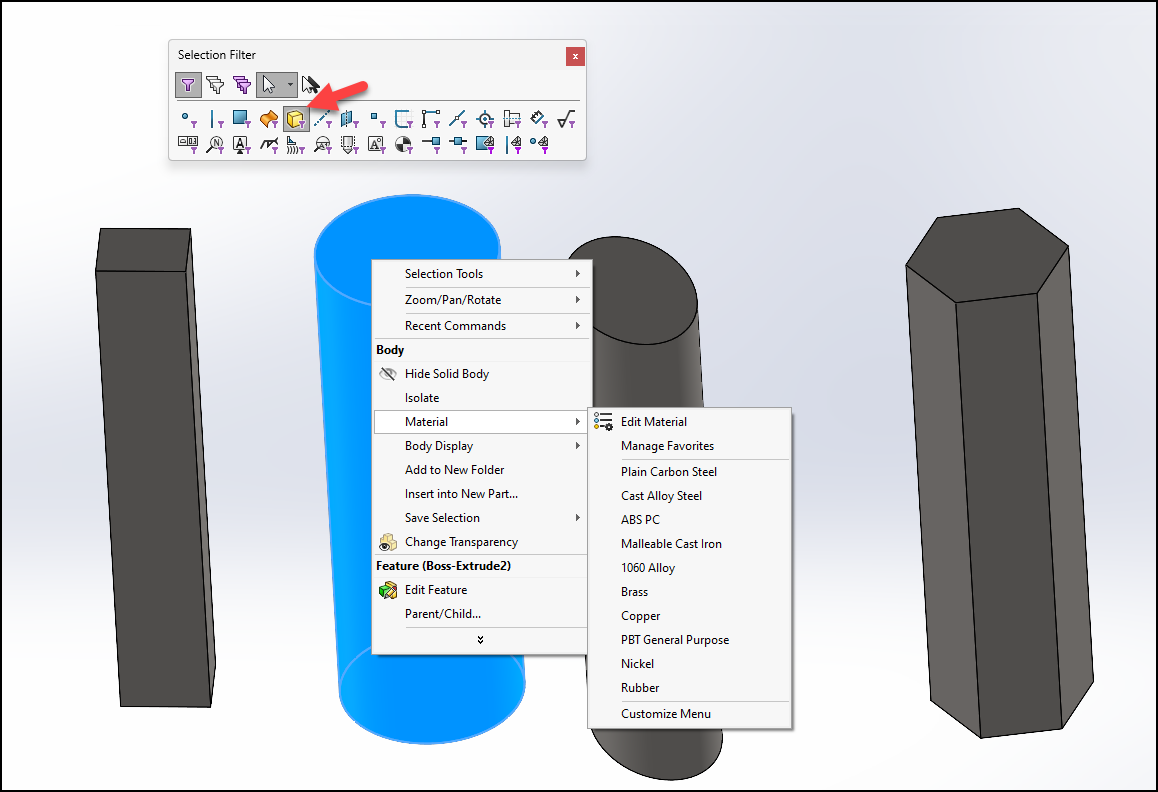
I did not know that. Thank you. I will leave my Idea up though. We shouldn’t have to jump through hoops to do something so simple.
They certainly should allow adding it to the “Body” section of the menu when right clicking the face. Also the copy/paste option should be there. Strangely enough it allows you to copy the material, and looks like it going to paste it, but nothing happens. I checked the Windows clipboard and it actually puts data there when copying the material.
Top Ten as it currently stands (2025-12-01);
1 Dark Mode for PDM in Windows Explorer (32 likes)
2 Desktop SOLIDWORKS: Focus More On Fixing Bugs (25)
3 Faster, Modern BOM Editor in a Separate Window in SW assemblies and drawings (24)
= Display States in Drawings (24)
= Option for Linear Dimension Between Two Non-parallel Lines (24)
6 SPR 807836 – Fillet all Concave Corners Connected to Start Loop (21)
7 Multi-instance of SolidWorks (20)
= Desktop SOLIDWORKS: Substantially increase stability in SOLIDWORKS (20)
I wonder if they will create multiple top tens based on product (SolidWorks, PDM, Simulation, etc)?
They’ve done that the past couple of years because the Top Ten was always filled with ideas for the side products like Electrical / MBD. So far at least this year it’s more focused on the core product so they may not feel the need to do that again.
You could class PDM as a side product. OK probably the most used side product.
Estimates only suggest 25% of SolidWorks users use PDM. Then a lot of those people won’t be interested in the dark mode. So being generous, say 5-10% of SolidWorks users will be interested in using a dark mode on PDM.
There used to be separate top tens for SolidWorks, PDM, etc. I hope they maintain it. Few SolidWorks user may vote for PDM enhancements like tihs one, but a large amount of PDM users might.
if they do some of mine may make the list.
The BOM editor would be a huge help, but I am scared they are going to break a lot of stuff in the process (as usual)
Top Ten as it currently stands (2025-12-15);
1 Dark Mode for PDM in Windows Explorer (38 likes)
2 Faster, Modern BOM Editor in a Separate Window in SW assemblies and drawings (27)
3 Desktop SOLIDWORKS: Focus More On Fixing Bugs (26)
= Option for Linear Dimension Between Two Non-parallel Lines (26)
5 Display States in Drawings (25)
6 SPR 807836 – Fillet all Concave Corners Connected to Start Loop (23)
7 Desktop SOLIDWORKS: Substantially increase stability in SOLIDWORKS (22)
= Ability to change type of pattern within its feature (22)
= We want more flexible sheet metal functionality. (22)
10 Multi-instance of SolidWorks (21)
It just occurred to me that this is probably the last year I can submit Ideas with any realistic hope they’ll be implemented before I retire, and even now it’s iffy.