Part Numbers, Man readable names, no PDM

Hi all…

We currently use a fairly robust part numbering system:

XXXX-OOOO-XX-XXXX

At present, the filename itself is simply the drawing/part number. We’ve also added a small amount of human-readable text to help engineering, purchasing, and production identify parts more easily.

Personally, I’d prefer an even cleaner numeric or tightly codified system, but we’re balancing readability, legacy workflows, field-length restrictions, and future scalability. I’m also trying to avoid creating a mess that becomes painful later if/when we implement SOLIDWORKS PDM or another PDM platform.

The challenge is Windows Explorer usability in a non-PDM environment.

For those using manual numbering systems with SOLIDWORKS, have you found a reliable way to expose meaningful human-readable information alongside a numeric filename, particularly when configurations are involved?

My current thought was to concatenate configuration-specific properties into the file-level “Description” custom property so it appears in the Windows Explorer Description column. But from what I can tell, that approach starts falling apart with multiple configurations because Windows only really sees the file-level metadata, not the active configuration data reliably.

Interested to hear how others are managing this… especially companies trying to maintain proper numbering discipline without turning filenames into long descriptive sentences.
Piling on.

Don’t have a suggestion, but interested in what others might think.

Have you seen this thread? I think it might help with your situation.

It was my second Job, that I came across the best part numbering system that I ever found. #1 thing about it was that it was very well documented with a excel page that explained how every part number was created. If you were building a part for a nozzle all you had to do was open the page on the excel sheet and open the NOZ sheet and you had all the info that you needed to build your part number and description.
My next job they were looking for a way to keep up with files and drawings and we came up with something. I told the super that as long as it was documented that we would be able to follow and find all the files and that seemed to work.

Also following this thread. A way to expose custom properties other than Description in Windows Explorer without PDM or supplicant documents (like Excel sheets) is something that I need as well.

The method used here that is about as good as I have worked with is like this :

6 digit part number (could be longer if needed)

The first digit gives type of item

1= manufactured part

3= purchased items

4= hardware

6= Kits

7= assemblies8= weldment

9= Top Level Finished product

The second digit designates the product line.

The third can be used for different categories within the second digit category. for example 401xxx might be hex nuts and 402 could be hex head bolts.

After that we just go sequentially as the parts are created.

How would you want this to work? What information should be shown in the explorer column for a multi-configuration part file? The data for the last saved configuration?

To be honest, even PDM doesn’t display Configurations Specific data in a table format, you must click through each configuration tab one at a time. I’ve been asking for it for years but PDM no longer seems to be their focus. However, it being stored in SQL, you can build some reports to show them.

Not sure there is any good way to do this in Windows Explorer without a PDM and/or database without resorting to the API if thats an option for you.

If you want a single answer, there’s no definitive solution. I’ve participated in similar studies in many companies I’ve worked for, encountering many different methods and experiments. This topic has become a subject of theses in universities, a complex brainstorming session. It depends on the sector, the product, company policy, production methods, national culture, programs used, working conditions, and many other factors. Even in its simplest form, it’s a subject with the potential for complete chaos. Let’s imagine you’re producing a product from scratch.

Should you determine the part code
according to the production method?
according to the material type?
according to the inventory system?
according to the sales system?
according to the spare parts system?
according to the capacity of the program (software or application) you’re using?
blah… blah…

Often, codes that are meaningful to technical personnel are meaningless to the inventory system, and codes that are meaningful to the inventory system are meaningless to the sales system. It’s a complete vicious cycle.
We give a product a name in the design phase (a logical choice for us), but our colleagues in the production department say the name is too complicated and not memorable. We have a meeting with the production department, and to avoid putting pressure on them, we name it according to their suggestions. BUT the assembly department complains that the name is meaningless to them, doesn’t evoke anything during assembly, and is completely production-oriented. The accounting department doesn’t want a name because of the software they use; they only want numerical codes without special characters. Numerical codes alone are meaningless to the production and assembly departments, codes that are meaningful to the production department are confusing for assembly, and codes that are meaningful for assembly are confusing for the sales department.

In short, there is no single definitive and most correct method, unfortunately!

If it will help you, we subcontract production to companies like Siemens, ABB, and Schneider Electric.

These companies use this method…

A product’s
Stock code (warehouse code) - numerical code
Technical drawing code (for production) - numerical code
Part name (for assembly) - non-numerical, just the name
Order code (purchasing, accounting, order, customer) - numerical code
These are kept in lists in the company’s ERP systems. They are given to subcontractors as Excel lists.

I wanted to share my experiences to at least give some idea.

I’d like to share this amazing article on naming/coding conventions that I found on the internet a while ago; the site was taken down, so I pulled it from the archive, so pictures are missing. But the info here is golden. It settled the argument for me (I settled for dumb sequential numbering and wrote some macros to automate it for me).

The question of displaying file metadata in Explorer still remains, though.

Manual File Management.pdf (277.1 KB)

It’s a really great resource, thought-provoking.
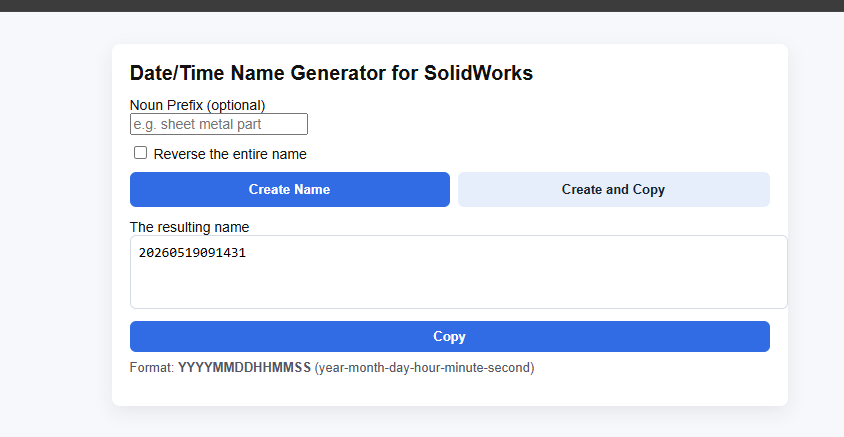
Unfortunately, the industry isn’t conducive to coding with intelligence. That’s why I prefer random numbers. I have my own solution for this; I designed an HTML file, not complicated, just detailed dates: year, month, day, hour, minute, second.
It might not be successful for large companies, but we are three people in the same room, aware of each other, and using a shared network.

I’m also sharing a macro I’ve made for sequential file numbering. You will need to create a text file with a single number as a starting point, and modify the path to that file in the macro. This macro has two functions, AssignNewNumbers and AssignExistingPartNumber, I recommend assigning them to buttons on command manager.

How it works: it assigns numbers to files, configurations or Cut-List items. If nothing is selected and you run AssignNewNumbers, it will rename the part with a new number, replacing the old file. If you select configuration or Cut-List item, the number will be assigned to it instead. Multi-selection is supported. The text file with number will be updated. Document does not need to be saved for this operation. It only works from within the part, but not in Edit Component mode.

AssignExistingPartNumber assigns number to a selected item that is same as parent. For example, if you selected a configuration and run it, configuration number will be the same as document number. If you selected a Cut-List item, it’s number will be the same as configuration number. So hierarchy is Cut-List item → Configuration → Document.

This macro was written based on following workflow and rules:

Assign number to a part/assembly/drawing file. Whether drawing uses the same number as referenced document is up to you, depending on whether you have multiple drawings per part/assembly.

If you use configurations as different representations (flat/folded state, different movement positions), then don’t number these representation configurations. Only number configurations that are different products. Mixed cases are allowed. If there is just one configuration, it should have the same number as document. If there are multiple product configurations, assign them new numbers that are different from document number.

Always create Weldment feature to group bodies into Cut-Lists. If part is single-body, assign it’s Cut-List item the same number as configuration. If multibody, assign new numbers that are different from configuration number.

Note that if there are multiple configurations and body geometry is different in each, then Cut-List numbers should be different for each configuration because they are different products. Due to API bug it is not possible to configure Cut-List item name and description as “this configuration”, you will need to do it manually in advance.

This works really well for me and covers pretty much every case.

Note on naming: by default macro will number parts like A0000254 (prefix and 8 digits). I use prefix because if it starts with number there will be issues in various contexts. You can customize this in the macro.

Document number generator V3.swp (90.5 KB)

In my head it make no sense to build in some inteligence in the numbering of the parts.

It just doom to fail down the road.

For me artnr is something you should never change. Title/caption and so on is open for editing.

The key thing is to have an external register that have search with suggestion.

With that in place you will even get normalized titles of the parts.

My last gig we had 70k + parts, majority had normalized titles. It was no instruction on how to name things it just came naturally with the erps search with suggestions.

Part number is just a number.

The more meaning you add to it, the faster it fail.

Make it as simple as possible. Make sure you got enough digit for growth.

Gonna disagree with all you guys, although as mentioned, it depends on size and complexity of company size and product to some degree.

We have had smart numbers since 1989 and used them successfully since then. There is some bad cases here and there but 95% of it is clean, It does need a group to police the assignemnt so parts end up in the correct group. Parts get a 3 digit code based on the type of part (Bracket, plate, etc) and top level assemblies get a 4 digit code based on the component group (Machine assy, cabin assembly, etc).

In the last 4-5 years our global parent company has pushed a new global collaborated product line with a dumb" 10 digit number. Now they are backpeddling and building a smart number system and near every region asked for it. Why?

  1. For assemblies with hundreds of parts, there is value in recognizing part types on sight.
  2. While this part type code is also an attribute in PLM/PDM, not everyone uses PDM when viewing part numbers.
  3. Downstream systems don’t always have these attributes. There are many (dozens) downstream systems, some commercial and some custom built. Some data is “pushed” to them, some is manually re-entered.
  4. SolidWorks files are named by part number (family number actually). When looking at a tree of hundreds of parts, or sorting through files to insert, “meaning” in the number makes it easier. Its a common complaint in the new product, all numbers look the same and its more difficult to find stuff.
  5. This isn’t just wanted by engineering and manufacturing, we hear from sales, marketing, the field, quality, spare parts. Just about every department that deals with these numbers like them and hate the new dumb numbers.

It takes alot of work and foresight up front. It takes a dedicated team to keep it running smooth. But it benefits our entire business.

You raise some really good points there. Though for my personal use I am happy to have switched to dumb numbering system, what you said about downstream systems not being able to read attributes of the file is a big issue. Even in SW, in certain contexts all you can see is the file name, not Description or other properties. Explorer doesn’t see attributes as well (other than Description). Searching for SW files based on attributes with 3rd party tools (for example I use Everything) is almost impossible. Exporting files to STEP, STL, PDF or other formats also loses attributes. For my personal projects I also like to sometimes share various files with other people, for example for 3D printing on sites like Thingsverse or Printables, and of course they don’t see attributes either. Same when outsourcing parts for manufacturing. So I find myself renaming files that leave my little ecosystem from dumb numbering to descriptive naming, which introduces a whole bunch of new problems.

I wonder if there is any other solution these issues other than smart/descriptive numbering/naming. Obviously we can’t force every downstream system to adapt to read and display metadata, we can’t even make SW do it all the time. Writing add-ins for some of these systems might be possible (maybe an add-in for Windows Explorer to read SW file metadata based on Document Manager API, like PDM does), but it only covers a small fraction of it.

I feel like there should be another solution to this issue.

Ten digits is too many. General Motors uses 8. Unless you are a company on that scale, 6 is probably enough. We use 6 here. We started in 2005 and have only burned though 38,000 numbers so far. Six is relatively easy to remember, especially if you are from a generation that had to remember things like phone numbers and zip codes. As soon as you have a searchable description, the part number should become irrelevant. A proper description carries far more useful information than any intelligent numbering system.

To address the original question from @DavidWS, adding columns to Explorer isn’t terribly difficult. I’m working on a proof of concept that would show config specific custom property information in an Explorer column. However, there is no way to alter Explorer such that a column would become a dropdown that you could select a configuration. That just isn’t possible. So, you would only see the properties for the ‘active’ configuration, which in this case would be the last-saved configuration.

I’m still building it out so I haven’t had a chance to run it yet and see how it performs. If it works, it would be a simple Windows installer. SOLIDWORKS would not be required, but a Document Manager API key (free for internal use) would be needed.

Current job using a mostly dumb system with no dash numbers. The categories are weld, part, subassembly, assembly and wholegood. Previously where I’ve worked used dashed numbers and things like standard hardware have a little more ‘order’. Here hardware was/is given a part number as needed among the part numbers for a bent piece of 1/2" steel.

A year ago the company starting using Fastenal to manage VMI. First thing Fastenal did was organize the parts bins by P/N. That drove the worker bees nuts because they had had the parts bins sorted by description so that the bolts/washers/etc were grouped together by type and size. The worker bees won.

System can’t work against people.

My short story opinion:

  • If you’re going to do smart part numbers do like Honeywell or hydraulic manufacturers do. Must have non-overlapping categories of properties where the divisions are mutually exclusive. Plot them out in what would be better managed as a multi tiered commodity breakdown structure, then give plenty of characters for each “code”. Chose a consistent delimiter that’s not used for other things such as revision delimiter.
  • People only tend to memorize the last three for four numbers of a part number.
  • In CAD due to all the places where file name is shown but custom properties are not simply available, the file name should match the part number or be prepared for extra work and things to maintain.
  • “Man readable names” are not part numbers, they’re called descriptions. Exception, the part number is a long hyphenated string of codes.
  • Companies that do smart numbers right with space for every possible combination still have xxxx codes at the end for OEM customs.
  • Companies that do smart numbers right don’t use their smart numbers, they use a different product number for ordering. The product number appears to be serial with no meaning so cross referencing hyrdaforce skus to their smart part numbers requires four browser tabs to find the proper valve cartridge and body.
  • A smart part number will not fit on a label in a large enough font that material handlers will get the right part from 5 ft away.
  • Material handlers have QR code scanners with a ~5 ft range.
  • There’s room on the bin label for a 60+ character description in font large enough to read from 2 ft without my cheaters.
  • Nobody knows the future.

Edited, it’s not short. I deleted the rest of the post as I know I wouldn’t read one this long…