Good Afternoon Everyone, Alex Here from the UK, Happy I found somewhere I can learn and ask questions about problems I’m having with my CAD software I hope to learn and grow. I will add a photo soon to my profile.
[quote=AllexDee post_id=21508 time=1657629151 user_id=1558]
I’m using Solidworks 2020 (not by choice) and working in the agricultural machinery manufacturing industry (engineering)
What about yourself?
[/quote]
I’ve been using Solidworks since 2009, making models and then drawings used to build the stuff shown in the videos below.
You said not by choice. What part, Solidworks itself, or version 2020?
This is a “friend of a friend” story, so take it for what it is worth. I was told that he had a large transmission on a flat bed truck. Something happened in front of him and he couldn’t get slowed down in time. What would have been a small fender bender turned into a fatality because the transmission wasn’t properly secured and came through the cab.
[quote=“Glenn Schroeder” post_id=21523 time=1657648259 user_id=50]
I’ve been using Solidworks since 2009, making models and then drawings used to build the stuff shown in the videos below.
You said not by choice. What part, Solidworks itself, or version 2020?
Well, I don’t hate solid works but it’s my first CAD software, I’ve seen others like fusion360 and some others, not a big fan of the interface SW offers.
I’ve used 3D software in the past like Autodesk 3Ds max that’s how started my Digital 3D experience.
2020 was my first version so hoping 2022 is a little better but work doesn’t want to upgrade just yet, if at all.
Something I’ve found hard but maybe it’s just me not being proficient in the software yet is Mating, simple mates I find no problems but when mating to a curved surface it makes me punch the screen.
I’m sure there is more but cant think of any more from the top of my head.
This was a few years ago. Things might have changed, or my faulty memory may be at play.
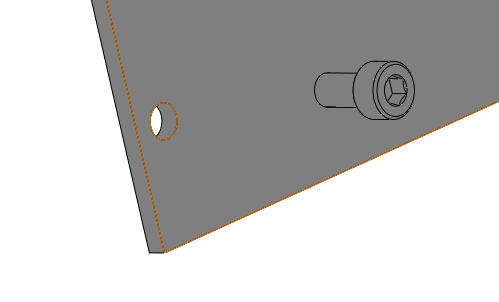
Let’s say you want to constrain this fastener to this panel.
In solidworks I would pick the face of the panel, and the underhead of the bolt and create a coincidence mate. Then I would select the cylinder of the hole and the cylinder of the bolt and create a concentric mate.
In F360 you would select the edge of the hole in the panel, and then the edge of the underhead of the bolt. The software would create both the face to face and concentric mates based on this selection.
(I had a bunch of screenshots in this post, but the forum and I weren’t getting along, so I had to start over and didn’t take the time to recreate them.)
 I hope to learn and grow. I will add a photo soon to my profile.