I downloaded SW2022 a week or so ago, and IT finally did whatever process they need to do every year so that I could use it, since it’s a network license, so I started using it Wednesday (two days ago). So far there are mixed reviews.
One feature I definitely don’t like is this one: http://help.solidworks.com/2022/English/WhatsNew/c_wn2022_ui_reference_geometry.htm?id=340244abde7b4ef881f28f1042afa594#Pg0. It says the axes show up when you hover, but all too often I select them by mistake when I want to select the outer surface. For large cylinders this probably isn’t much of a problem, but it definitely is when working with rebar. In my opinion there should be a longer period of hovering before the axis is selected, but the developers at SW still aren’t consulting me on how to implement new enhancements. I did think they’d finally stopped introducing enhancements without also offering a way to turn them off, so hopefully they’ve done that here too and I just haven’t figured it out yet.
I don’t have it yet, but the last item you mentioned above is going to be a huge help. I’m not sure the thing about selecting temporary axes is going to be so helpful. I don’t need to select axes very often, but when I do it’s easy to toggle them on and off. As for selecting other reference geometry, I’ve had a macro for years that does that. It’s incredibly helpful. Combined with my “select parent” macro, I can easily select the primary planes of any component or subassembly with just a copule of keystrokes.
For your IT folks:
The license server must be upgraded every time a new release comes out. As far as the server is concerned, it’s a “future version”, so the license manager must be upgraded to the latest version of SW that you’re running.
To do this, the new manager must be installed, the licenses saved, which, like the SW desktop license swap, shuts down the license in the interim, but for the server, all license are down.
The licenses are then reinstalled in the new manager and hopefully, nothing has gone awry causing everyone to be down until a remedy is found (or a server rollback is performed).
Also, as with Desktop SW, you can hit an OS roadblock on the license upgrade. SW2020 changed the minimum Windows Server OS version, so until you can upgrade your license server, you stay on SW2019 (or before).
I concur with you on how they implemented the axes.
I think many people did ask for this one (I did), but I thought it would be a right click select choice (mating, revolving, etc.) as it’s so infrequently required. Like selecting midpoint, loop or tangency.
I also hope they’ve put in (or will soon) an uncheck as this implementation takes the shine off this feature.
Agreed also on the properties dialog upgrade. Attas all around for that one.
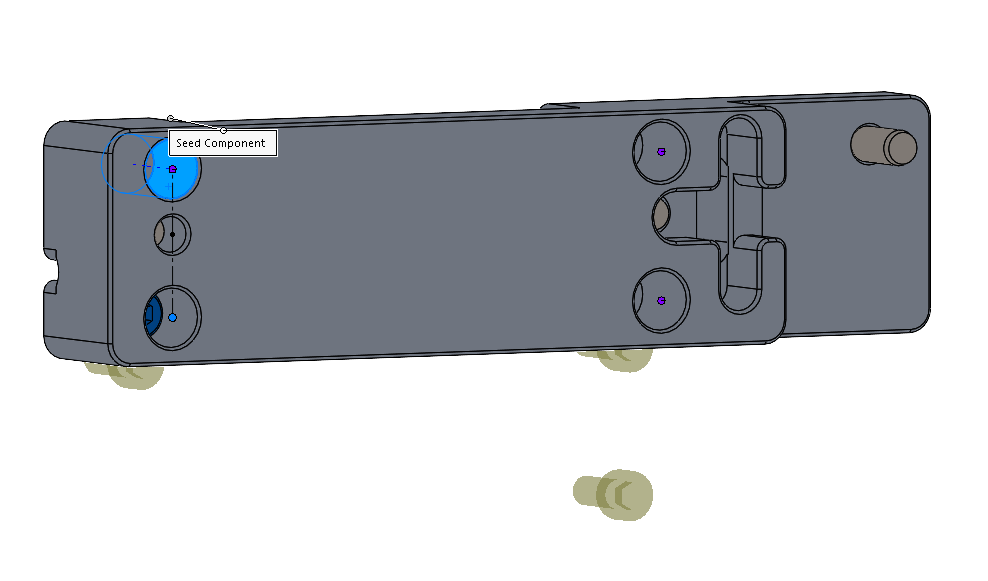
It’s nice to see seed picking is improved, but by now, my expectation is to look for it to see if the pattern is narfed up and pick the correct seed if it is.
I don’t mind fixing it (~50%) and to be fair, there are occasions where I pick a hole that isn’t where the seed component is located (flush PEM studs fill their holes, so it’s easier to pick an empty hole and fix the seed after).
Thank you for the insights.
Keep them coming please.
Are you not able to choose an axis from the standard CS i.e. as a reference geometry for something? Did you try that out at least (i.e. for a pattern.)?
I’m sorry, but I’m not at all sure I understand your question. Did you mean you can use the new easy-to-select axis to drive the direction of a linear pattern? If yes, then yes, you can.
Yup. That’s been one of my favorite enhancements in recent years. Previously I had three axes saved in my assembly template, but I have since removed them since I use the primary planes almost exclusively.
I have now had ample opportunity to try that out. It works properly more often than previously, but definitely not all of the time. It’s a good thing they didn’t remove the Select Seed Position button when they “fixed” the issue.
We just got onto 2022. Unfortunately, the installers put us on SP2. While that is getting corrected, we have to deal with the bugs.
I find that when creating or editing a pattern-driven-pattern, I can’t change the seed. Doesn’t seem to matter if “Align to holes” or “Align to Seed” is picked, nor if the “Select Seed” box is lit up.
I haven’t seen that. By the way, the problem of frequently needing to select the “Seed Position” instead of the software using the location that actually has components was supposed to be fixed. While it is definitely better, I have still had to select it manually a few times.
Actually, I can get the seed selection to change, but the result is wonky. Here’s the wrong seed position, with the result you’d expect:
Screenshot 2022-10-18 082330.png
And here the correct seed position, with an odd pattern result.
Sorry, I cannot. This may be coming out of it’s being a old assembly file. I am going to see if this continues to be an issue, and recreate it in some non-work files.
I think I found another issue. (Why didn’t I just stick with 2020?)
When using ordinate dimensions, you can break the alignment of individual dimensions to relocate them on a crowded drawing. In 2020, I could pick an individual dimension and re-align it to the ordinate. In 2022 when I do that, it now re-aligns ALL ordinate that are not aligned with the ordinate.