Not a big deal at all, but in CAD Forum I had set to show latest posts on the top so that if there were a lot of posts I didn’t need to scroll to get to the end. I checked my user settings for some way to open topics to the latest post but didn’t find anything. Does this exist and I’m missing it?
I’m trying to find a “best way to use” sort of thing myself. There is a blue dot next to entries on the left which shows there are new entries. Also if you scroll down, you get the “last visit” line. I’ll be following this for better answers…
Another person trying to figure out the best use of this UI.
I’m skimming through the Discourse 101 again, not looking for answer to specific question this time. This bar might be all I need to get to the other end of a topic quickly. Not sure if the slider works well on phone yet.

Also noticed that once at the bottom of a long old thread, next time I navigate to that topic, it loads to the point I left off, which I think is super cool.
Clicking the topic title will take you to where you left off when reading that topic previously. So you will go to your last unread post.
Clicking on the value in the ‘Activity’ column will take you to the most recent post in the topic. Once in a topic you can also click on the value at the bottom of the slider on the right to jump to the latest post. On mobile, the slider doesn’t show up unless you tap the XX/YY (current post/latest post) at the bottom right corner.
Ah, so clicking anywhere in the activity column takes to last post. I think this takes care of my topic navigation needs.
I’m surprised by how fast is navigates the topics, even the big ones imported from CAD Forum. I wonder if that has to do with the infinite scrolling behavior. Anyway, it is nice.
This is likely not what you’re looking for, but if you click on Topics near the top left it will open a page with the most recent activity, regardless of category.
It is the infinite scrolling. It only loads a few posts around the point in the timeline you’re in.
I definitely preferred pagination over infinite scrolling. I am putting it down to being an old man who doesn’t like change.
I like the slider bar, and I don’t mind the lack of pagination, but I want to know how long the list is because I might not want to commit to a long discussion. Not sure there’s a real request or action item in there.

I can agree. That does sound like an old man. 
Joking aside though. TLDR; I do agree with you, the “Infinite Scrolling” term did not give me warm fuzzies. But I’m trying to be give it a shot and am starting to warm up to it.
Infinite scrolling has been done so badly in many places. It just sounds like Facepage or SWYMp or any other modern message board. Nested replies that default to partially hidden, lacking order and navigation, jittery loading constantly shifting what I’m trying to read as more crap loads. Infinitely long technical blogs that are packed with dynamically loading ads that cause me to wonder if I’m reading a tech column or click bait. And don’t get me started on infinitely long web"page" that has 10 feet of wasted space filled with stock images or actors pretending to be having a good time using the product that I still don’t know anything about. Most of the time the relevant info could fit on a single 1024x768 display. So yeah, I’ve had my fill of “Infinite Scrolling” and when I found that Discourse is implemented that way I was not impressed. I was looking at other layout options, this was discussed in the Beta site a little. But, after poking around a little I’m finding they have implemented some pretty helpful mechanisms.
- The slider bar on the left is where us old dogs are used to finding vertical scroll bar, but adds more info. It’s bookended with the starting and most recent dates for starters. Also shows the total number of posts, instead of noting the length of the slider to get a feel for the total length of scroll. Here’s where other infinite scrolls failed, that slider would be deceivingly large then shrink as more records were loaded. I think discourse has a useable solution to that folly by showing a fraction of which post is showing over the total number of posts (even those that are not loaded yet).
- I have yet to notice time for a page to load here. I don’t think I need to mention how many times the SWYMp redraws and bounces the layout around when loading each topic. Obviously, pagination reduces load times for long threads. But it makes it troublesome to jump around long topics. Sometimes I need to go way back to an old post for tidbits, that’s a hassle loading one page at a time looking for that post. Like looking for photo on my phone from the fall of 2023, I use the scroll bar that shows dates when I drag it up and down.
- Discourse remembers where I was last at on the thread and loads it as fast as a single page. It just seems to work. I still agree that navigating to a specific page is handy when we know which page we want or we book mark that specific page. Now we can link or bookmark specific posts, I think the functionality is still there, just looks different.
If you’re really old (like me), you might want to type ‘?’ to see a list of keyboard shortcuts. Mouse?! Who needs that new-fangled thing?
I was born and raised on DOS. I resisted the mouse for as long as I could.
One of the nice things about Autocad back in the day was you could do everything wtihout your hands leaving the keyboard.
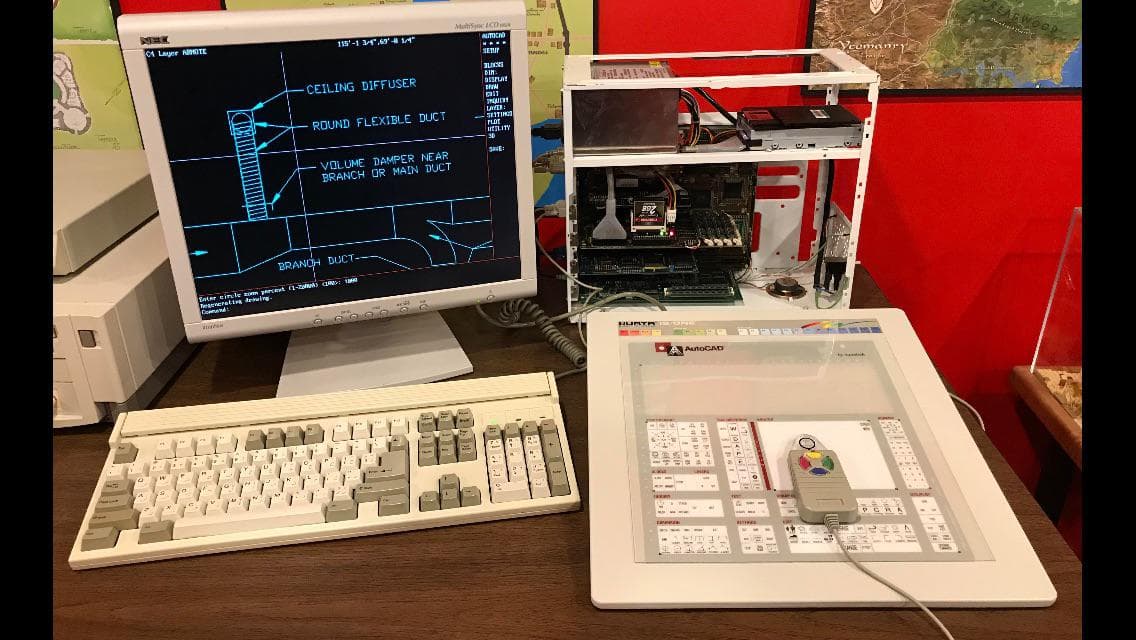
So you “clicked” on the toolbar icons with the digitizer?
The drafting course I took had a small segment on CAD, and used a digitizer (circa 1989.) I didn’t use Autocad again until 1996, and at that point it could all be done via keyboard.
Used the same (more or less) setup with CADkey circa 1994.
Where do I type ‘?’ ?.
I knew it would be confusing. Type it anywhere (without the quotes). Doesn’t work in a text box obviously.