The trouble is, i need the rounding to occur prior to being displayed on the BOM. I would prefer it if my colleagues did not have to implement equations on line items that are being evaluated as decimals.
I did visit that page yesterday and used it to successfully round my global variable.. only to realize that I just ensured it would double the quantity and not just add 10% .
Whenever I see people doing gymnastics with their BOMs, I wonder if they have ever considered handling the problem at the source: the assembly. This problem seems like a good candidate for a macro, or better yet a macro feature. If these items represent spares and such, why not add the actual items as parts in the assembly? They could go in a ‘Spares’ folder, whose components are all hidden but would appropriately increase the BOM quantities.
Now, how to automate this? Macro feature to the rescue. On every rebuild, the macro feature can traverse the assembly components, checking them for a particular custom property, doing the appropriate calculation (with the full math capabilities of an actual programming language at your disposal) and then add the required number of extra copies of that part to the ‘Spares’ folder.
You could even implement this as a macro feature per component where the user can indicate the desired ‘percentage extra’ for a selected component. Then the part files wouldn’t need any sort of property at all. It would happen at the component level in the assembly. This would allow different percentages for different jobs/customers as long as the assembly was unique to that customer.
I’d work on this but I’m too busy with my real job…
As with most problems users face with this software, there is typically more than 1 way to find a solution. Some require more experience than others and unfortunately, macro creation and editing is not a skill i possess. I don’t disagree with your assessment however, that an alternative solution to this problem could be to look more closely as ways of including the spare components as actual parts ; its just if can I create a way to do that, that is clear and obvious to the person building the project. We manage hardware a little differently than most I’m sure, but in a way that works really well for the equipment we build.
For consistencies sake, if I can manage to find way of doing it through the property tab builder and custom properties, it would be my preference. Its a bit of “tunnel vision” on my part perhaps. I’ll update if i find a solution.
All the help and feedback I’ve received so far has helped me crack more than a few nuts, so I appreciate all of it I can get.
Instead of a question, here’s something I’ve figured out that was a nice breakthrough for what I’m trying to accomplish.
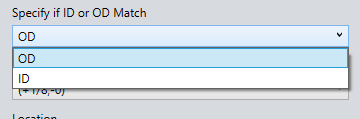
Because I am creating a text string using properties from the model, I was trying to dertermine how I could also toggle those outputs for different scenarios. For instance, sometimes our projects are built using the Inside Diameter as the governing surface, sometime they use the Outside Diameter. A dimension will only allow you one result.
What i discovered, is you can nest a property within another property. For example, if the dimension name is “Cylinder OD@Sketch1” you can create a custom property selection in your poperty tab builder that evaluates a property name (EX: $PRP:”Profile_Match”)
Now, in your text string, replace the “OD” with the property name:
Cylinder $PRP:”Profile_Match”@Sketch1
As long as you have a dimension named Cylinder OD and a dimension named Cylinder ID, that property will toggle which dimension is being evaluated, and will update the result in your property string.
Ive gone on to use this on numerous components to allow our users to make selections from different options, based on what the job might entail. All without having to do any manual manipulation of the property string already created for them.
Ran into a snag using the logic in my previous post.
For instance - if I drop the external component from out library into my assembly, make it virtual to break the link, and rename it.. its having an effect on the BOM output.
The evaluated value in the model is un-affected.. it always solves correct, regardless of file name, but the BOM on the other hand seems to be trying to solve the logic on its own. If the latter part of the script (after my inserted $PRP property) isnt a perfect match, it just spits out the full logic. I would’ve expected the BOM to just simply mirror the model property, not try to evaluate it independently.
I can’t really pin down why solidworks will update all associated file names sometimes, and sometimes not. If there is a specific sequence to ensure it does this 100% of the time, I’m not aware of it at this time.
Open to suggestions though.
EDIT - has something to do with the template. Parts still using my old templates have no issue, parts re-created on new templates from 2024 are the ones affected.
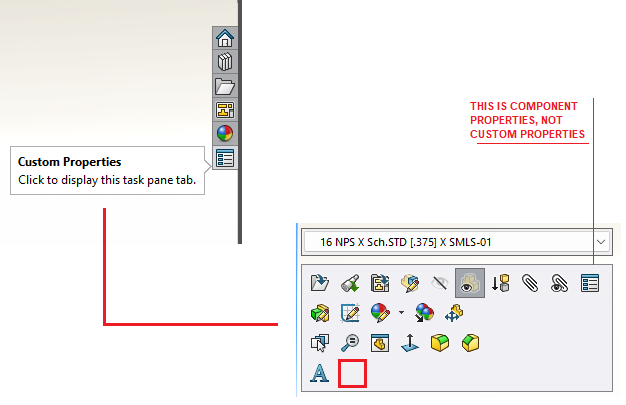
Not the shortcut that would open up the property tab builder, but you can add shortcut to file properties. And when you click on that, it will open the file properties window.
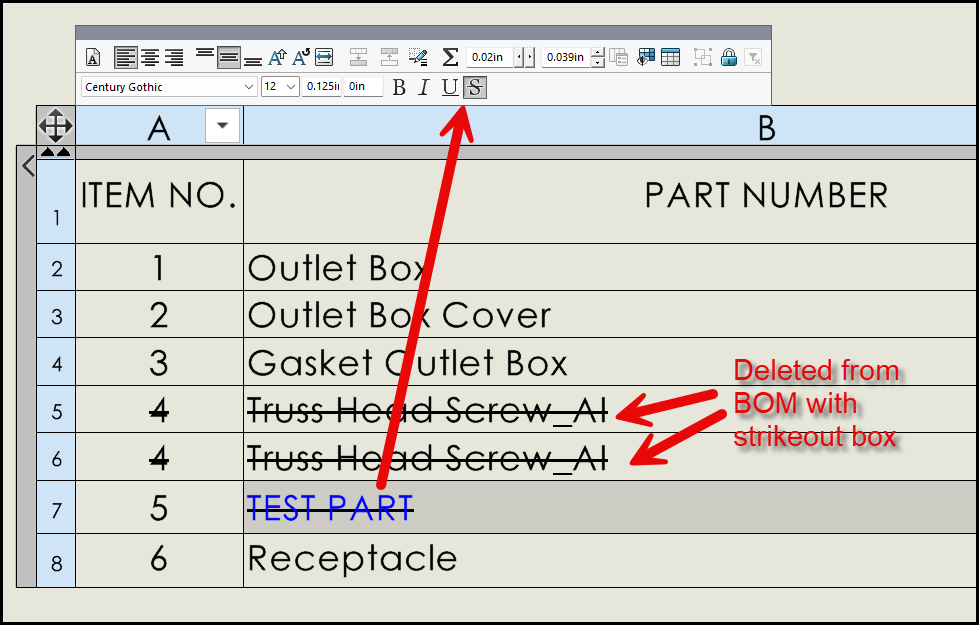
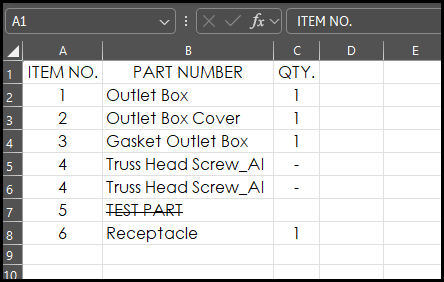
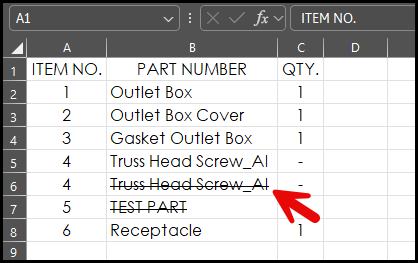
Are you aware of why the strikeout formatting on the BOM, doesn’t transfer to the text on an exported .xls?
We have to keep a record of our revision history, and this circumstance is causing a wrinkle in my development. Instead of just being able to create a macro in excel to manage the text with strikeout, I’m having to jump though other hoops to ensure these line are still represented for historical purpose, but are also shown as empty cells due to being revised out of the project.
I tested this and it appears to be how they have implemented it in the table. The “strikeout” BOM option is different than the strikethrough text formating. I added a manual row item and used the format text “strikethrough”. Then deleted the truss head screws with the BOM option set to strikeout.
Agree, thank you for sharing! In the time since posting the question, I’ve created an excel macro that should help our users with navigating this, but it’s good to have another method in my back pocket in the event it requires a different approach. I appreciate the time taken to test this out.
It works on the exported excel file. I think (for now) rather than risk them forgetting to add the additional formatting to those cells per jcapriottis suggestion, I will have them remove the data and then use the excel macro to format it further for our external system.
If you are using item numbers to reference parts in the ERP system , I had to do this in With SAP and inventor.
All because some genius thought it was a brilliant idea to used balloons on the drawings and reference the balloons to a SAP bom, So the could they could reuse a drawing and change the spec of the part by editing the the SAP bom. It is a nightmare for revision control.
You need to treat the assembly subassembly and part and drawings as project specific for that job.
You cannot reuse the part numbers in a different job project. You need to give it a new part number.
You then need to assign the part sub-assemble and assembly a custom ERP balloon number then some how make that the ERP balloon number in the SW bom. There is a trick inventor to do it and also in Solid edge. Not sure about SW.
You also need to create a master ERP balloon number excel sheet to track the balloon numbers for that job or it will all go to hell.
 .
.