This seems like it should be easy, but I’m unsure of the right combination of BOM settings to acheive what I want.
I’ve got custom properties linked to model data, displayed in a text string to display our bill of material data, so that way when revisions occur, the data updates to the new values.
Currently, I have not yet employed the ability to link the BOM data to balloons on the drawing. Why? Because we experience alot of revisions in the line of work I am in, and whenever a component is suppressed or deleted, I cannot afford to have the entire BOM re-ordered, thus changing all of the linked balloons to new numbers. It is imperative that once a BOM is created, and the balloons are linked, those numbers cannot change.
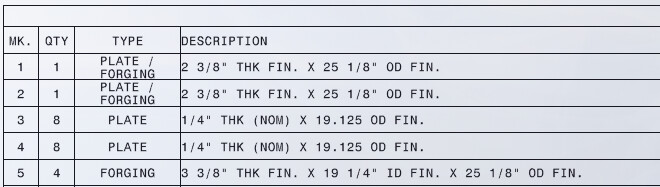
Lets say theoretically in the example - i have this as my BOM:
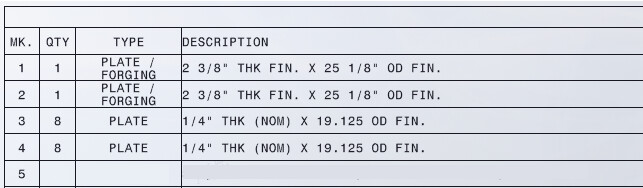
‘Do not change item numbers’ is an interesting selection. If checked, and I suppress MK.5 for example, it removes the row & item, and everything re-orders up (1) number. But if I unsuppress that item, it will re-appear on the BOM, however, it will now be MK.1 , duplicating the first number on the BOM.. If you un-check it.. it resets as the last number in the series.
Also, if checked, you can move MK.5 up in the BOM order, lets say in between 1 & 2 and it will not change. The order would be 1,5,2… so it does accomplish that…
Regardless.. it doesn’t behave how I anticipated it would.
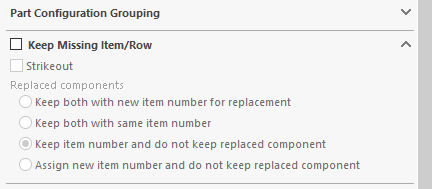
The ‘Keep missing item/Row’ is probably a requirement. But none of the options really do exactly what i want. Strikout really seems like the only way to keep the placeholder, but indicate that the component has been removed.
So you don’t use balloons? Our assemblies are way too big to not use balloons. Even if we did use part number labels instead of balloon item numbers, still need to reference the info in the BOM, seems like it would take longer to find the line item by part number. Guess it just depends on assembly size.
That’d be an option, but I have to export this information, (the formatting has to match) and then paste it into an external program that handles all of the other elements of the business. It’s not ideal, but my challenge has been trying to make SW work with the existing programs that have been in use here far longer than we’ve had the software, not the other way around.
Also, each of our projects are entirely unique from the next project. They may look simiiar, but all have a completely different set of circumstances that dictate thier design. So there is no re-using parts, or parts to place in inventory. Every part is custom made for its one-off application.
Yes, still use balloons, however they are not linked to the SW BOM currently. We just cross reference from the external BOM and identify them manually. There are many valid reasons for this, just don’t feel the need to explain them all here. The important thing is I’m trying to work towards taking advantage of the ability to do this in SW. I just can’t afford to let the software constantly shift its data around when changes are made.
along with a split balloon that can have two different data sets. One on top and the other on the bottom. Some drawings we do need to have a code for the items, like if they need to go to the saw or the plate cutter. Then we also have the item # in the balloon so it is easy to find in the BOM.
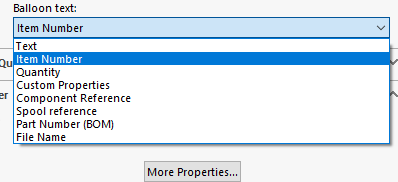
TRKemp I would take a look at some of these options along with taking time to review all of the BOM options that are available, from getting a detailed cut list in it to this little area
Do your testing and find the right settings that will work for the way that you want things to go. Then write up a SOP, and make sure that every operator knows how to set the BOM options so they will work best with your practices.
Your VAR should be able to help with getting things to work if any difficulties arise.
The AutoBOM is a tough nut to crack. Does any CAD tool really handle all cases well?
You can check the option to keep an empty row for missing items, which I believe means you deleted it. Suppressing is not deleting so its simply removing it from the BOM which sounds right to me.
Then there is the replace model command which has the option to swap the model in the BOM so it reuses the same item number. But I see some users not using the Replace command and instead inserting new and deleting the old.
Programtically, I don’t see how the code can know what you want in all cases. You do have the option to insert blank rows and move items you just inserted from the bottom to the position you want.
I usually check the fallow assembly order check box, this is the only way I have found to keep the same order because you can control it by re-ordering parts in your assembly.
You can go to manual item numbers in balloons by creating a custom property in your parts and adding that column in the BOM as a replacement for the standard item number field, but that is a lot of extra work and a pain to keep up to date in my opinion.
I get why you want to keep the item numbers constant, but I would think hard about why you want that, as long as the balloons point to the correct parts it shouldn’t matter what item number it is.
I agree that it is a tough nut to crack and its been a long time coming also. Because we use a cut-list style BOM, but use Parts / Assemblies rather than weldments, I had to patiently wait for the circular bounding box to be a thing before I could even link my properties to model data. So now that I’ve accomplished that, I’m on to trying to link the BOM data to my drawing balloons.
Using a custom property is the preference, I agree with that. Its just the file management aspect that I’d need to have a fool proof process for. If it can be done with a Macro, unfortunately I am not as good as some of you in that regard. My solutions usually involve alot of practicality and creative use of the available utlities.. not so good at writing scripts. lol.
Its imperative they don’t change because of traceability. Purchasing treats an item number as a part number, when they order it, it is referenced. Our receiving dept uses that number to identify the part when it arrives; Q/C links it to the MTR for the raw material.. etc..etc.
Using the assembly order does solve one problem but it does restrict me from grouping “like” materials together. To make it easier on purchasing, i usually will group items by TYPE, so when ordering they are able to calculate totals a little eaiser. This is more of a me problem than a SW problem, I will admit.
Don’t need macro to fill in the number. Manual will work.
Similar to what you are doing now. “Item number” got moved to part and assembly. Add that column to BOM. Someone will need to check and make sure no duplicate number and don’t change any old number.
Pretty much what you’re doing in drawing.
I’ve never done this so there could be other technical issue.
I suppose you could insert the BOM, re-order the lines to be in the sequence you want, then open up each part line by line and fill out the property. This way you arent missing components and it is less likely you use the same number twice.
My big concern was that my colleagues would just be sloppy in terms of their execution if selecting from the model and assigning item numbers.. the method above would sort of resolve that worry.
I think its pretty common in job shops. The BOM is for that specific job only.
For instance, we have standard parts; they never change dimensionally but for each job in which they are used, they are just assigned a different item number.
if you have the property in the BOM already you don’t need to open the part you can update it from the bom if you are using the SolidWorks BOM. It is really nice when you have a lot of properties to insert on a lot of parts.
Just working through the testing, the workflow seems promising in terms of allowing the user to sort the items on the BOM in the sequence you want and allowing you to then insert the “Mark Number” in numerical order. That it will add the customer property to the part is nice, will keep me from having to go through the entire library and make updates.
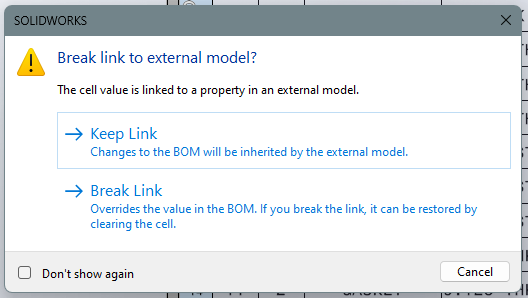
That said, having to select an option to keep or break the link every time is annoying. Having both options seems like a requirement, I’m sure theres a case where each could be necessary.. so not really sure if there’s anything other than continue to choose the best option for the circumstance each time.
 Thanks for the idea’s!