In an assembly, what is the most efficient way to see the save location of an assembly or part in the feature tree?
Currently, I open the assembly or part, then do a “Save As”. I feel like there must be a better way.
Thanks.
In an assembly, what is the most efficient way to see the save location of an assembly or part in the feature tree?
Currently, I open the assembly or part, then do a “Save As”. I feel like there must be a better way.
Thanks.
Right click on it and go to "component properties
image.png
image.png
This also can do:
image.png
Click on the file name in the tree. Select the “Component Properties” icon. The file path will be in the dialog box that pops up.
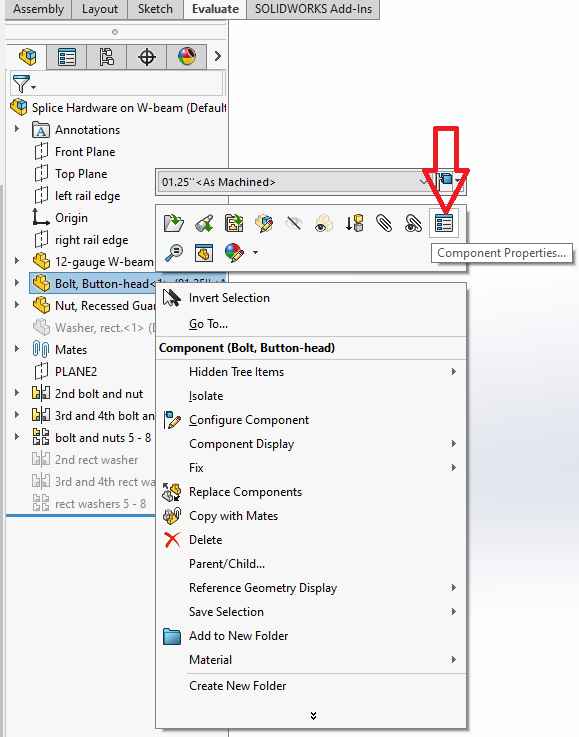
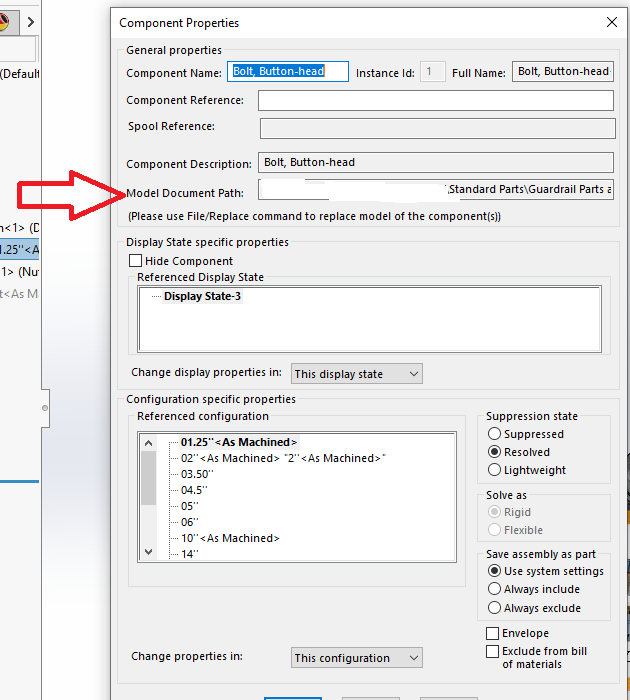
Thanks!
Is there any way to make use of this outside of a drawing?
https://help.solidworks.com/2022/english/solidworks/sldworks/t_link_notes_to_document_properties.htm
image.png
I was too slow.
Component Properties, as was already suggested. If you want to overview paths of all components, Pack & Go is pretty good that.
Anything further for that, I often setup special CUSTOMTOOLS Export profile for my customers just so that to get an overview of the whole assembly and whatever Custom Properties (or other special fields) are important for them. That can also be exported to Excel with component previews, but often just visiting the Export windows gives very important instant feedback for the designer.
You can also just use macro:
Hey Simo,
Could it be possible to export in excel and then import back? That would be sweet!
[quote=AlexLachance post_id=24121 time=1666960006 user_id=94]
Hey Simo,
Could it be possible to export in excel and then import back? That would be sweet!
[/quote]
I got this macro (Code below) that opens the file location in the Windows Explorer for the selected component.
Option Explicit
Sub main()

    Dim swApp       As SldWorks.SldWorks
    Dim swModel     As SldWorks.ModelDoc2
    Dim swSelMgr    As SldWorks.SelectionMgr
    Dim swComponent As SldWorks.Component2
    Dim Path        As String

    Set swApp = Application.SldWorks
    Set swModel = swApp.ActiveDoc

    If swModel Is Nothing Then Exit Sub

    ' Get the selected component feature or entity
    Set swSelMgr = swModel.SelectionManager
    Set swComponent = swSelMgr.GetSelectedObjectsComponent4(1, -1)

    If Not swComponent Is Nothing Then
        Path = swComponent.GetPathName
    Else
        Path = swModel.GetPathName
    End If

    Shell "C:\Windows\explorer.exe /select," & Path, vbMaximizedFocus

End Sub
For a part or assembly that you have open, do this:
Tap R to bring up recent documents
image.png
Then select “show in folder” for that document.
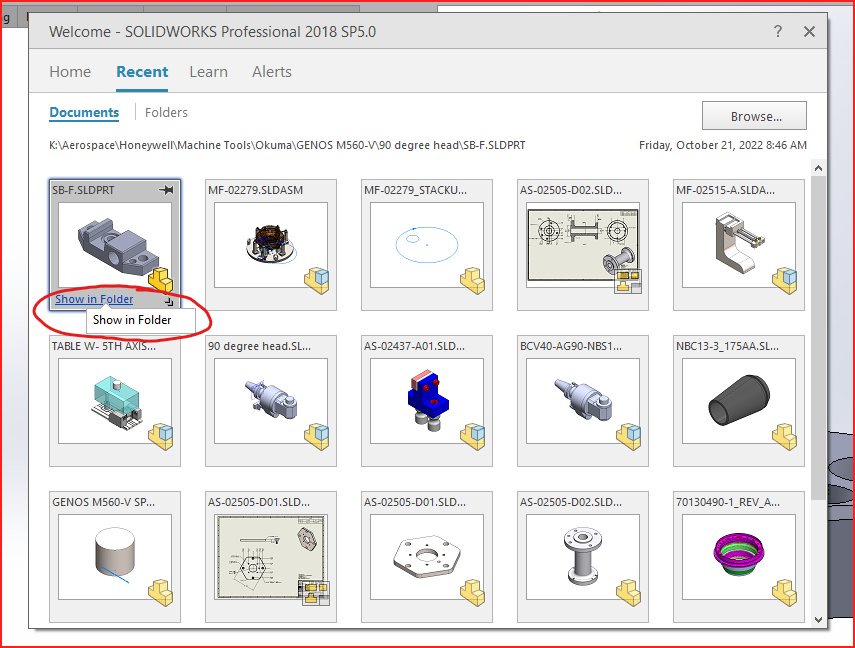
It won’t work for components of assemblies unless you open them separately.
Before we used a PDM system, I used to click on Save As and the save dialogue would bring up the folder the model was stored in.
