I was asked to make a template with a weldment cutlist table already saved inside the drawing file. I do not think it is possible since a view must be selected to allow the table to read the right properties and generate the table.
Any idea?
I believe you are correct, the weldment cut list is greyed out until you add a weldment into the drawing. You can save a weldement table template though, just like you can save a BOM table template
We already have a template, but my engineers find annoying to insert it every time they make a drawing. Literally 3 clicks, but if it could be fully automatized why not…
1 Like
I think I added an enhancement request to have the tables added to a template that has views saved in it. It is not in the top 10 since it was not open when I was trying to do the same thing.
1 Like
A macro feature in the template could do this. It could add a weldment cutlist when the first view is placed.
1 Like
macro feature sounds the only way to do it, but I wonder how it would be possible to trigger it on the first view creation only. or it has to run all the time to check if there are other views already placed? sorry, not familiar with those macro feature and I read about them in the technical documentation.
They run on every rebuild, so you just have to have some logic to check on things. For example, the first thing you check is whether or not there is a view other than the sheet, if not just exit. I’m just about done with a simple example. I’ll try to upload it tomorrow.
1 Like
Here’s a simple example to create a macro feature in the drawing template. There is a main module:
Option Explicit

Dim swApp As SldWorks.SldWorks
Dim featMgr As FeatureManager
Dim mDoc As ModelDoc2
Dim macroFeat As feature
Dim methods(8) As String
Dim icons(2) As String
Dim Names As Variant
Dim Types As Variant
Dim Values As Variant
Dim vEditBodies As Variant
Dim options As Long
Dim dimTypes As Variant
Dim dimValue As Variant
Dim macroFile As String
Dim handler As New EventHandler

Sub main()
    Set swApp = Application.SldWorks
    macroFile = swApp.GetCurrentMacroPathName
    methods(0) = macroFile 'Filename
    methods(1) = "AutoCutListMacroFeature1" 'Module
    methods(2) = "swmRebuild" 'Regen function
    methods(3) = macroFile 'Filename
    methods(4) = "AutoCutListMacroFeature1" 'Module
    methods(5) = "swmEdit" 'Edit function
    methods(6) = macroFile 'Filename
    methods(7) = "AutoCutListMacroFeature1" 'Module
    methods(8) = "swmSecurity" 'Security function
    Dim pathname As String
    pathname = swApp.GetCurrentMacroPathFolder
    Names = Empty
    Types = Empty
    Values = Empty
    options = swMacroFeatureOptions_e.swMacroFeatureByDefault + swMacroFeatureOptions_e.swMacroFeatureEmbedMacroFile
    Set mDoc = swApp.ActiveDoc
    Set featMgr = mDoc.FeatureManager
    Set macroFeat = featMgr.InsertMacroFeature3("AutoCutListMacroFeature", "", (methods), Names, Types, Values, dimTypes, dimValue, vEditBodies, (icons), options)
End Sub

Function swmRebuild(app As Variant, part As Variant, feature As Variant) As Variant
    Dim sldApp As SldWorks.SldWorks
    Set sldApp = app

    'Exit if this isn't a drawing (shouldn't ever happen)
    Dim mDoc As ModelDoc2
    Set mDoc = sldApp.ActiveDoc
    If mDoc.GetType <> swDocumentTypes_e.swDocDRAWING Then
        swmRebuild = True
        Exit Function
    End If

    'Set up event handler
    Dim dDoc As DrawingDoc
    Set dDoc = mDoc
    handler.init dDoc

    'Exit if there is already a cut list table
    If Not handler.GetCutList() Is Nothing Then
        swmRebuild = True
        Exit Function
    End If

    'Add table if it is missing
    If dDoc.GetViewCount > 1 Then
        handler.addCutList
    End If
End Function

Function swmEdit(app As Variant, part As Variant, feature As Variant) As Variant
    swmEdit = False
End Function

Function swmSecurity(app As Variant, part As Variant, feature As Variant) As Variant
   swmSecurity = swMacroFeatureSecurityOptions_e.swMacroFeatureSecurityByDefault
End Function
And there is a class module:
Option Explicit
Const templatePath = "<full path to .sldwldtbt template file>"
Dim WithEvents dDoc As DrawingDoc

Public Function init(ByRef aDoc As DrawingDoc)
    Set dDoc = aDoc
End Function

Private Function dDoc_AddItemNotify(ByVal EntityType As Long, ByVal itemName As String) As Long
    If EntityType = swNotifyDrawingView Then
        If dDoc.GetViewCount = 2 Then
            addCutList
        End If
    End If
End Function

Private Function dDoc_DeleteItemNotify(ByVal EntityType As Long, ByVal itemName As String) As Long
    If EntityType = swNotifyDrawingView Then
        If dDoc.GetViewCount = 1 Then
            deleteCutList
        End If
    End If
End Function

Public Sub addCutList()
    If GetCutList Is Nothing Then
        Dim firstModelView As View
        Set firstModelView = dDoc.GetFirstView().GetNextView()
        firstModelView.InsertWeldmentTable True, 0#, 0#, swBOMConfigurationAnchor_BottomLeft, _
        firstModelView.ReferencedConfiguration, templatePath
    End If
End Sub

Private Sub deleteCutList()
    Dim cutListFeature As feature
    Set cutListFeature = GetCutList
    If cutListFeature Is Nothing Then
        Exit Sub
    End If
    cutListFeature.Select2 False, -1
    Dim mDoc As ModelDoc2
    Set mDoc = dDoc
    Dim mExt As ModelDocExtension
    Set mExt = mDoc.Extension
    mExt.DeleteSelection2 swDelete_Absorbed + swDelete_Children
End Sub

Public Function GetCutList() As feature
    Dim mDoc As ModelDoc2
    Set mDoc = dDoc
    Dim featCount As Integer
    featCount = mDoc.GetFeatureCount
    Dim index As Integer
    index = featCount - 1
    Dim nextFeat As feature
    While index >= 0
        Set nextFeat = mDoc.FeatureByPositionReverse(index)
        Debug.Print nextFeat.GetTypeName2
        If nextFeat.GetTypeName2 = "WeldmentTableFeat" Then
            Set GetCutList = nextFeat
            Exit Function
            End If
        index = index - 1
    Wend
    Set GetCutList = Nothing
End Function
The macro feature will add a cut list as soon as a view is added to the drawing and remove it when there are no views left. In some view creation scenarios, the cut list will appear immediately, and in others a rebuild is required. For example, if you drag a view from the palette, the cut list appears immediately
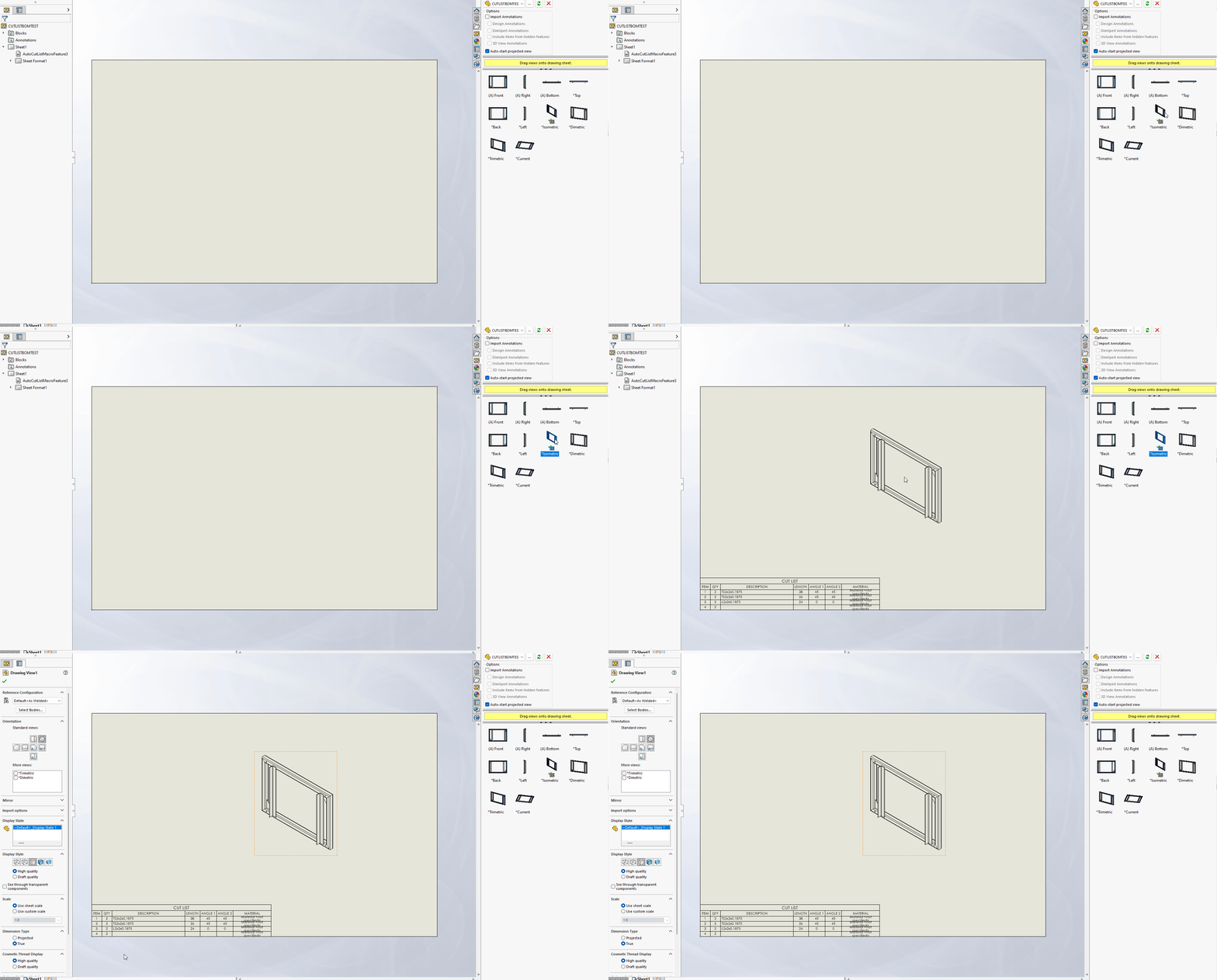
but if you create a new drawing via “File…New” or “Make drawing from part” a rebuild is required. It seems that the macro feature isn’t initialized in those instances.
Here is the SWP file:
AutoCutListMacroFeature.swp (103 KB)
To use it, edit the macro to change the ``templatePath``` variable to the location of your cut list template. Open your drawing template, run the macro, and then save the template. There will now be a feature named AutoCutlistMacroFeature1 in the feature tree and it should be ready to use.
Note that this is a simple example macro and doesn’t deal with multiple sheets and such.
4 Likes
a side comment: do you think this kind of code embedding insude 3d data could pose an exploitable security threat?
it is vba in the end running under sw user and likely easier to escalate to local admin…
Oh, absolutely. Just like Microsoft Office macros before Microsoft split the document types into .xls and .xlsm. A macro feature can do anything that the user running SOLIDWORKS can do. The VBA macro features are potentially extra dangerous because they can be embedded in the model/drawing files and will execute on rebuild. A .NET macro feature lives in an external DLL file that would have to be present in order to work correctly. I believe that the DLL also has to registered which requires admin privileges, so they are safer.
2 Likes