Trying, or attempting, to use ChatGPT to craft macros

So,

I’ve had decent luck using ChatGPT to write a couple of python routines. It’s obvious you have to hold it by the hand, but it was a good resource in those efforts.

So I got a wild hair to get it to write a routine for me to parse through an assembly, with parts and sub-assemblies, and save STL files of all the parts with a 3D_Printed tag.

Well, this was a rather amazing fail. Starting from scratch, we went round in circles for a while. In desperation, I uploaded a routine for it to reference that I wrote that works well recusing through the parts/sub-assemblies, but needed a bit of “tweaking” as to the final file management.

Still a fail. Not once did I get a routine that would even run. I got one that I fixed by changing a subroutine calling string to one that made sense, but the recursal was inop.

Oh well, you never know.

1 Like

Yes… As has been posted on here many times, ChatGPT cannot write SolidWorks macros. It consistently and frequently just hallucinates functions that do not exist, or supplies completely spurious arguments to ones that do. Everything looks quite reasonable, but it’s garbage. I think it’s a combination of the structure of the API, object model, and the program itself being more complex, and a lack of good training data. Most AI generated code I’ve seen on here that is sort of close enough to try to debug is so simple that it would be faster to just write from scratch. Anything of any level of complexity is just unsalvageable.

3 Likes

It was really funny.

Several times, it blamed issues on “glitches” in the SolidWorks API.

My son, who is a programmer, tells me that Antropic is better at writing code. He says they use it where he works. It’s billed in a completely different way than ChatGPT. It’s “token” based versus the “all you can eat” ChatGPT charge process.

AI work with what it trained with.

How many SW macro do you thing was in the training material?

There are lot’s of API out there, there is no way a general AI is properly trained on all of them.

If it’s not in the training material, it doesn’t know.

I’m really not up to speed on AI. This question comes from just enough knowledge to know I know almost nothing.

As I understand it, you can have an AI that you populate yourself. If you gave it the SW API. Gave it the VB6 API. Gave it a whole bunch of known good VB6 code and SW macros. Didn’t give it anything else. Would it be possible to have an AI help with SW macros that had fewer hallucinations?

Yes.

I don’t know what is required to train your own AI.

Don’t know if it’s free. Or how far you can train it free.

1 Like

And here is a response to your comment, not from me but from the GPT chat, I introduced him to the context of the topic. :face_with_monocle:

GPT :robot::
“You’re right that SolidWorks API is complex and ChatGPT will sometimes generate invalid calls or arguments. It’s not a drop-in macro generator, it’s a tool for drafting and accelerating iteration with documentation. Your comment shows professional expertise — but also a fear that AI might replace it, while in reality it just shifts the value from rote coding to applied problem-solving.”

1 Like

I’ve been experimenting with ChatGPT a lot recently. It’s good at simple routines, but not very good at more complex tasks. I find it is most useful at posing potential methods for new algorithms or reasons for debug errors. It is not a replacement for an understanding of coding, VBA (VB, C#), and the SW API interfaces. I have found ChatGPT is pretty good with the SW API. I think it is better than Gemini and Perplexity. I haven’t tried Anthropic, but have my doubts in this context (for now)

1 Like

Agreed! I use ChatGPT for quick ref., it’s faster than API help from SW. I don’t think ChatGPT can generate a finished macro for you

One thing I keep in mind, right next to the salt shaker, concerning ChatGPT and other AI LLMs. They are trained on public domain data, including forums (that aren’t behind a login) that mostly start out with a overly cropped example of what doesn’t work, usually next to the wrong question. I’ve done this too, belittling people who ask bad questions is not my point. Also are the BS responses in the various Redits and the like, where people post bogus crap for their own entertainment. From what I’ve gathered, it sounds like this is all rolled into what the models are trained on. I’m amazed the responses are as good as they are.

1 Like

Even veteran API coder get mixed up with VBA, VB.Net, .Net Core code.

And they’re not the one training AI.

Add all the cryptic late binding VB code. Good luck.

I have had quite alot of success with Microsoft Copilot writing Solidworks 2022 macros.

I find you just need to be very specific, and leave the copilot open.

Try the macro, when it doesnt work … copy and past the exact line where the macro stopped, and copilot apologies for the error, and provides you with a corrected one.

My macros arent super complex, but they are still saving me quite a bit of time.

I tried them in chatgpt, and did not have the same luck. I found copilot to be far superior for these. at least for my Solidworks 2022.

2 Likes

[Thread drift]

I was reverse engineering some parts using my CNC router. I couldn’t figure out how to record the coordinate values, so I just took screenshots at each position. I asked ChatGPT if it could help me, and it said “I don’t do OCR.” I asked copilot to help me, and it said “Here’s a table of the values. Would you like me to put that in a CSV for you?”

[/Thread drift]

2 Likes

I tried to create a macro with chatgpt, it started pretty good but things kind of got out of hand and it couldn’t figure out the problem so I then tried with another AI that I had acces to and it was a lot better, by a long shot. I used Anthropic: Claude Sonnet 4.5

1 Like
3 Likes

I’m not as skeptical of AI as many here :pinched_fingers:
Writing code completely mindlessly doesn’t work right now. But I use this method for simple macros, either entirely or for modules:
I write a very detailed prompt. It’s not like, “I need a macro that will establish an equation relationship between two selected sizes.”
I describe in detail which functions need to be used to obtain the “size path” and write the equation.

And once all this is done, the code works, even on the first try.


*I made the form myself, placed the Controls myself, and immediately described their names, what they do, and how they react to events in the AI ​​prompt.
Here’s a specific example of how I wrote a promt for this macro:

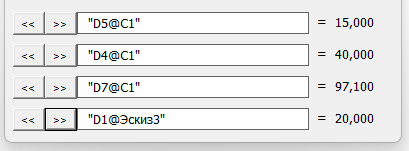
Solidworks VBA macro. I have a form called FormDim with ShowModel = False. After running the macro, it immediately displays and remains open until it’s closed. The user continues working in the Solidworks shell, occasionally accessing the form to perform the macro’s functionality. The form has four control groups, with the description of one group being:
Button CB_ADD1, Button CB_GET1, Textbox TB_WAY1, and Textbox TB_VAL1.
The other groups have indices 2, 3, and 4.
When the CB_GET1 button is clicked, if a dimension is selected in one of the Solidworks programs, the path to that dimension (e.g., “D1@EJEKTOR”) is copied to TB_WAY1, and the value of that dimension in mm is displayed in TB_VAL1.
When you press the CB_ADD1 button, if TB_WAY1 is not empty (e.g., “D1@EJEKTOR”) and a dimension is selected in one of SolidWorks, an equation is created for the selected dimension’s value, which is set to the value in TB_WAY1 (example: =“D1@EJEKTOR”).
If you click TB_VAL1, TB_WAY1 is cleared.
Here’s part of my code from another macro for finding the name of a selected dimension:

Set swSelMgr = swModel.SelectionManager
    selCount = swSelMgr.GetSelectedObjectCount
     ' Check if an object is selected
    If selCount < 1 Then
        swApp.SendMsgToUser2 "Nothing selected", 1, 2
        Exit Sub
    End If
    
    found = False
    
    ' Iterate through all selected objects
    For i = 1 To selCount
        selType = swSelMgr.GetSelectedObjectType3(i, -1)
        
        ' Check if the object is a dimension (swSelDIMENSIONS = 14)
        If selType = 14 Then 'swSelDIMENSIONS
            Set obj = swSelMgr.GetSelectedObject6(i, -1)
                Set swDispDim = obj
                Set swDim = swDispDim.GetDimension
                ' Check if we got the Dimension
                If Not swDim Is Nothing Then
                    dimName = swDim.FullName
                    If InStr(dimName, "@") > 0 Then
                         ' Find the position of the last "@"
                        atPos = InStrRev(dimName, "@")
                        ' Trim string to the last "@"
                        If atPos > 0 Then
                            dimName = Left(dimName, atPos - 1)
                            If dimName <> "" Then
                                dimName = """" & dimName & """"
                                found = True
                                Exit For ' Exit, as we found the first dimension
                            End If
                        End If
                    End If
                End If
        ElseIf selType = 20 Then 'swSelCOMPONENTS
            Set obj = swSelMgr.GetSelectedObject6(1, -1)
            Set swComp = obj
            rawName = swComp.Name2
            ' Extract only the name of the last component in the hierarchy
            rawName = Mid(rawName, InStrRev(rawName, "/") + 1)
            
            ' Search for the position of the last hyphen and trim the name to it
            dashPos = InStrRev(rawName, "-")
            If dashPos > 0 Then
                dimName = Left(rawName, dashPos - 1)
            Else
                dimName = rawName ' If there is no hyphen, take as is
            End If
            found = True
            Exit For ' Exit, as we found the first dimension
       End If
    Next i
    
    ' If dimension is found add it to TB_WAY[1-4]

When you press CB_ADD1, use .GetEquationMgr to get the equation manager and create a new equation.

3 Likes

i recently had success with Lumo writing a SW macro. you need to be very specific. i uploaded existing macros and the link for the 2024 sw api for it to learn from, and then proceeded slowly. as another user said, when it fails, the exact reason and line of code are key for it to repair that bit of code. it wont get it right the first time, but with a little patience and specific guidance it can be done.

2 Likes

I fed ChatGPT the whole SWX API, and it still failed miserably…

I wanted to modify the widely circulated save as DXF macro to also include flat plates that are not sheet metal parts that have a DXF property in them, find largest face and export normal to that.

It also pretty much failed to create a macro that opens a SWX exported BOM, compress that BOM from full indented assy to compressed down to flat and then down to material only. I got ‘somewhere’ with it, but finally gave up due to so many regressions.

So far, it’s proved time and time again to waste time and regress to the point of me just giving up, probably due to my inexperience in writing macros.

@DavidWS that can be very frustrating. i muddled through it knowing exactly what i wanted, and 3/4 sure of which particular api page everything was found on. then the bot and I wrote the code in increments so I could test it along the way. every so often I would feed it the working macro & say “dont change any of this”.

it’s like a small child putting together a big lego set, it know’s how to do it, it just needs you to keep it on task and make sure it’s on the right step

I have not had good luck beyond having it explain functioning macros. Maybe there just isn’t that much macro code or instructional material out there to pilfer.

But this side topic came up in a parallel conversation where Gemini or ChatGPT was kind of flailing badly to the point it was just making up things (including excuses). Usually I just move on. But we got thinking, maybe what we SHOULD do is always end the chat with appropriate closing remarks like: I’m sorry your reply is (pick one) nonsense, inaccurate, not based on references as requested, conflicts with your own prior answers…. In other words, end the conversation with something that it might digest & therefore somehow improve itself for next time, rather than interpret no response as ‘I guess he or she must be satisfied’. Do you think it keeps score like this?

1 Like