I specially didn’t want to ask this in the PDM section of this forum because I don’t want just those that are actively using it to pipe in but everyone that ever had experience with it.
Background info
We use Solidworks mainly for Routing (piping to be exact) and have been using it since 2009.Our library (self made) is extensive.Except of the actually piping fittings there is hardly anything that get re-used without modification that are particular to the project at hand.
The company keeps growing and where as in the beginning there were just 3 users, we now are with 7 full time piping designers working on projects going from a something that fits into a container to complete Biogas energy plants, or in other words, from project barely 6 figures to well in excess of 8 figures, and that’s just our part.
Question
1/How stable is PDM? Us having Solidworks premium, I’m talking about the one that comes with it (PDM standard) not the PDM PRO.
2/Is there anyone that use routing and that is using (or has tried) it and what are your experiences like?
3/How long did it actually take to not just have the initial setup done but actually have something that aids instead of being a hindrance? In other words, let’s cut through the marketing BS and actual state real life situations. E.G.: Routing gets sold as if one can use it production wise straight out of the box when it took us weeks to get it up and running (with lots of self study and try and error) and several years to actual have a solution that works stable for our needs.
4/ How much maintenance/policing does PDM take? As in, how much time has to be spend by someone to keep it up and running smoothly, correcting things, fixing things, etc. Or in other words, even in the best situation does it only take an hour or so a week or is it something that needs lots of babysitting even when everyone is playing by the rules.
I know it’s all rather open ended and I don’t expect anyone to take the time to write an essay. If there are any posts or reviews that you know of a simple a link would be greatly appreciated or even a search term that I can enter in google without having to wade through the usual company/marketing BS that SW is so plentiful in spewing.
I’ll start off by stating I’m a PDM Professional CAD Administrator currently.
PDM is quite stable, but will only be as stable as your network or connection to your cloud hosting server if you go that route. There are a lot of factors to consider regarding the network infrastructure and stability but we’ve been using PDM for over a decade and it’s been very consistent.
I have tried to set up routing by hosting the relevant files (databases, tag schemes, cable/electrical parts, etc.) and it worked pretty well once set up. So, with that said, I imagine copying all of your existing files to PDM and redirecting all of your solidworks clients would be relatively painless to get up and running. This could certainly be implemented and tested before fully turning all of engineers over to PDM for production use.
PDM in general takes quite a bit of time to set up. With PDM Standard, you’re limited to something like 1 workflow with 10 file states and 20-ish transitions. The other limit is you must use SQL Express (free) but that limits your database size to 10GB which is more than enough for a small company for many many years. It takes a long time to plan the data you want to track along with the states you’d like your file to move through (Editing, Review, Release, etc.) with the permissions, data cards, and variables to accompany them. Once it’s configured and tested, moving your files into the vault and beginning to use it should be a few days at most.
Once a system is properly set up, it typically takes very little policing to keep things tidy. For me, this stuff is usually caught during the Review process before a file is released. The bigger issue at hand is training people to work within the system and stop using files outside of PDM. Engineers can get set in their ways and it can cause problems if they try to circumvent the system that is in place.
So, PDM is not for everyone, but it is a nice system that allows only one engineer at a time to edit a file with the check-out/in and version control. Moving an existing system to PDM is no small feat so you will need support of your managers, peers and IT to be successful. Your VAR should offer the service to aid you in implementing a PDM system and transition your files into it so requesting a quote from them will give you a good starting point.
First why PDM? What are you trying to get from it? What problem you need to solve?
With PDM, users still can’t work on same assembly and file at the same time.
File management is only as good as user has implemented. Crap in, crap out.
We’ve been using PDM for 14 years. No piping or routing though, just big assemblies with thousands of parts. Our products are not one offs, we maintain them for years with parts over 30 years old.
The setup doesn’t take real long. Migration and data cleansing and the planning around it is the big time sink and key to a successful implementation.
I’m biased and extremely comfortable with it, but even if I were a one man company I’d use it for version control and backups.
I am the exact case Jason describes here. I use PDM standard. Honestly, in some ways it is a pain in the ass. But I won’t always be a one man show, and even now it is worth the hassle for revision control and to keep me from accidentally changing something that is released.
I hired someone to setup the server for me. Based on the hours billed it wasn’t too much work. My data preparation, on the other hand, took weeks.
jcapriotti By maintain do you mean you’re still shipping new orders of that product on a regular basis or is it providing service parts? Interested in your use case.
Peter De Vlieger
I would agree about setup doesn’t take real long, >IF< you know how you’re going to use it. Granted we have PDM Pro so there’s much more to uncover than in standard, but we’re three years in and still trying to figure out how to fit our processes to PDM or PDM to our processes. If your CAD processes are not fully constrained by outside forces and you can align your processes to the PDM “Best Practices” that will be nice.
I’m in the same situation that jcapriotti is in. We’ve been manufacturing the same things for decades and some product lines require part updates due to material availability changes or manufacturing improvements. These are typical sustaining engineering activities but they support an established product.
This is something that I think is overlooked on a lot of initial implementations. I just spent the last 6 months creating a new process in PDM because Revisions were never properly set up in our vault. It would be so much nicer if this were set up from the start. It’s not hard to create a revision scheme so I’m not sure why it never happened.
Service parts mostly. But we do have some parts of our products that just never really change much nor get replaced. We may make new assemblies for a similar and hopefully better design but a lot of the core parts could be from the 70s, 80s, and 90s. Most really new stuff is related to electronics and cosmetic stuff the customer sees.
If standard is anything like Pro with the vault view/ search result columns, vs where used and contains tabs, vs data card tab vs version tab ( think I have them all?) Oh, yeah, and the Solidworks PDM add-in view. Anyway, endless variability here based on version, configuration, and local file property data.
Data card typically shows data for local version, unless you don’t have a version in cache then I’m pretty sure it shows latest version data.
Search View results >make sure you have search all versions unchecked or it will silently include old version data in the result set. I’ve added the “found in version” column to the search results column set.
If you have the data card controls set to “update all configurations” that only works when the update is done from the data card or from transition action. If the user or some other force updates the custom property that the variable is mapped to then the configs will have different data even though data card is set to update all configs. Its not a magic setting.
Has the search result set or vault view updated recently? switching between tabs usually updates the data in the data card, where used, contains, etc. tab sometimes. But the view above that updates based on the setting in admin tool or when the search is refreshed. This is especially problematic for the users that insist on using vault view/search tool for PDM stuff while the file (or something that uses it) is open in Solidworks rather than using the SW PDM Add-in like I beg them to do.
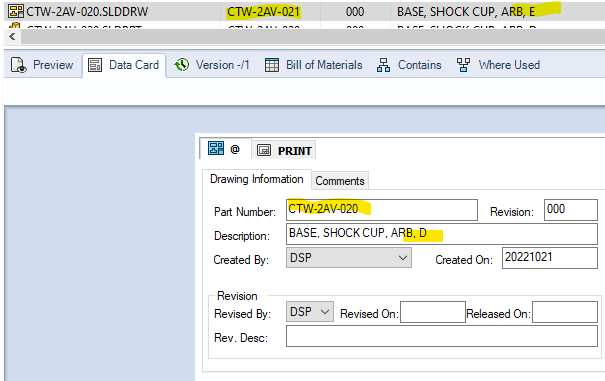
When people would send me little screen shots like what you have it only tells me a 1/3 of the story, I need to know to explain to them why the data being presented is different and appears to be contradicting.
The problem we’re facing that we want to solve is the slowness of opening files. As you can imagine we use big assemblies. We created a workflow that is very modular just to prevent having massive ASM’s but none the less sometimes we still have big ASM’s that take a while to open/save.
We have a dedicated server on site that is solely for Solidworks files and that only us Solidworks users have access to. We got highspeed servers, highspeed connections, decent workstations with decent graphic cards and even our VAR can’t find anything that we do wrong or could do better hardware wise. There for the only thing left, the only thing ouir VAR could recommend, is instead of working on files on the server is working on the files locally. Now storing files locally by manual means is complete rubbish and bound to lead to problems. This isn’t 1974 but 2022 after all.
However using a PDM system combines the two. The files are stored on the server but when working on files they are stored locally. There is a distinct ,and supposedly safe, means to not run into problems with what is the latest (and correct) version and seeing that only at the moment of putting something in the vault or pulling it out the vault addresses the server, it should mean that the burden on the server is less + the access times would be better while working on the files because the files are stored locally once they have been pulled from the vault.
I can see that if everyone at the end of the day is uploading the latest version to the server that it would create a bottleneck but even so, it would mean only issues at the beginning of the day and end of the day.
HOWEVER, there is one thing that all this doesn’t take into account. Namely, while some of us are working on big projects, projects that one or two designers are working on full time for several months and in some cases more than a year there are those of us that work on smaller projects. Projects that only take months, weeks or even days. On top of that is the fact that it isn’t rare that we have to work on several projects, making small adjustments or big alterations, in a single day. And with several I mean up to 6 utterly different projects in a single day per person. Anything from altering material or diameters of piping to modifying general arrangement layouts. There for I kind of worry about the bother of signing things in and out of the vault. What use is it if the files open faster if the time gained is lost by the hassle of accessing the vault? Or is this just not an issue and am I just being paranoid because I have no experience with PDM?
AND that’s is what I’m worried about.
I don’t want to have to spend lots of time on setting up something that causes lots more work for me and that frankly would barely help anyone.
Which is what I’m worried about.
In the beginning no one in the company would know what it can and can’t do. What needs to be in it and what not. So sure, the initial set up, with VAR guidance and assistance (and additionally paid for) will only take a few days. However, I suspect that only then we’ll see all the issues.
Also I’m worried about the fact that Solidworks has the tendency not to cater to what the user needs (let alone wants) but that they expect the user to conform to what Solidworks dictates are the “best practices” no matter how utterly against logic or common sense they are.
There is no doubt that loading files locally from fast solid state drives will be better than over the network. And keep in mind that PDM is granular down to the file level. If you and another user both have local copies of a very large assembly and you change three files out of 1000, the other user only has to retrieve 3 files to be up to date. The bigger hit would come when you finally check in the large assembly file, but even then it is only the assembly file itself that the other user would have to retrieve. All the contained parts are already there.
PDM is also very, very, very configurable. You can set it up as nothing more than what you’ve described: checking files in and out. You can leave all your other existing processes in place. You wouldn’t need workflows, revision control, elaborate users/groups/permisions and other PDM stuff that requires more time and effort to set up. That can be added later. You can also set it up side by side with your current system. No need to move everything in to the vault. Just pick a project and copy all of its files to the vault and take it for a spin. If you have a lot of files that are shared across projects, you’ll want to keep track of what you touched if it affects other projects that aren’t in the vault, but you should know pretty quickly if using PDM is better than what you have currently.
Having said that, if you decide that PDM is working for you, careful planning is required before moving everything in to the vault. The more ‘correct’ you set it up to begin with, the less maintaining you will have to do after the fact.
Also, if you have processes in place that work for you and users are satisfied with, it is a good idea to keep them if they don’t conflict with PDM and if PDM can help automate them, even better.
You need someone who knows the system really well to help with those decisions. We didn’t really have that for Windchill and are paying for it. Our outsourced devs know how to configure the system well, but not why.
This applies to most PDM/PLM systems. Best to not try and force your legacy processes into it, but change your process to do it the way the system handles it best out of the box. Not possible 100% but something you should strive for. We had a major failed $30 million SAP implementation for this very reason.
When I got Vault with Inventor (20 years ago), took me a month or two to redo my files folders. Still using same structure for IV and SW.
Keep is simple. Keep all common, shared part, library parts together. Not over many projects folders.
Look at filenames and create system for them. As simple as possible.
“Smart” filenames are smart until it breaks which is often and soon.
Don’t move everything to PDM all at once. Move a few projects and test.
That’s what I was testing for 2 months. Check in, check out, Pack and Go. Make sure folder structure stay the same.
Make sure server use SSD. Even split storage into multiple drives.
When ever CAD open a file, it doesn’t just open 1 file.
For each file it open, a lock file is created which the server need todo can confirm with local machine.
When a file is save, it save a temp file first. Rename and move the old file. Rename the new file.
This create lots of network traffic hence we always suggest to not do it this way.
Unless you got a really good network admin.
I did some network optimize in XP days to get a ERP system usable. It just a database and only 4 users.
Check in, out is not too bad.
Try to modify released assembly and parts is and have good reasons.
PDM helps to prevent mistakes.
User can (should) check “where used” before changing files.
Everyone will need to get some rules and process down to setup and work with PDM.
It is alot to do and it affect everyone. Everyone will have something against it because of how they do thing before.
Those need to get iron out.