Table Variables how to change?

Hi,

I know this is a simple one, but can’t seem to remember the procedure/trick.

I have a table that the heading says length and I want to change it to Material, how do I get it select that variable, I though you did something and you use to get a drop down on what that row as selecting, but can’t seem to get it.

guess I am looking for the custom properties list from the row

SolidWorks 2020 sp4.0

Regards,

Jim

Double click the column header. You will get a different toolbar with a ‘Link to property’ button.

1 Like

Hi,

I tried it forgot to mention it was a cut-list, either way, modified a BOM to get what I wanted, thought I was loosing my mind.

If someone knows how to get it work on a Cut-list to see and change the variable please chime in as only seem to go through this ever other new job.

Regards,

Jim

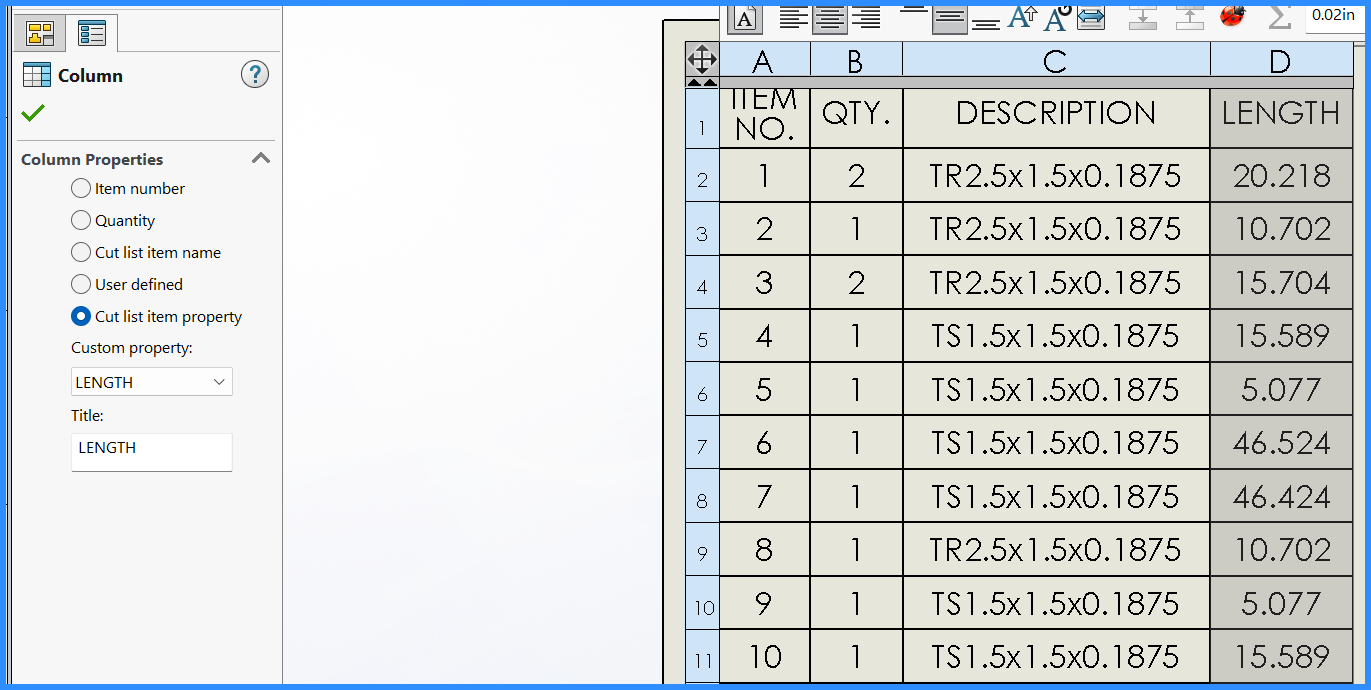
Select the column header (in the blue bar that appears at the top when you hover over the cut list). Property Manager shows the column properties. Select ‘Cut list item property’ and then ‘Material’.
1 Like

Weldment cutlist; it should be on the property manager

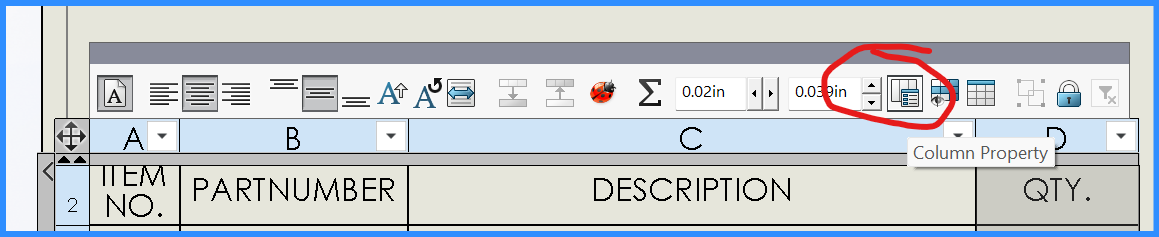
BOM; Click on the column heading & then click column property.

I’m not sure on any other tables.

2 Likes