I have a need to create a C++ add-in for SOLIDWORKS 2025. The APISDK download includes a C++ add-in wizard, but it is hopelessly tied to Visual Studio 2017. The Visual Studio template system underwent a serious overhaul after 2017 so the old template is not compatible with newer Visual Studio versions and SW hasn’t bothered to update them.
Therefore, I set out to solve the problem by creating a Visual Studio 2022 compatible template for creating SOLIDWORKS C++ add-ins. I’m mostly finished, and it works. I can use the template to create a new SOLIDWORKS add-in project and the project will build and the add-in can be used in SOLIDWORKS. There is just one issue.
The original add-in template creates a VS project and generates the code to add a CommandGroup and a FlyoutGroup to the command manager. Then some custom commands are added to the command group and flyout group to do simple things like start Notepad, display a custom property manager page or show a dialog. The C# and VB.NET templates do something similar. The C# add-in produces this:
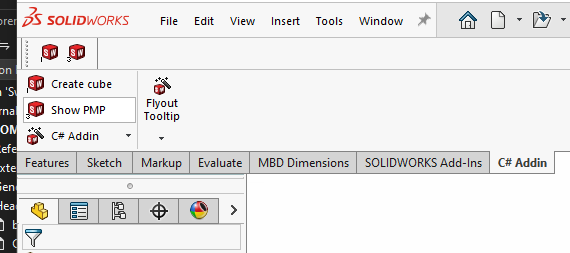
The strange thing I’m seeing is that in the C++ add-in, all the code to set this up succeeds, but all I see in the UI is the command group name:
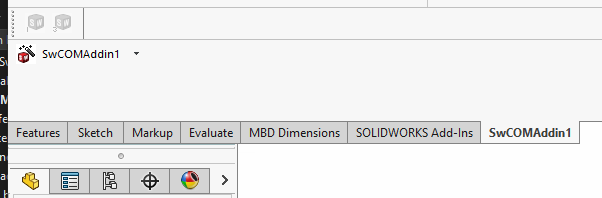
The individual commands, the separator and the flyout are missing. In the actual toolbar, two commands appear, but as you can see they are disabled.
The really strange thing is that if I hover over the commands, the tooltips that appear are completely wrong:
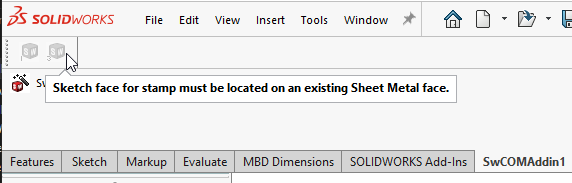

These aren’t even command tooltips. They are error messages associated with the sheet metal stamp feature that normally show up in an error dialog like this:
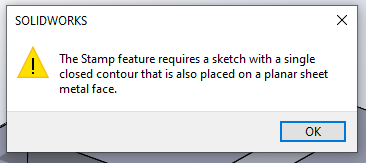
This shouldn’t even be possible. The tooltips are resources embedded in the add-in DLL file. Showing completely different text from a location outside the add-in DLL is crazy.
Any SOLIDWORKS C++ add-in experts have any idea what might be going on here?
 ):
):