Ditto 
2 things specifically.
1.) does mirroing actually work this time?
2.) is pack and go still all $@#&ed up? or is it fixed?
Ditto
2 things specifically.
1.) does mirroing actually work this time?
2.) is pack and go still all $@#&ed up? or is it fixed?
Well, today is the first day the company is officially on SolidWorks 2023. Half of the employees are in vacation for this week because daycares aren’t opened yet and school only restarts next week.
Still, we should be able to see bugs if there are some that do occur.
I’ll be surprised if you find anything of consequence, unless it’s in a feature or workflow that I rarely or never use.
Hopefully they’ve fixed the “open drawing” bug from 2022 SP5.
What was the behavior..? It seems to work on my end.
Morning’s about to be over and we haven’t ran into any issues so far and people seem to be pleased of the little improvements they made such as that one.
I’m still on the wall about loading SP3, currently on 2021 sp5.1
I guess I might as well wait now until sp5 comes along unless anyone thinks it’s night and day from 2021? (which I doubt). 2021 isn’t running bad on my machine if that is any help.
My ‘objective’ is generally to update every 3 years unless there are major reasons to. We skipped a year because 2022 wasn’t very appealing and moved to 2023 because we needed to in order to keep up to date with CustomTools and everything else also.
If no new features jumped to your eyes, you can most likely wait until 2024 to update but then again that pushes you back to about 15 months from now, which is kinda far away. If you’re a single user, you probably could update rather quickly to 2023 SP5 when it’s out if you want to make sure that most bugs are off the map.
https://www.cadforum.net/viewtopic.php?p=28187&hilit=open#p28187
SPR 1241174 – The new ‘Open Drawing’ command always shows an Open browse dialog for file part of multiple drawings - even if drawing match matching file name exist in same folder as part/assembly - Inconsistent behavior without add-in
The problem exists for me on ALL drawings, even those with a single view of a single part. I guess it is a PDM problem, so you wouldn’t see it.
The fact that this exists in an SP5 is beyond disheartening. Either it was broken from the beginning in 2022, and it wasn’t fixed in time for SP5, or it was working earlier in 2022, and they managed to break it. The idea that SP5 is more stable/reliable than SP4 or SP3 doesn’t match with what I’ve seen reported (and experienced) with this software. 
I haven’t ran into the issue so far and noone around me has either but then again maybe there’s something different in our workflows.
Most issues we’ve seen so far are fairly small annoyances, nothing that’s a show stopper.
I’ve had no real issues with 2022 SP5 which i’ve been running since it was released. It seems steady and stable enough.
Well, I’m having issue with a flexible sub-assembly, only one though.
This is how it shows up:
image.png
This is how it should show up:
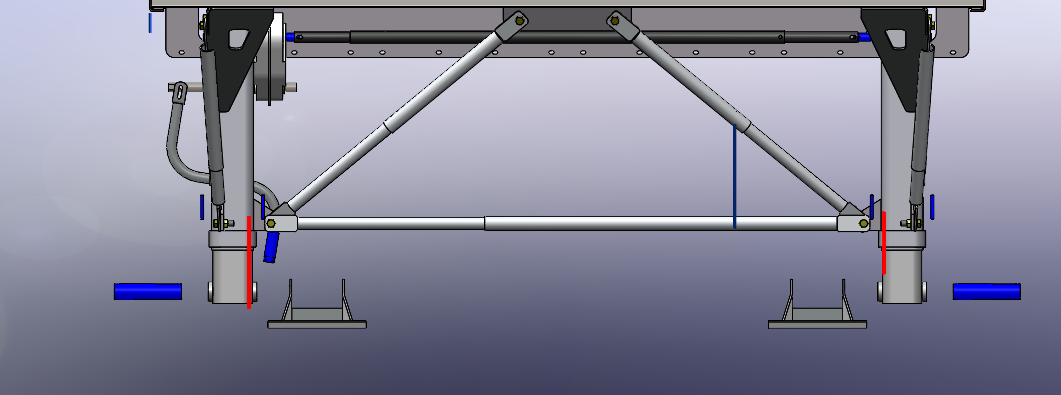
Most likely caused by how the flexible sub-assembly was mated in a lazy way using the lock mates.
Yeah, lock mates are like “fixing” components in space. Poor practice most of the time since they don’t really move/update when components move/change.
Yeap, I try not to use 'em, but some people did in the past. I deleted those mates and recreated them as standard mates and now everything is A-OK. I figured it was the mates causing the issues because there were 4 different flexible sub-assemblies inside that one and only one was showing issues, which was the one with lock mates.
I’m not surprised that a combination of lock mates and a flexible sub-assembly caused issues.
I have gotten this, hiding and showing part solves the issue as well. One the engineers encounter since they work on surfacic is the nameless features. That’s kind of an annoyance.
image.png
AlexLachance Can you rename the surface features later?
We have a sister company that is on SW2023. We want to bring them into our PDM vault, but we’ll have to move our vault from 2022 to 2023. I don’t know if I do want us on SP3 with this bug.
I believe it is a bug caused by having a different language then english because this is a workaround I found for my collegue.
MicrosoftTeams-image (3).png
I do not understand why change the registry when that setting available is inside SW system options?
I kinda had the same thought to be honest  The funny part is the SolidWorks guy even put a notice below it, something like “Playing in your registry can mess things up, and that will be your fault if it happens, not ours”
Yeah, SP3’s got a few little bugs, none so far are showstoppers but they are somewhat annoyances. Here’s another one
I AM A GIF CLICK TO PLAY ME
bug.gif
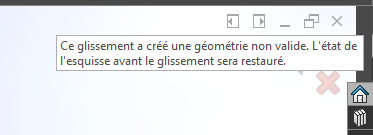
“This operation would have created unvalid geometry, the state of the sketch has been restored previous to the operation”