Many times I find the “P” key more useful than the “Q”. This is an old video recorded before “Q” was a thing. 
New in SW 2023. For SW 2020-2022 users, you can use the Show Primary Planes toggle button (I assigned the “P” key for it).
Q to temporarily show planes is working for me in SW2022
This is new:
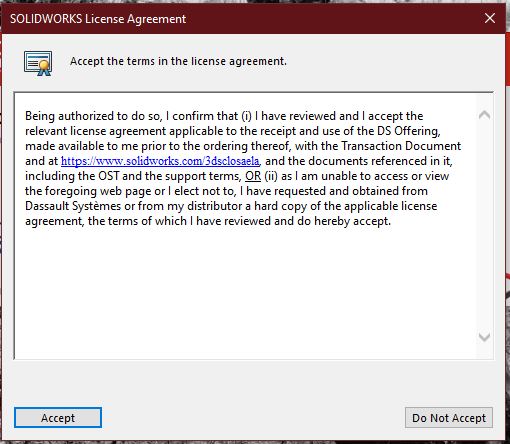
Is this English?
The DS Offering?
Whiskey Tango Foxtrot?
What the heck..?
Goal is to confuse the customer into ignorant non-compliance.
For the curious here are the ELA and the CLOSA documents:
https://agreements.3ds.com/AV00000003617/ELAIndirect-USA-V12.1.pdf
https://agreements.3ds.com/AV00000007236/CLOSAIndirect-US-V13.1.1.pdf
Interesting
image.png
This was a nice feature i was looking for a long time. One can see the description name on insert.
Welp, we got our new server, so I’ll be testing SP3 on some of our products to see how it handles them and if it’s too buggy it’ll be 2022 SP5.
Did some tests this weekend, everything seems to be working alright on 2023 SP3 for us. We should be moving to it on friday. Crossed fingers.
Has anyone seen this is SW 2023 SP3.0
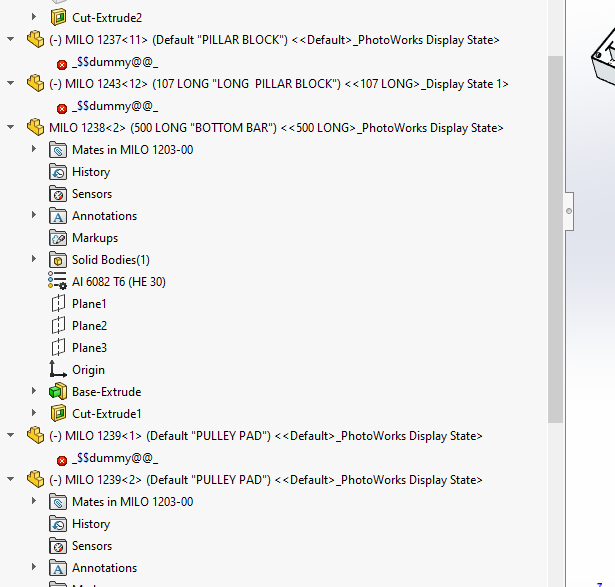
What is $$ dummy@@
The files open ok and Ctrl Q does get rid of it.
that is the new subliminal message they added the tells you the give them more money dummy! 
Seems like an old bug that pops up every now and then. The link dates back to 2014. Someone got it again in 2018 and now you in 2023.
It might be this bug:
Listed as fixed in SW2024.
Welp, today’s the big day.
Transitionning SolidWorks License Manager and CustomTools SQL Database+License Manager on the new server while also updating both to 2023, then updating 15 workstations to SolidWorks 2023 SP3 with CustomTools 2023 SP1.
Good luck! Sounds like you don’t have to worry about a PDM upgrade… I’m jealous.
FIFY
That’s fair 
Nope, no PDM on our side. Everything is driven by CustomTools + our ERP.
Welp, everything went fine and dandy and was also a bit faster then when we moved from 2016 to 2019.
Now, let’s see next week if the problems start popping up
I am waiting to see how things go for you. While I don’t really want to upgrade, especially to an SP3, 2022 SP5 crashes often enough that its forcing me. Earlier in the year I was on W10 and different hardware. Now I’m on W11 with the same video card, but different MB et al. I don’t remember it crashing that often before the upgrade, but so many things have changed its hard to blame it on the OS.