Sheetmetal in weldments and default properties

Is there a way to add default custom properties to a cutlist generated from a sheetmetal body?

For weldments there is a txt file we could use to generate the properties we need, but it does not seem to work for sheetmetal bodies.

Everytime we have to add 4 properties for our standard drawing BOM.

including description…unfortunately I noticed it only today since we have a department that started to use quite some sheetmetal features and the problem came out.

BIG RANT ahead warning

years ago I escalated to critical, a weldments issue that was thought to be a minor foreign language translation problem, and that apparently is affecting also sheetmetal bodies.

At the time I noticed the variable description was literally localized in the SW translation.

Those idiots (sorry, but I lack the vocabulary to be polite in this case) broke a whole legacy layer of data for weldments, where they could just get away with a label translation instead of changing a legacy variable name used in hundreds of drawings.

It was back at sw2021 or 22 and we got a fix at SP3 level to have the description back.

At least a switch to use both the botched and the legacy variables name.

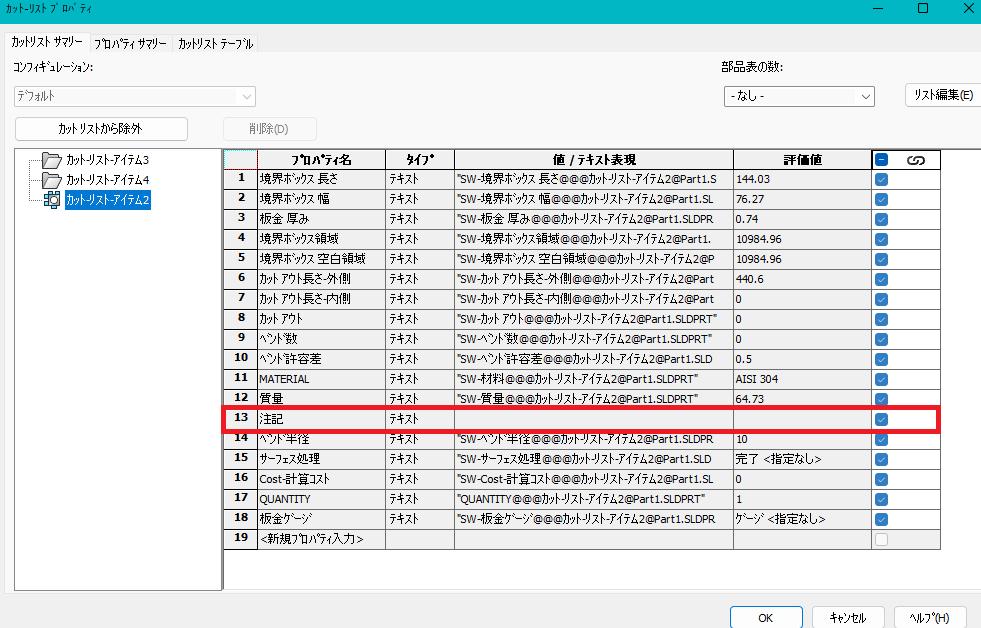
Eventually that issue was not noticed in sheetmetal, but it is the same: description in japanese was description, same as english, but some idiot decided it deserved to be 注記 (notes) for god knows what benefit.

Obviously all our BOMs, template and drawings are all “description” centric (plus another couple of variables) .

UPDATE:
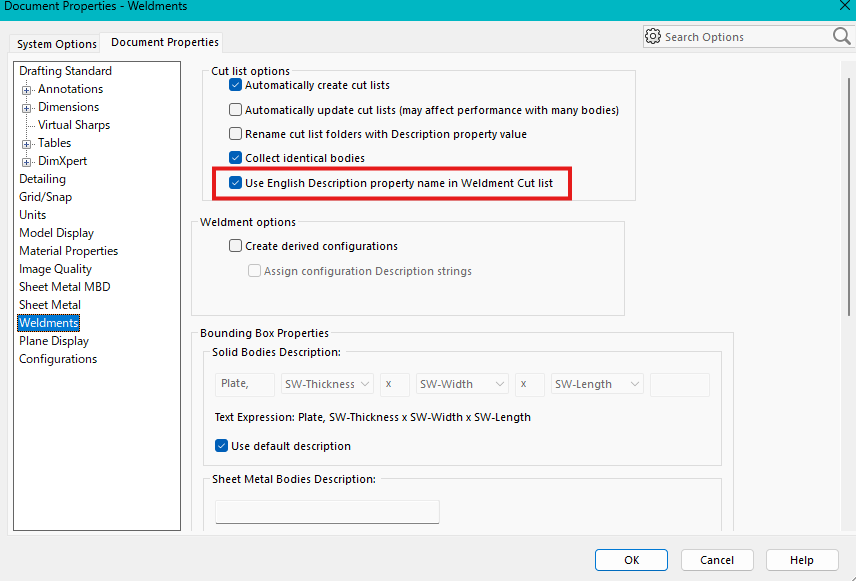
This document Property was added upon our agreement to solve the cutlist mess back in 2022.
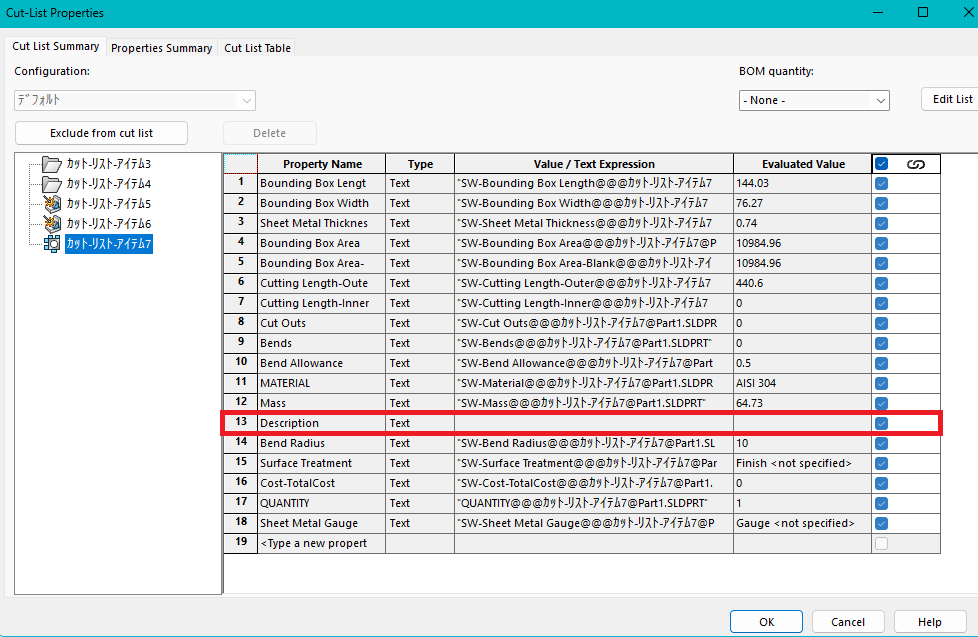
It works for SW set in Japanese for all cutlists, BUT sheetmetal… If SW is set in english everything works and the drawings are able to show all 3 types of cutlists.
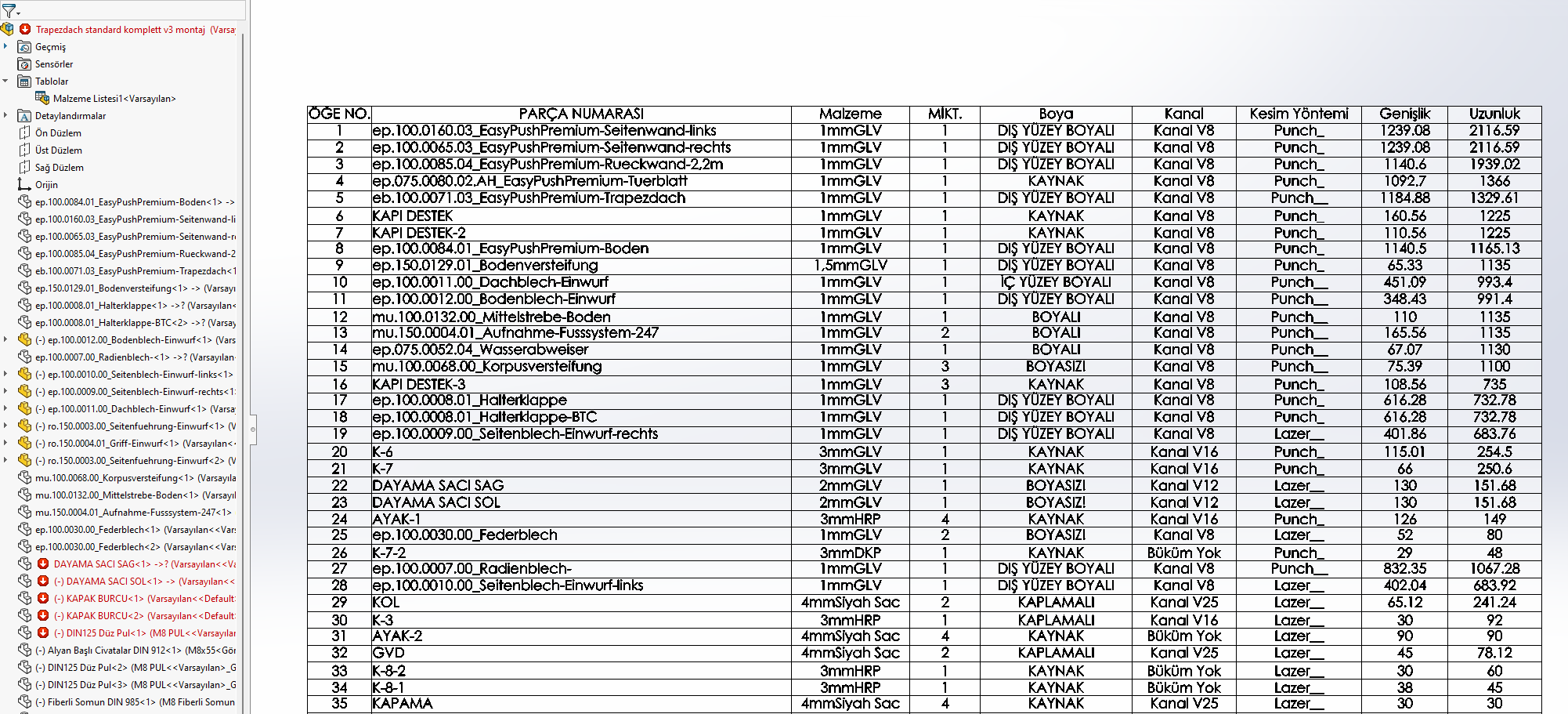
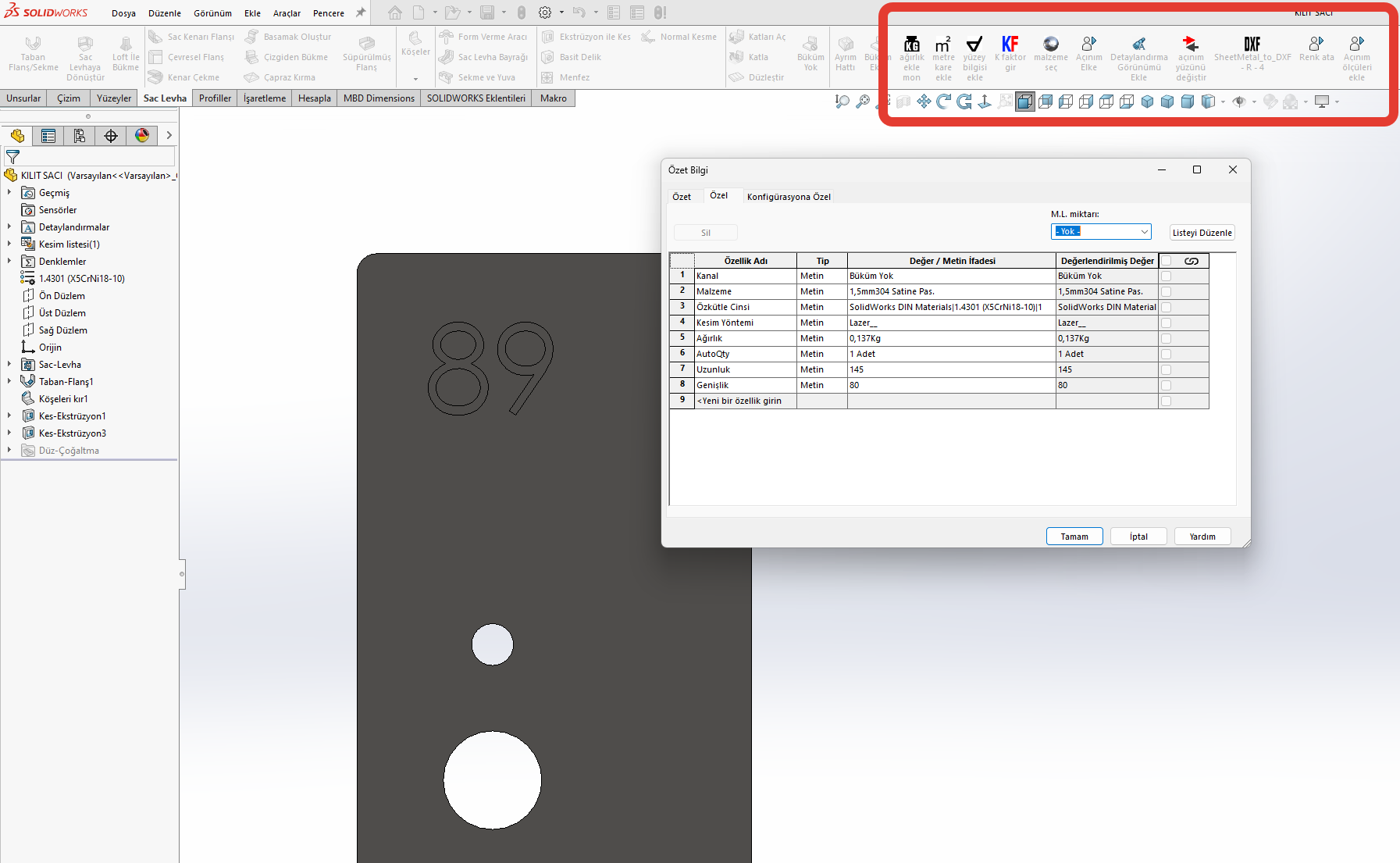
Sheetmetal cutlist created with SW in Japanese (ignores document settings)
Sheetmetal cutlist created with SW in English
I found my old post.

That issue was later escalated to critical as it just broke all our legacy data. LOL

here-we-go-again-SW!

I may not have fully understood, but wouldn’t this work if you used a bom list template instead of adding a bom list property? (Separately for welding and sheet metal parts)

When I create sheet metal parts, I add special properties such as material, quantity, square meters, cutting method, etc., and I can get these properties in the boom template I set once.

could you elaborate a bit more?

Do you have an example to look at? We already have 1000s of files aligned with the same standard variables like “description”, thickness etc those needs to be pushed inside the files, because we use a mix of weldments, sheetmetal and features in our multibodies.

sheetmetal is the only one that need the variables to be pushed manually. Additionally, due to a SW error in the development, the “description” variable was localized and behave differently than weldments, or extrusions.

If you set solidworks in english the variable name is back to description as it is used to be before 2021 when SW broke the backward compatibility.

At this point we push 4 variables in the cutlist for the sheet metal bodies, I would like to have them by default to match our system already in place and standardized.

We manufacture sheet metal products, but we also use them for non-sheet metal products, which we don’t manufacture ourselves. Therefore, my list only includes detailed information for sheet metal, for production tracking and pricing.

I have macros that I use when creating a drawing. I print the information I need about the product into special features.

I created a list template for the production and pricing sections. I don’t enter any information manually (by handwriting); the data I print into special features is listed with my macros.

These are my business processes.

What normally is create a a part called frame.sldprt the create the frame. I then insert the frame.sldprt into an assemble called frame.sldasm place my sheet metal parts in and create a drawing from it.

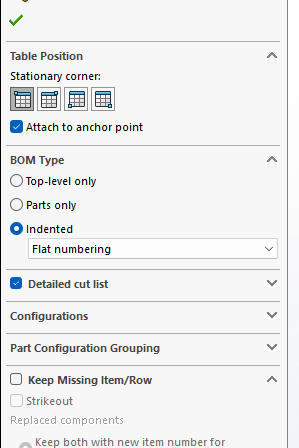
create an bom with this setting

Then hide the row for the frame.sldprt but keep the frame lengths

I also hide all the rows that say Sheet in the description.

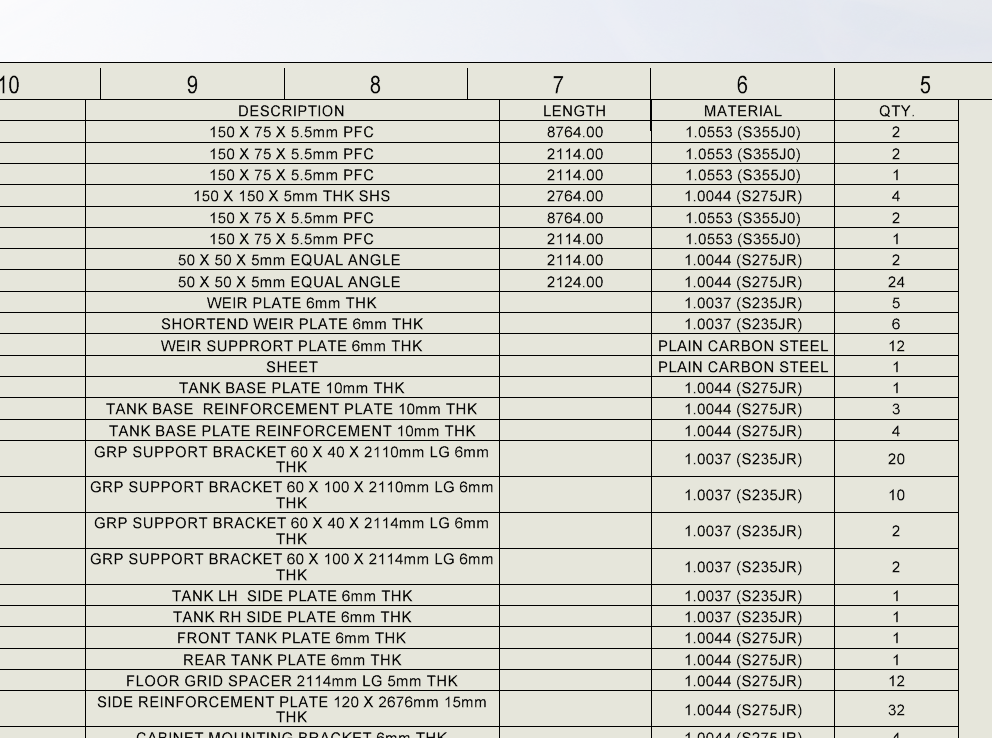
so you end up with something like this

i call the frame.sldprt the same as the assembly as I do stuff like this so I want the custom properties to be the same for the frame and assembly to populate the sheet correctly

I prefer to do it this way so I can run a macro to find the sheet metal parts and create a flat pattern dxf of each part it is a time saver when you have frame with 100s of sheet metal parts in it. The macro will pull from the custom properties like part number revision description qty required sheet thickness and material name as name the dxf like this

If you do it as a multibody the macro cannot recognize the sheet metal parts from the frame and also cannot flatten the mutibody parts to DXF

I do the same thing, I make my weldment a sub assembly in an assembly with the sheet metal parts.

Biggest thing for us is we need a clean sheet metal part to import into our laser/press break software for flattening and bending. And it makes the BOM stuff easier as well.

I played around with API and SHEETMETAL cutlists in SW2023: is a complete mess.

SW apparently hard coded the translation for the localized cutlist property used for the sheetmetal cutlist folders description (注記 notes) making impossible to insert a property named “description” via API. I am able to insert it manually or insert a “description-” one, but no luck with the proper “description” we use in our workflows and templates with SW in Japanese…

:face_with_symbols_on_mouth:

I SAY IT AGAIN: THIS IS WHY DEVS SHOULD NOT MESS AROUND WITH LEGACY COMMANDS AND WORKFLOWS, BECAUSE BACKWARDS COMPATIBILITY WITH LEGACY DATA JUST GOES DOWN THE TOILET.

I am officially furious, after spending half a day to explain our VAR that SW devs broke the backwards compatibility of sheetmetal cutlists and they just said to try and propose an enhancement?

My engineers are working around this broken piece of software with manual input of properties that worked just fine until solidworks 2021. Then SW decided to localize those properties breaking our files and workflows for weldments and general cutlists.

We got them fixed with SPR1218577, but as usual SW did half of the job leaving out sheetmetal cutlists, that are still broken, and they broke also the API which I wanted to use to work around their stupidity.

Are you able to add to a sheetmetal cutlist a property named “description”? (by API, manually is allowed)

Before sw2021 it should be possible as the software used description as default. that was before Sw decided to translate the properties and block API that try to write a description property because the translated description is already seen by API as the old description and you cannot edit it since it is a locked sheetmetal property.

My var said nothing can be done.

We use a MIX of the 3 types of cutlists bodies: Weldments, General and Sheetmetal together.
Only sheetmetal use a localized variable instead of “description” disregarding a document property option we asked DS to add to fix the weldments backward compatibility they broke in SW2021.

With SW in Japanese the option below is respected for all cutlists but SHEETMETAL

It is impossible to automate with API since Add3 thinks that 注記 = description, but the weldment table is set to show description and refuses to show 注記 as it is seen as a different variable. The implementation of cutlists is a complete incoherent mess.

BTW if I set SW in english… it works as expected and sheetmetal cutlists use “description” like all the others and drawings shows all 3 types of cutlists.
SW messed the localization badly here.

I briefly experimented using an assembly BOM with an expanded cutlist for a part file and it seems to catch both the localized and the english description.
I do not really want to go down that way since it creates a major workflow split and for our existing cutlist multibody part it requires to remake the whole table with additional man hours.
Which is the same problem we asked DS to solve with our SPR, but they did it half of their homeworks…

Can you just abandon the Description property altogether and use your own property? I do this in some of our cutlists that include pipe fittings so that the length says ‘N/A’ or to say ‘SEE SHEET XXX ‘ when the cut list item is fully detailed elsewhere. Tne only bad part is having to cut and paste the values from the standard Length property to this new property. I haven’t looked at automating it, but it might be possible.

well, description is our property. it is used in all our multibody drawings.

It is a simple name (like steel plate, pipe, insulated pipe, rolled steel plate and another dozen of terms) and I am working at a macro that allow to pick it from a dropdown list.

Our legacy data drawings are generating a drawing cutlist like

balloonID, description, thickness, material, notes, weight

those properties are generated from the weldment feature in the tree for general cutlists and imported from a weldment profile (the length is possible too, but require a special syntax that I have noted somewhere since it requires multiple characters to link with the system generated value, I think it was @@@ not sure).

We put the actual description inside the notes like the pipe size and schedule, or the feature library component specification, with size and the official nomenclature.

With API :

  1. I read the thickness and the weight of a sheetmetal part if not zero I assume the cutlist is a sheet metal one (I should check if the subfeature body issheetmetal, but whatever…)
  2. I copy weight and thickness expressions to our properties
  3. I disable the default value for the sheetmetal description in document properties
  4. This allow me to write the “translated description” a value my users will select from a drop down list

At this point I have two dirty workarounds:

  1. Leave the sheetmetal cutlist like this, use an assy bom, setup like a weldment cutlist table and leave the translated description in the sheetmetal cutlists hoping DS is not going to break it in the future again. it seems to work, but I have not tested it too much and I do not want to put too much faith in that. I does not work for a legacy data that does not use a assy table. it could be quite annoying to swap them when we have a lot of cutlists (100+) in a part file.
  2. write the translated property AND an additional “description-” (description dash) property and ask the engineer to delete manually the dash in the name… this method is pure garbage, it has the merit to work with our legacy data, but once you rename “description-“ to “description”, removing the “-”, the “translated description” is ignored and after further edits of the culist we will have a cutlist with “description” (translated) , “description” (manually renamed) and “description-” (programmatically generated) since the API is not able to see if a description property already exists since the translated one is seen as the same variable.

sorry for the very confusing explanation, but it is really a mess and DS is not even aware of what they broke.

DS officially told us that “use english description property name in Weldment Cut list” affects ONLY the weldments. THAT IS THE PROBLEM!
With that property enabled SHEETMETAL cutlists ARE NOT AFFECTED, unless you input manually a property named “description“ in english and from that point the original cutlist property in the sheetmetal is ignored.
It was not the case with previous version of SW. DS changed the way the cad handles properties breaking the legacy data and they are not even aware of what they did??
I think I am going to grill my VAR a little more, because SW has issues and DS is dismissing our concerns without looking at the problems seriously.