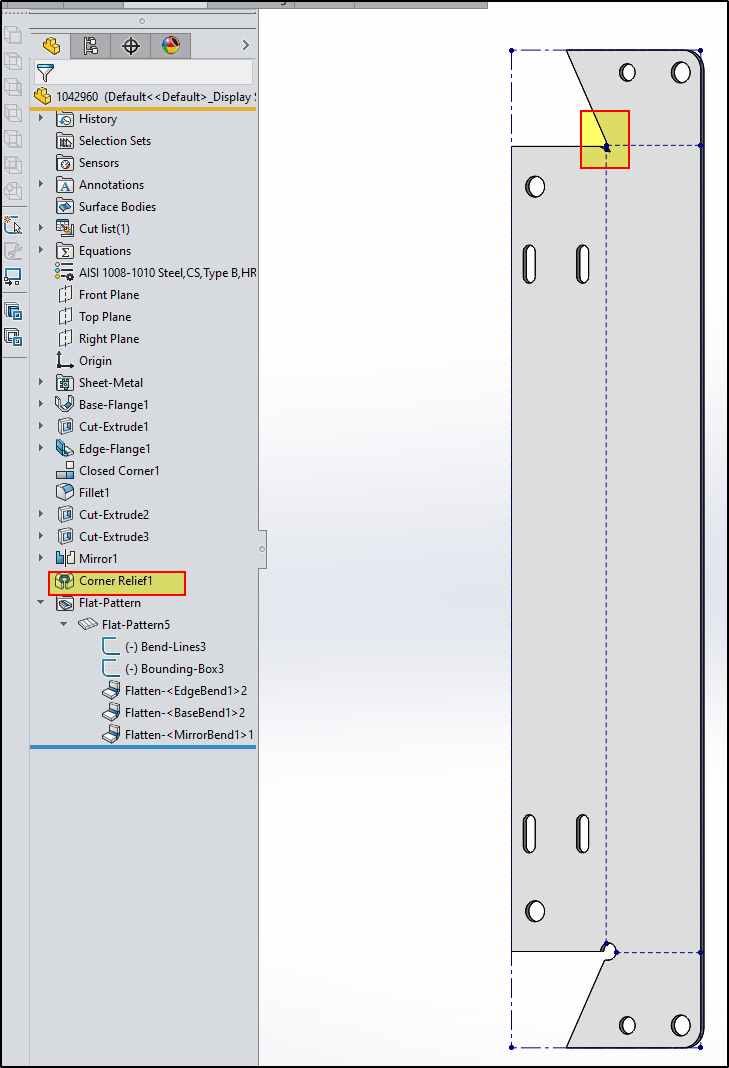
I’m making a bracket and since it’s symmetrical I’m doing the trusty mirror body at the end. Model seems fine and drawing was fine until I added a flat view and noticed one corner didn’t have the relief. After poking around I can see it’s only the flat view that doesn’t have it.
image.png
We’re on 2019SP4, and I’m wondering if it’s my first time running into a common behavior that many are used to and work around or maybe it’s been fixed on newer release? Or maybe it’s just my modeling. The work around is simple enough I thought, I’ll just move the corner relief feature below the mirror body feature and select both corners. Interesting that after moving the relief feature below the mirror but before editing to include the other corner, that corner on the mirrored side was different. So it’s not that the flat pattern missed the relief feature on the mirrored side, it changed it.
image.png
Turns out I cannot select the corner on the mirrored side, the relief feature fails.
Edit: forgot to paste this image:
This is really undermining my trust in mirror body being a solid method. Workaround that I find is the standby, decades old method of flatten, cut a circle in the corner re-bend. Someone failed to apply the KISS principle as they built the Corner Relief feature.
I’ll attach the model, maybe this doesn’t happen in newer versions. Or maybe it’s in the way I edited the flange profile or messed something else up. I don’t know.
Rather then do a symetry of the flange, why not add the edge to the existing “Edge flange” feature so that both edges create flanges and have your existing extruded cuts go through both, if necessary..? This way, you’d avoid the creation of an extra feature, and fix your bug, all while having what you desire.
Edit: Nevermind, I had misunderstood the workflow.
Are you saying you won’t mirror those types of features or won’t mirror a body that is made from any of those features?
I’m used to abnormal (albeit expected) behavior when mirroring features, but this is the first I can think of were mirror body produced glitchy output.
Just tried your suggestion, same as before. The formed model is good, the flat pattern has one corner relief different than the other.
The work around I used was similar though; unfold, cut hole at corner, refold then mirror. The model and flat are both as expected with that workflow. Something between the Corner Relief feature, mirror body and Flat-Pattern cause the problem.
I do not use the mirror feature in sheet metal, the reason is that it gives errors very often, restricts freedoms, and sheet metal features cannot be used on the mirrored part. sw2020sp03
I think they’ve made improvements in this area, but mirror body isn’t without issues. It doesn’t (or didn’t) recognize mirrored holes as holes, so callouts in drawings weren’t correct.
I suppressed the corner relief and made another to see if something in that feature instance was corrupt. Found out that the “Centered on bend lines” setting had an affect. If I check that box then everything is as expected. Also, increasing the size much bigger clears up the problem as well. Changing to obround works well with default values. I should have done this test first. I was thrown off when the formed model made good geometry, but the flattened would not.
bnemec I would submit this as bug. While unchecking “Simplify Bends” fixes it as a workaround, the problem also goes away if you change the edge flange to 90°. The Simplify Bends option should be ignoring the Corner Relief but is failing to in the mirrored bend geometry.