questions about Revision Tables

Up until now, I’ve been using line and text-based revision tables. Pretty barbaric. And not efficient.

I’d like to start using proper Revision Tables.

I have a few questions:

  1. How do I set the table growth direction to “up”? Meaning: I want the column headers on the bottom and new rows to go above it.

  2. How do I edit the table in Excel? Is this possible?

  3. How can I have the table that appears on Sheet 1 (and is edited on Sheet 1) mirror on subsequent sheets?

  4. Does the Revision Table typically go on the Sheet, or the Sheet Format? I prefer it on the Sheet Format.

Thanks for any replies.
  1. Change the table header top to table header bottom. Your rev table will be flipped vertically
    image.png

  2. I dont think it is editable in Excel

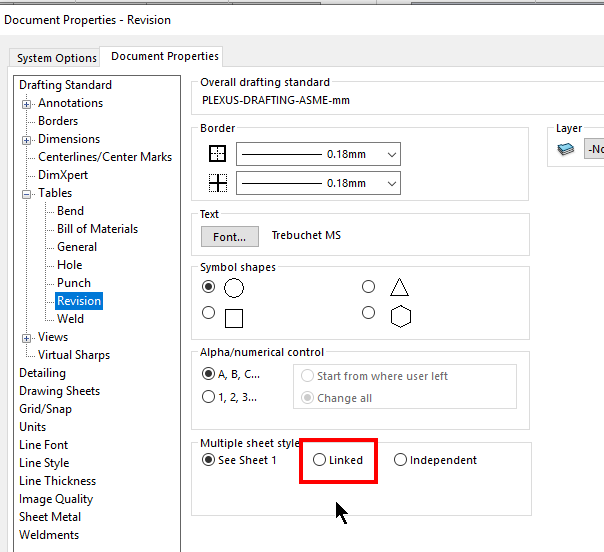
  3. Under Document Properties → Table → Revision, select Linked for Multiple Sheet Style
    image.png

  4. This depends on your use case. In your case, embedding in sheet format might be a better option if you want the rev table to show up on all sheet
    Edit: Rev table could NOT be inserted into sheet format. See comment below

This was extremely helpful.

Thank you, Zhen-Wei Tee.

One question, though.

How do I embed a Revision Table into a sheet format?

Insert, Tables, Revision Table is grayed out when editing a sheet format.

Thanks.

Sorry, i think i remember wrongly.
Rev Table could not be added onto sheetformat. It need to be added into the drawing template

Got it. Thanks.