Out of the blue (sort of) users cannot log in to our vault. I’ve checked everything I can think of but cannot find the problem. I say this was sort of out of the blue because the troubles started not long after we migrated all our users to a new domain. The servers were moved to the new domain a couple months back, and we had both domains in use, with users still on the old domain. Every now and then a user would get a failed login and they would have to add the domain name before their user name on login and the problem would be gone. Sometimes the old domain was needed, sometimes the new. Whatever. Fast forward to now and no one can log in except the master ‘admin’ login. I’ve moved this vault to new domains and new servers multiple times over the last 20 years with no issues until now.
I’m looking for anyone who has an out of the box idea about what might be going wrong, or novel ways to troubleshoot it.
One thing I keep seeing recommended is using a dedicated domain account to run the archive server service instead of the local system account. We’ve never done this, and have never had a problem until now.
The PDM servers can still communicate with the DNS server?
Our company has been siloing servers more and more and we’ve had issues off and on. Our global IT requires only essential servers and subnets to be allowed to talk to each other. So we have to specify ip address and ports that allow the communication. On occasion they have changed it and stuff stops working.
Yeah. I don’t believe its a DNS issue. Forward and reverse DNS searches are good. Ping works, telnet to port 3030 on the archive server works. Server names in the registry and databases are correct.
This seems to be some sort of deep Windows authentication issue. There is no good information about how all that is supposed to work. From what I can tell, the client sends credentials to the archive server and then the archive server is supposed to forward those to the domain controller via Kerberos (or NTLM as a fallback). Then the domain controller says yea or nay, sends that info back to the archive server and then you are logged in or not. Verifying if any of that is happening seems impossible. Logs have no useful info.
I’ve got an email in to my VAR (after waiting on hold for 30 mins without talking to a human). Hopefully they can shed some light.
Just logs an invalid user or password. Which isn’t true and apparently that is the message shown for any problem that occurs during the authentication process.
Have you checked the logs on the SQL server as well? Just throwing that out there since I had an issue with failed logins caused by user machines that hadn’t been reset since the SQL password was changed. Not sure why the IT guy saw fit to change the database user password to a live database in the middle of the day, but I digress .
They were pinging the server every 15 seconds with the wrong database info bogging down the database so much that multiple users could not log in. It was a weird one.
Perhaps a simple thought, but logins can also be blocked from the Administration tool. Administration tool → RMB on Database → Properties->Block/Permit Log-ins. We have had instances where the Block Logins button was activated without us having pressed it ourselves.
Do you have local (PDM, non domain) test account(s) other than admin? Can they log in? I’m assuming they can, but its something I would check.
Can you update users/groups from the Admin tool on the archive server?
Can a domain user log in to PDM on the archive server?
It feels like there’s been a change on the DC relating to how/if AD allows the SOLIDWORKS PDM Archive Server service to authenticate users. Ours still does but does not allow it to gather other info about the users/groups from AD. Some back story:
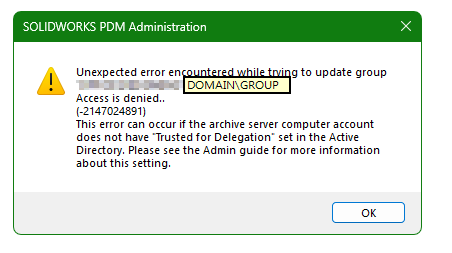
Our IT group has been doing some restructuring on the Domain Controller and I’ve lost the ability to manage AD users through admin tool anywhere other than the archive server. Here’s the error I get:
I’ve gathered that “Trusted for Delegation” is the problem but it only applies to when the archive server is trying to get more user info, authentication does not require this “delegation”. The SOLIDWORKS PDM Archive Server service is running as Local System, that used to be able to be trusted but now is not. From what I’ve gathered the fix is to have it run as a domain user, but that’s for another day.
‘Validate logins’ and AD sync from the Admin tool don’t throw any errors and the results seem correct. No red plus signs, a few lock icons (for old employees).
Log in attempts using PDM client on the archive server fail in the same way.
I’m not using any sort of AD groups. Nothing fancy. Just using Windows logins so that PDM users don’t have to remember yet another password.
I had IT create a domain account yesterday to run the archive server service. This threw a different error, but it is due to the new domain account not owning the registry keys or the archive folders. Some sources said the domain user needs to be a local admin, others said you can just set the registry and folder permissions. At that point, I reverted back to the local system account and decided to make my VAR earn their subscription fee. So far, they are stumped. Next step is waiting on IT to create a brand new domain test account and see if that user can log in. This would point to something having happened when IT moved the users from the old domain to the new.
Our VAR was no help at all. They had me try a bunch of stuff I had already tried, and then basically washed their hands of it saying it was an Active Directory issue. A couple of emails were clearly cut and pasted AI search results.
Anyway, this morning Gemini finally offered up a possible cause and it turns out it was correct.
The issue was that when authenticating a user, all groups that the user is a member of are also checked. If any fail, the login fails. What can cause a group check to fail? If the SID of the group changes due to a domain migration or other IT related stuff. So, if in your archive server config tool Tools…Default Settings…Login…Settings…Add Users and Groups includes groups such as <domain>\DomainUsers and <domain>\SomeUserName and SomeUserName is a member of DomainUsers, the user and group SIDs must both be valid.
To solve the issue, I just removed all the entries from the list, and then re-added <domain>\DomainUsers and restarted the archive server. Logins then worked. Then I added our more restrictive group <domain>\SolidworksWorkstations and removed the DomainUsers entry and everything is back to normal.
What an ordeal, and one that detailed documentation could have prevented.