Your post is why I started the thread. I cannot believe that we are the only company that has indefinite product lifecycles, with all the parts able to be used where ever and anything can be revised while there are active orders and inventory.
I think that if I’m ever forced to go job hunting for another design engineering role I’ll look for someplace that makes one off machines and every part is only made once and the CAD files never reused or maintained. Better yet, if I’m forced to go job hunting I think I’ll just go back to welding in a fab shop.
So I’m not the only customer who’s “doing it wrong”. Suppose there are others? Maybe a support group?
Unless I misunderstand here, we are a bit different in this. We frequently must release assemblies that have components that are in WIP, but they should be using the last released version, not the new version. To do this the user who checks the assembly in before sending to review state must have the latest released version. That option is not available and they must do it manually. But really only makes sense to do it for files that are in WIP so they can be checked out by the user, otherwise the changes aren’t pushed to the server anyway (half my users still don’t get this). So if the parent file is not in WIP the children should be cached by referenced version, not latest, not latest released.
Preach!
I’m curious about what your UI looks like. Did you make your own Get Reference File Dialog, a tree view with columns? There’s so much already done in the existing ref file dialog (columns and what not) but no option to get latest version in a special state but I’m not smart enough to add functionality to or change behavior of the existing dialog.
Are you covering the case where the user just double clicks an upper level assembly or drawing from the vault view or search tool? Also don’t forget the PDM File Viewer that comes up with the Where Used command from the Solidworks PDM Add-in. There’s so many ways that users can open a file; trying to cover all those cases is a big challenge, trying to force all of the users into just one or two of those methods is like herding cats.
We have a couple users that I secretly use to help me come up with test cases just by watching the many ways they can drive a train right up off the rails. If something can be broken they will, and silently so you don’t see it until months later.
I should clarify that this means we cannot use a Version of a file that has not been released. We are still able to modify it while other groups are still using the last released version.
I am using the built in UI for the BatchGet functionality. This is the same window that pops up when you select Get on any assembly with the tree, reference version, local version, etc. The only difference is that I specify which version of each component in the tree to get based on the History of state changes.
Use the Branch/Merge function. Maybe some usability issues to deal with as its newer functionality. Also the UI is a bit involved,
Create copies then have a coordinator/power user replace the released versions and re-release a new revision. We don’t do this on ECOs but longer projects we often copy and prefix files with a project number. Then we checkout and replace the released version when it does get an ECO to release. This kind of what branch and merge does.
If I understand correctly, what you are after is listed in SPR 718692 – Add option for Check out and Get of assembly to default to as built for references versions
Thank you for clarification, I was misinterpreting. What you say is identical to what we do.
That sounds very nice. I used the BatchGet in my pdf/dxf add-in to make sure it uses the referenced versions of all the files, so in hopes the output would match what was last checked in. I did not explore recursing though and setting the version on each file based on states of the parent and child refs.
Where do the users launch this get functionality from? Are you adding it to file menu? Any chance of being able to do this from Solidworks while the file is open or are you handling if a file that needs a different version is “Open in another process”, usually Solidworks.
When getting the data to determine which version of each file to use, are you using PDM APIs or querying SQL directly? I’ve found that going straight to the DB is much faster. Although that opens it’s own can of worms when updating to new version of PDM, just more testing I guess.
That would be a step in the right direction, yes. We are on that SPR and a couple similar ones as well.
The ideal would be:
get root parent file by selected version (usually this would be latest version)
get children
----a. if parent is in a state flagged as editable (WIP state would have this flag set in the Workflow Editor of PDM Admin Tool)
--------i. if child file in state flagged as released (“Released” state would have this flag set in the Workflow Editor of PDM Admin Tool) Then get latest version
--------ii. else get child file by referenced version
----b. else (parent file not editable) get child file by referenced version
----c. recurse on the child file back to step 2 as a parent *!This must be done AFTER the correct version of the child selected so that we get the correct versions of it’s children.
The open-in-another-application error is checked for by the built in PDM dialog. It follows your PDM Admin settings for what errors/warnings to check for and potentially block behavior until the file is closed.
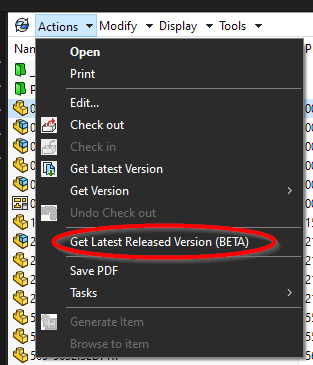
I’ve added the function to the right-click menu and the Actions menu in the tool bar when a file(s) is(are) selected.
image.png
This is with PDM APIs only. No queries directly to the database.
Custom Progress Window
image.png
PDM Built-in Dialog
This is essentially how it is being done.
It checks the file’s history for changes in state to determine when the last released state change was made. This logic needs a bit of work to account for admins going in and updating already released items, but the framework is there. Lots of testing will be needed to ensure things work before potentially deploying this.
You bring up a good point with ii.c. where a sub-assembly’s contents may enough between versions to where it may be necessary to check into things further. I can’t say whether the out of box behavior will work or not for this… we shall see!