ONE SOLIDWORKS LICENSE TWO COMPUTERS

QUICK QUESTION

I have a laptop at home which is perfectly fit for SolidWorks 2022 which I run at work on the company license. Can I install a copy on my laptop and use it at home with the one license so long as I am only logged into one station at a time ?

what kind of SW license do you have?

And what of the many Solidworks are you using? SW makers, SW connected, classic SW with a node locked or network license??

The old way need to release license from one computer to use on another.

If you forgot, you can’t use SW on the other.

You can do it about 1000 times before it get locked and need to contact VAL to reset it.

I use RDP to access my Solidworks computer from a 2nd location. It works well and I don’t have to worry about licenses, or PDM file status.

@SPerman

Same here I can remote ino the shops 6 pc’s and run any of the softwares from home.

we also have VPN to ping license too and we can Barrow license, so no remoting\vpn.

We have 8000 licenses, though EDU and 5 research that are concidered commercal because they don’t watermark files so we can work with industry.

8000 licences? holy bejeezus how is that possible? Why do you require so many..? Do you have 8000 people who use SolidWorks to design? We have 2 licences dedicated to people outside the engineering department and we find that to be a burden in the sense that we pay for licences that are only used as viewers.

ASU (Arizona State University) used throughout Fulton Schools of Engineering courses, installed in all computer labs. When I started in 2008 there were only 500, mainly for the CAD course which was about 250\semester. At the time the students had to VPN or connect via wireless on campus so at time we ranout during peak course work.

Now with the 8000 network we also get 8000 SDK (Student Design Kits) which allows student to download a standalone were no network connection is required. have not had problems since. it would kill you to know how little they charge for all that, pennies on the dollar. less than $10k I think but don’t quote me because that’s above my pay grade here at ASU, just a lonely Student machine shop manage supporting mechanical capstone
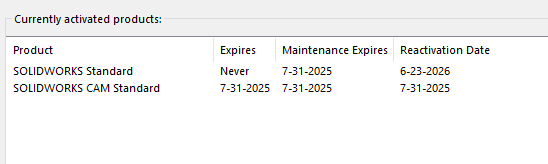
how can I find out that information?

Why not use Remote Connection option to connect to your company computer ?

It’s a pain to setup 3D mouse on remote.

I use USB Network Gate to operate 3D Connexion controller. No problems.

RDP can be setup to use the 3d mouse remotely without any additional software.

TeamView into work computer for Inventor.

Then from work computer Citrix to remote Solidwork.

Could you elaborate a bit. In the past it was not possible and I had to use HP remote.

Are you talking about MS RDP? within two windows PC or a RDP server?

Microsoft RDP.

I originally used Flexi-hub, but it kept breaking on me so I found instructions for how to do it natively in Windows.

I have tried that. internet is too slow to work smoothly. I may try again; I have upgraded my home service.