Over the years it has been noticed that the NX and Solid Edge are morphing together. It appears that “new” NX sketch solver and functions appear to come from Solid Edge. I was wondering if anyone has had some time to play around with the “new” sketcher in NX and would be willing to share their experiences- whether it’s confusion, joy, frustration or other.
Hello Ryan.. with my limited use past and present… personally, I think the new sketcher is better, imho. But, I can see how the past behavoir and someone’s muscle memory could annoy users.
I feel that the use of Relations vs. constraints is where most users will have issues. I still don’t fully understand how “relations” work. If this is something that is something that is continually calculated while you are in the sketcher or if the relations are initially calculated and then “stored” like constraints. NX has been using ST engines to help with 2D geometry for some time now. So it would only make sense to push that technology into the sketcher. But to do so, would require a new sketcher solver. Which is what we see now. Does anyone understand how these relations are truly working?
My observation is that the ‘New & Improved’ NX Sketcher is a different way of approaching the problem - however IMO it fails to make any improvements in overall workflow speed/efficiency. So - take your choice, Coke or Pepsi…
Prove me wrong. 
I feel that the new sketcher environment is actually harder to use. Trying to make changes to a sketch after it’s done seems to be twice as hard to figure out what relations/constraints are and how to change them. I’ve disabled the new sketch environment and use the legacy one as I’m faster with it.
I tried the new sketcher and see the value, but I’m still mostly using NX1872 because I prefer to use the Direct Sketch environment, which got dumped before the new sketcher got introduced. If they would bring Direct Sketch back, I’d upgrade to latest version immediately.
You can toggle OFF the new sketch environment and continue to use the legacy sketching on the newer versions if you need or want to. Go to FILES>UTILITIES>EARLY ACCESS FEATURES and at the very bottom you can turn off the new solver & UI for sketching . I do see that 2306 seems to allow you to change from the new UI back to the legacy sketcher to add new features. It’s still making you use the new sketcher to edit any of them created in the new sketcher unlike in previous versions where if it was started with the new sketcher UI then you had to use that for doing anything with the part.
image.png
That’s for the solver and UI, but the “environment” is a different thing. The Direct Sketch environment (discontinued as of NX1903, I think) allowed continued access to Modeling and Assembly commands that are not accessible when going into the dedicated Sketch Task environment… which has now become the only sketching environment, irrespective of solver.
I don’t know why Direct Sketch got axed but it’s the workflow which I vastly prefer, and one of the main reasons I generally prefer NX to SW (the others being: interpart functionality, drafting flexbiility, and speed/stability). For me, the various enhancements that have come along since the discontinuement of Direct Sketch haven’t been meaningful enough to be worth losing Direct Sketch. So yes, I’m still working with NX from 2019.
Thanks for the replies. I think but not sure..that the Direct Sketch function had to deal with the ability to import large amounts of 2D curves and then assign driving dimensions. Goes way back to when NX was trying to convert all the 2D users to 3D and a few large customers that were trying to create large product machine designs- think assembly line type equipment. I have a feeling this went away because you can do this with Synchronous Tech sketches..not totally sure about that. Or it could have gone away due to the “harmonization” of NX and Solid Edge sketcher environments.
Finally took the time to update to NX2406. There are still a couple of little things I would like to get back from the older days, but once you get used to the newer workflows, the update makes a lot of sense. The “new” sketcher needed some time to get used to, but with the addition of the “region” function and the new navigator, I really like using it.
Not being able to do component or feature picks from the screen while in the Sketch environment is still irritating, but now being able to do live upstream modeling changes from the tree while in Sketch is very cool.
Jim Elias I’m curious if you find that the new solver is any better at handling edge cases. To quote Hoffmann and Joan-Arinyo from their 2005 paper A Brief on Constraint Solving
The general properties a constraint solver should have include the following:
- Soundness: The solver always halts and, if a solution is found, it satisfies all stipulated constraints.
- Completeness: The solver solves all solvable problems and announces the unsolvability of all unsolvable
problems.- Competence> : Since the known, efficient methods are not complete, property that is more attractive in
practice is that the solver solves all solvable problems in a subdomain of interest and, for unsolvable problems
in the subdomain, announces unsolvability. Note that a characterization of the subdomain may be difficult.- Persistence: With the same set of (valuated) constraints the solver always finds the same solution.
- Stability> : Under small changes of assignments to the geometric constraint tags, the solution found is nearby.
- Efficiency: Efficiency measures the computational cost, that is, whether solutions are found rapidly.
- Robustness: A solver is robust if the solutions are not adversely affected by the finite precision of floating-
point computations.- Intensionality> : The solver finds solutions that the user is interested in.
- Geometric sense: A solver has geometric sense whenever the solutions it finds can be expressed as a
sequence of geometric construction steps.- Dimension independence: The solver can be used for problems embedded in the space E = Rn
independently of n.- Generality: The solver can deal with the general geometric constraint solving problem including symbolic
constraints and external variables.For 2D solvers, there are good > compromises > that achieve these solver characteristics to a reasonable degree. However,
it is difficult to obtain solvers that exhibit persistence and stability fully.In general, solver > competence is the antithesis of efficiency > since constraint solving is of doubly exponential complexity.
Exponential scaling is a huge bother, but in the past 20 years Moore’s law has made what was once a hard problem (giving us users a solver that is competent across all medium sized sketches) a lot easier. I’m curious if in your experience the new NX solver is any better at delivering on that front.
Hi ryan-feeley
What do you mean by “edge cases”, and what do you feel needed to be “better” as regards the old solver?
As I remarked earlier, I ended up skipping over the releases where the new sketcher was reportedly getting its kinks worked out (i.e. I went directly from 1872 to 2406). So I can’t really say much about those. I’m on 2412 now and still happy with it. If you can give me an example of an “edge case” or such to try, I’ll give it a shot and report. (I have SWX as well, so I can also compare the two.)
Cheers
Jim
Hi Jim Elias
I was actually thinking about the sort of stuff that you’d commented on in my other post about the solidworks sketcher. You’d said
I don’t have a lot of experience with the old NX sketcher, and none with the new one. I’m curious if in your experience either of them has requires less of this sort of rinse-and-repeat hassle. In particular when working with splines.
Thanks for taking the time, and have a good one!
Hi ryan-feeley
One thing to note is that SWX is completely concentrated on the explicit sketch environment for referential wire geometry. There are some non-sketch “curve” objects which can be created, but these are either inflexible derivations (projected/composite) or “dumb” thru-points.
With NX, there are many types of non-sketch Curve objects which can be referentially created. These are primarily defined via constraints to other pre-existing geometry – you don’t “draw” them. Especially for work with splines (and conics/equation curves/etc), it’s necessary to understand when sketch objects or non-sketch Curve objects (or combinations thereof) are best called for. My guess is that this system as a whole is more robust due to the non-sketch Curve objects not having as much additional (and superfluous) solver baggage to carry. For example, a “Bridge Curve” object gets defined via the specified continuities to the two pre-existing objects it’s bridging, and that’s it – there’s no attempt on the part of the software to incorporate it into some larger-destiny (but unnecessary) solve. (Some of this general notion likely transfers over to what I remarked in your SWX thread, about splitting up the pieces into separate sketches.)
In any case, the advantages I have seen regarding the “new” NX sketcher have to do with general UI ease-of-use, not with better solver performance.
Cheers
Jim
I would assume that the actual “solver” is still the D-Cubed 2D & 3D DCM…
yes, that’s certain. But I never took that much interest in the underlying tech, all the CAD dimension-and-constraint sketchers seem to work about the same.
As I’ve remarked elsewhere, I think the main advantage NX offers over e.g. SWX regarding the sketch environment, is the ability to edit sketches without rollback. You have to keep the “time machine” aspect of this in your head, since you will see the (non-selectable) Ghost of Geometry Yet To Come on the screen… but once you’re used to that, it is very helpful to have all the downstream stuff still visible for reference.
Jim Elias We are a Solid Edge user, and the same happens if the Sketches are created in the Synchronous mode or in the Assembly environment (no history).
SE does offer limited non-history editing of sketches in Ordered where you can modify dimension values or move elements in under constrained, but you cannot add/remove elements or relationships.
SWX is similar. It will allow you to edit sketch dimensions without rollback, but you can’t actually go in and e.g. alter entities without rollback.
NX will allow full editing of the sketch while continuing to see the model at the current point in the tree. Any geometry (edges etc) that “don’t exist yet” are accordingly not selectable, so it can be confusing if you’re not used to it.
For me, this capability often makes it a lot easier to visualize/predict the downstream effects of what I’m editing.
I noticed that Onshape has a toggle when editing a feature to show the last rebuilt geometry or not. Neat option.
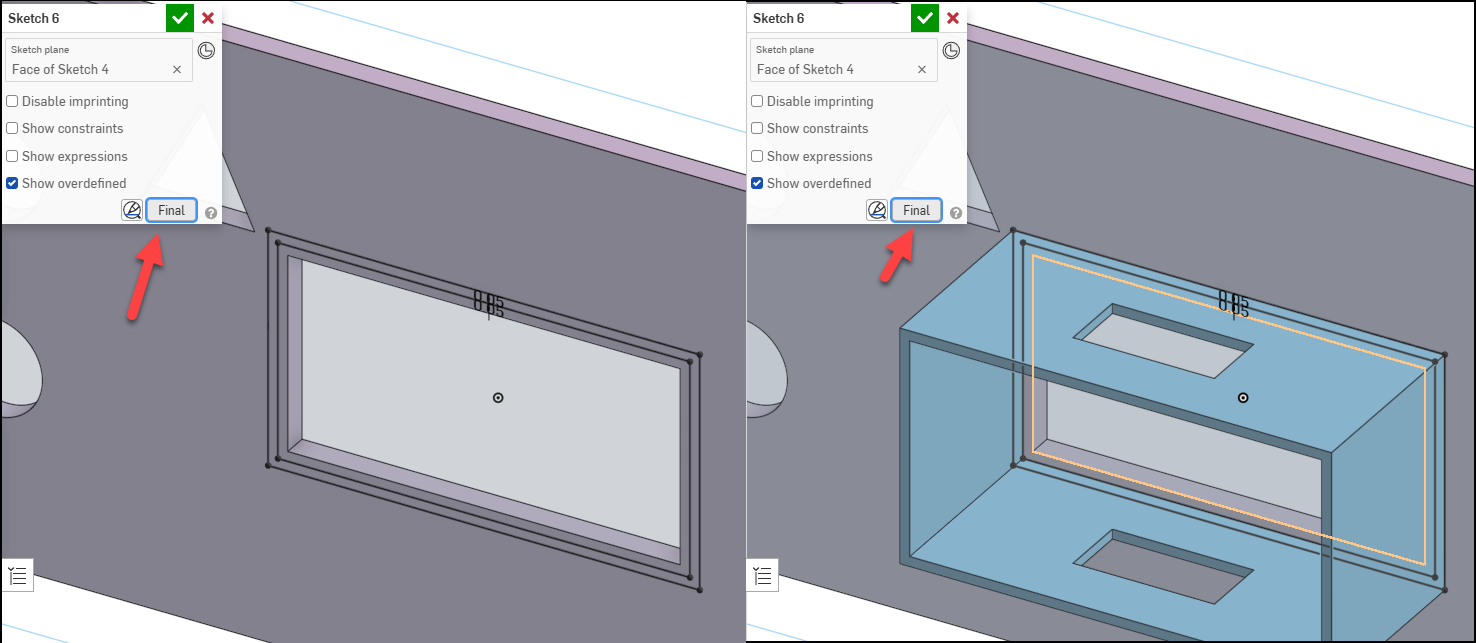
NX has two rebuild-actuation options while working on a sketch:
- Continuous will rebuild the model with every single change. Sometimes useful but usually tiresome.
- Manually-actuated update whenever desired (but without exiting the sketch, i.e. you’re still kinda “on the fly”). This is likely to be pretty close in practice to the Onshape toggle – though in NX, the resulting solid(s) are always present and can only be translucified, not “toggled off”