I have a multi-body part that is my model of a vendor part. I specifcially designed it multi-body so that I could assign custom appearances to the appropriate bodies to emulate the finished look of the part.
I can add appearances to the various bodies but they disappear on a rebuild. Thoughts?
Thanks. The part has two appearances. I worked around it by changing the default appearance of the whole part to the main appearance and then adding the 2nd appearance to the two bodies that needed it. I had been assigning individual appearances. The assigned ones to the main bodies still disappear, but, since the overall appearance is correct, it doesn’t matter.
I have another multi-body part with custom appearances that seems to be working fine after rebuild. shrug
jmongi What version of SolidWorks? We do this a bit in 2019…bit of weirdness here and there but I don’t recall it just outright removing the appearances on rebuild.
The problems are probably due to bodies changing names - bodies being split, joining, the number of bodies changing, moving from solid to surface, etc. If you try naming bodies manually, you probably run into the same problems. It’s a really complex thing to try to keep track of internally or even to come up with rock solid rules that can be applied consistently to always give expected results.
It does change when body names change, etc. But, that is not what is happening.
No changes, no adjustments. Just manually click rebuild and voila! Magical disappearing appearances.
All I can think of is that I’ve run into some glitchy data saving involving materials vs appearances where something is stuck and I haven’t found the right command to redo to “rewrite” whatever underlying data is stuck. I’m just glad the workaround worked!
It is also affected by rollback state and configurations. And then there are some features (like Ribs) where the selection is affected by the body count when the feature is rebuilt.
That’s how I first noticed it. Wrapping up and moved the freeze bar down and poof no appearances.
I just had a different vendor created part that I am modifying to have a configuration for every port location on a regulator. When I hit the fourth configuration, some of the appearances disappeared.
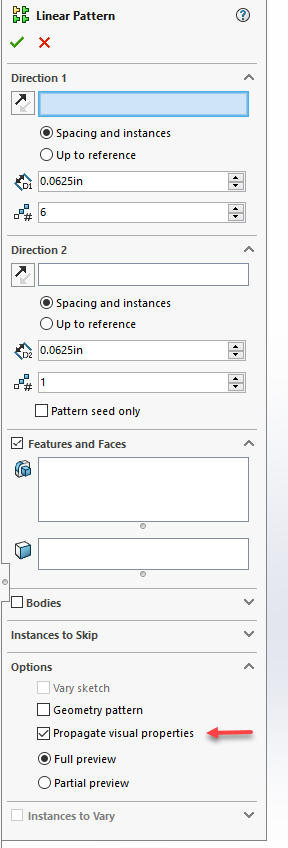
There is an option in the pattern features to “Propagate visual properties”. That will override any individual body appearances you set and set them to match the seed body.
jmongi Paul asked, and I would second this, do you have VOR turned on or off? There is also a difference between using “ctrl+B” and “ctrl+Q”… which one are you using?
Also where are you applying the appearance? (i.e. in the main Part file, the split bodies, in the assembly)?