Material Mass Macro

Would anyone happen to have a macro that can traverse through the top level assembly, and get the mass of specific material types?

I would like to look for specifically .. these materials types, ignore any hidden or suppressed.

“Aluminum - 6061”
“Aluminum Hex - 6061”
“Aluminum Angle - 6061”
“Aluminum - Tooling Plate”
“Aluminum Hex - Extrusion”

and have a popup that will display the total weight in KG

and if possible in that same popup, a separate line item that would display the weight in KG for “Welded - Aluminum”

Any help would be very greatly appreciated !!

Thanks,
Mark

The mass of specific material types are set in the material data base.
If I am wondering if I have the material set right for a part in the assembly I tend to go to the assembly visualization tab to see if any parts look off. Then check the material.

[Pedantic]
The density is set in the material database. The mass is a factor of the density and volume.
[/Pedantic]

1 Like

Not really sure what you guys are talking about?

I have all the materials already set for each part. There are many parts in many assemblies all with different materials, and they are all in 1 main assembly.

I am trying to see if there is a macro available that could traverse through all of the files in the top level assembly, give the the total mass of certain materials only, not the entire mass of the whole assembly.

So a mass of just the Aluminum details … or just all the brass details … etc.

Does that make sense?

Thanks,
Mark

Hi Bradford,
Have you considered using a parts only BOM and export it to excel to do the sum there? Or is this not something you want to do?
Excel has the advantage over SolidWorks BOM’s it can update values using formula’s.
Eddy

1 Like

Just trying to avoid extra steps that could result in operator error.

A popup with the Mass of those particular materials would be ideal.

Saves the extra steps, and prevents a designer from math errors.

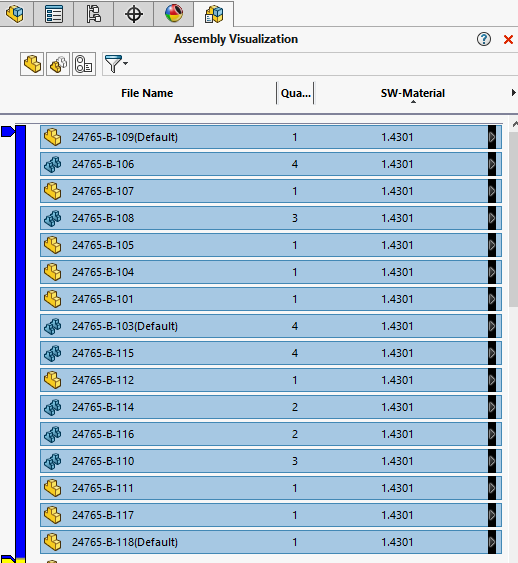
If I would do this manualy then I would also use ‘Assembly Visualization’ and doing the following steps;

  1. add the material column, if missing.
  2. sort this column and select the part with equal material.
  3. Go back to the FeatureManager Design Tree
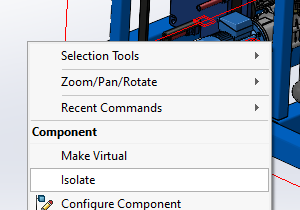
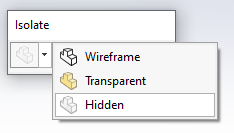
  4. Go to Isolate mode. S key or right click empty space.

    Make sure hide is selected.
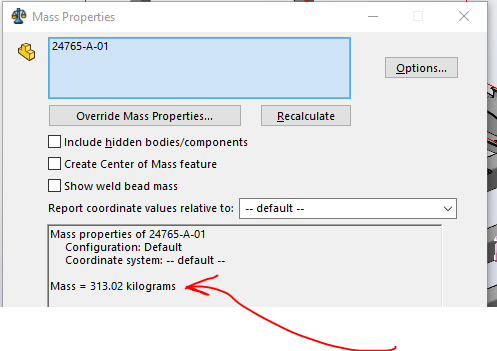
  5. Open Mass Properties and make sure ‘Include hidden bodies/components’ is deselect.
2 Likes

I was thinking of using the display states for the materials. Since it seems that we are looking for the total weight of specific materials in the assembly. The Assembly Visualization is a great tool when things like this are needed to be done.

I did try the Assembly visualization (works great for a manual work around !) Thank you!

This is what I am trying to do by macro.

  1. Accurately sums the mass of specific materials,
  2. Skips suppressed and hidden components,
  3. Displays a pop-up with the result.

This is what I have so far … although I am getting an error.

I am receiving and error. “Object doesn’t support this property or method”

Const swComponentHidden = 0
Const swThisConfiguration = 1

Dim swApp As SldWorks.SldWorks
Dim swModel As SldWorks.ModelDoc2
Dim swAssy As SldWorks.AssemblyDoc
Dim totalMass As Double
Dim targetMaterials As Variant

Sub main()
On Error GoTo ErrorHandler

Set swApp = Application.SldWorks
Set swModel = swApp.ActiveDoc

If swModel Is Nothing Then
    MsgBox "No active document. Please open an assembly file.", vbExclamation, "Missing File"
    Exit Sub
End If

If swModel.GetType <> swDocASSEMBLY Then
    MsgBox "This macro only works on assembly documents.", vbExclamation, "Incorrect File Type"
    Exit Sub
End If

Set swAssy = swModel

' Define your specific material list here
targetMaterials = Array( _
    "Aluminum - 6061", _
    "Aluminum Hex - 6061", _
    "Aluminum Angle - 6061", _
    "Aluminum - Tooling Plate", _
    "Aluminum Hex - Extrusion" _
)

totalMass = 0
Call AccumulateMass(swAssy.GetRootComponent)

MsgBox "✅ Total mass of specified materials: " & Format(totalMass, "0.000") & " kg", vbInformation, "Mass Summary"
Exit Sub

ErrorHandler:
MsgBox "Error encountered: " & Err.Description, vbCritical, “Macro Error”
End Sub

Sub AccumulateMass(comp As SldWorks.Component2)
Dim visibility As Long
Dim model As SldWorks.ModelDoc2
Dim matName As String
Dim massProps As SldWorks.MassProperty
Dim children As Variant
Dim i As Integer, k As Integer

If comp.IsSuppressed Then Exit Sub

visibility = comp.GetVisibility(swThisConfiguration)
If visibility = swComponentHidden Then Exit Sub

Set model = comp.GetModelDoc2
If Not model Is Nothing Then
    matName = model.GetMaterialPropertyName2("", "")
    For k = LBound(targetMaterials) To UBound(targetMaterials)
        If StrComp(matName, targetMaterials(k), vbTextCompare) = 0 Then
            Set massProps = model.Extension.CreateMassProperty
            totalMass = totalMass + massProps.Mass
            Exit For
        End If
    Next k
End If

children = comp.GetChildren
If Not IsEmpty(children) Then
    For i = 0 To UBound(children)
        Call AccumulateMass(children(i))
    Next i
End If

End Sub
1 Like

Do you need to account for different materials applied to different configurations of the same part?

Here is a full working macro for this project in case anyone would like to use it or modify it.

Option Explicit

Dim materialList As Variant
Dim totalMass As Double
Dim massByMaterial As Object

Sub Main()
    Dim swApp As SldWorks.SldWorks
    Dim swModel As ModelDoc2
    Dim swConf As Configuration
    Dim rootComp As Component2

    Set swApp = Application.SldWorks
    Set swModel = swApp.ActiveDoc

    If swModel Is Nothing Or swModel.GetType <> swDocASSEMBLY Then
        MsgBox "Please open an assembly document.", vbExclamation
        Exit Sub
    End If

    Set swConf = swModel.GetActiveConfiguration
    Set rootComp = swConf.GetRootComponent3(True)

    If rootComp Is Nothing Then
        MsgBox "Root component not found. Ensure the assembly is fully loaded.", vbCritical
        Exit Sub
    End If

    materialList = Array( _
        "pfgmaterials|aluminum - 6061", _
        "pfgmaterials|aluminum hex - 6061", _
        "pfgmaterials|aluminum angle - 6061", _
        "pfgmaterials|aluminum - tooling plate", _
        "pfgmaterials|aluminum - extrusion", _
        "pfgmaterials|welded aluminum base" _
    )

    totalMass = 0
    Set massByMaterial = CreateObject("Scripting.Dictionary")

    TraverseComponents rootComp
    ShowMassSummary
End Sub

Sub TraverseComponents(startComp As Component2)
    Dim queue As Collection
    Dim current As Component2
    Dim children As Variant
    Dim child As Component2
    Dim i As Long

    Set queue = New Collection
    queue.Add startComp

    Do While queue.Count > 0
        Set current = queue(1)
        queue.Remove 1

        If Not current.IsSuppressed And current.Visible = swComponentVisible Then
            ProcessComponent current

            children = current.GetChildren
            If IsArray(children) Then
                For i = LBound(children) To UBound(children)
                    Set child = children(i)
                    If Not child Is Nothing Then queue.Add child
                Next i
            End If
        End If
    Loop
End Sub

Sub ProcessComponent(comp As Component2)
    Dim model As ModelDoc2
    Dim matName As String
    Dim massProps As Variant
    Dim massKg As Double

    Set model = comp.GetModelDoc2
    If model Is Nothing Then Exit Sub

    matName = Trim(LCase(model.MaterialIdName))
    If Not IsInMaterialList(matName) Then Exit Sub

    massProps = model.GetMassProperties
    If IsEmpty(massProps) Then Exit Sub

    massKg = massProps(5)
    If massKg <= 0 Then Exit Sub

    If massByMaterial.Exists(matName) Then
        massByMaterial(matName) = massByMaterial(matName) + massKg
    Else
        massByMaterial.Add matName, massKg
    End If

    If matName <> "pfgmaterials|welded aluminum base" Then
        totalMass = totalMass + massKg
    End If
End Sub

Function IsInMaterialList(matKey As String) As Boolean
    Dim i As Long
    For i = LBound(materialList) To UBound(materialList)
        If matKey = materialList(i) Then
            IsInMaterialList = True
            Exit Function
        End If
    Next i
    IsInMaterialList = False
End Function

Sub ShowMassSummary()
    Dim key As Variant
    Dim summary As String
    Dim weldKey As String
    Dim weldMass As Double

    If massByMaterial Is Nothing Then
        MsgBox "Mass dictionary not initialized.", vbCritical
        Exit Sub
    End If

    weldKey = "pfgmaterials|welded aluminum base"
    summary = "Mass Summary by Material (kg):" & vbCrLf & vbCrLf

    For Each key In massByMaterial.Keys
        If key <> weldKey Then
            summary = summary & key & ": " & Format(massByMaterial(key), "0.00") & " kg" & vbCrLf
        End If
    Next key

    summary = summary & vbCrLf & "-----------------------------" & vbCrLf
    summary = summary & "Total Combined Mass (excluding Welded Base): " & Format(totalMass, "0.00") & " kg" & vbCrLf

    If massByMaterial.Exists(weldKey) Then
        weldMass = massByMaterial(weldKey)
        summary = summary & "Welded Aluminum Base: " & Format(weldMass, "0.00") & " kg"
    End If

    MsgBox summary, vbInformation, "Material Mass Summary"
End Sub

Thanks for all of your suggestions.
I really appreciate it.
Mark

4 Likes

Two things:

First: I edited your post to correct the formatting of the code. In the future, when posting code, use three backticks on a line before the code and the line after the code so it will auto format and syntax highlight it. Also helpful to put the language at the end of the first three backticks to let the highlighter know. So, like this:

```vba
<your code here>
```

Second: You are using an obsolete function (ModelDoc::GetMassProperties). It has been marked as obsolete as far back as SW2010. While it may continue to work in future SW versions, it also may not.

3 Likes

Thanks for doing that and for the Suggestion Jim!

2 Likes