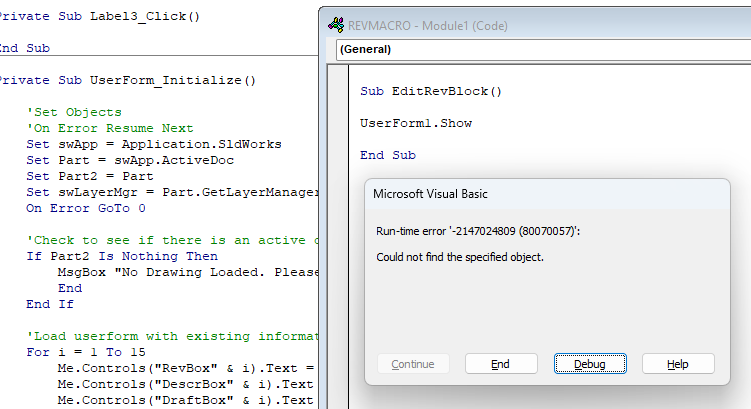
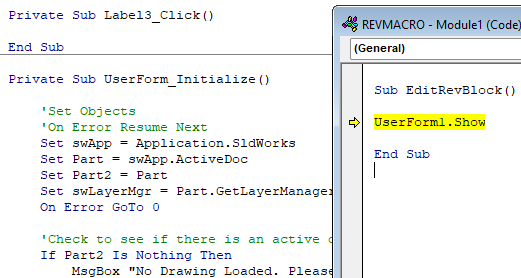
My best guess would be the failure to initialize and dispose of the form object each time it is run. Without the code to look at, it’s all speculation. Any chance you can post more of it?
Dim swApp As Object
Dim Part As SldWorks.ModelDoc2
Dim Part2 As SldWorks.DrawingDoc
Dim swLayerMgr As SldWorks.LayerMgr
Dim swLayer As SldWorks.Layer

Private Sub Label3_Click()

End Sub

Private Sub UserForm_Initialize()

'Set Objects
On Error Resume Next
Set swApp = Application.SldWorks
Set Part = swApp.ActiveDoc
Set Part2 = Part
Set swLayerMgr = Part.GetLayerManager
On Error GoTo 0

'Check to see if there is an active drawing open
If Part2 Is Nothing Then
    MsgBox "No Drawing Loaded. Please Load a Solidworks Drawing.", vbExclamation, "Model Properties"
    End
End If

'Load userform with existing information
For i = 1 To 15
    Me.Controls("RevBox" & i).Text = Part.CustomInfo2("", "rev_ln" & i)        'Loads form with existing revision info from custom properties
    Me.Controls("DescrBox" & i).Text = Part.CustomInfo2("", "desc_ln" & i)     'Loads form with existing description info from custom properties
    Me.Controls("DraftBox" & i).Text = Part.CustomInfo2("", "by_ln" & i)       'Loads form with existing drafter info from custom properties
    Me.Controls("DateBox" & i).Text = Part.CustomInfo2("", "date_ln" & i)      'Loads form with existing date info from custom properties
    Me.Controls("ECOBox" & i).Text = Part.CustomInfo2("", "ecn_ln" & i)        'Loads form with existing eco info from custom properties
   'Me.Controls("EngBox" & i).Text = Part.CustomInfo2("", "ckby_ln" & i)       'Loads form with existing engineer info from custom properties
Next

'Load checkboxes
For i = 8 To 15
    Set swLayer = swLayerMgr.GetLayer("REVLINE" & i)
    If swLayer.Visible = True Then Me.Controls("RevCheck" & i) = True
Next

'For i = 1 To 5
    'Set swLayer = swLayerMgr.GetLayer("REVLINE" & i)
    'If swLayer.Visible = True Then Me.Controls("ECOCheck" & i) = True
'Next

'For i = 6 To 15
    'Set swLayer = swLayerMgr.GetLayer("REVLINE" & i & "B")
    'If swLayer.Visible = True Then Me.Controls("ECOCheck" & i) = True
'Next
' OVER
'Load ComboBox info
For i = 1 To 15
    With Me.Controls("DescrBox" & i)
        .AddItem "RELEASE TO PRODUCTION"
        .AddItem "INITIAL RELEASE"
        .AddItem "REDRAWN NO CHANGE"
       .AddItem "RELEASE TO PILOT"
      .AddItem "SEE ECO"
    End With

    With Me.Controls("DraftBox" & i)
'        .AddItem "LAN"
'       .AddItem "BV"
'       .AddItem "CB"
'       .AddItem "DH"
    End With

    'Me.Controls("DateBox" & i).AddItem Left(Date, 5) & Right(Date, 2)
    Me.Controls("DateBox" & i).AddItem Format(Date, " mm/d/yy")
    Me.Controls("DateBox" & i).AddItem ""

   ' With Me.Controls("EngBox" & i)
       ' .AddItem "TS"
        ''Add more engineers here
       ' .AddItem "JK"
    'End With
Next


End Sub

Private Sub CommandButton1_Click()


'Update SW information with input from userform
For i = 1 To 15
    Part.CustomInfo2("", "rev_ln" & i) = Me.Controls("RevBox" & i).Text        'Updates revision info into custom properties
    Part.CustomInfo2("", "desc_ln" & i) = Me.Controls("DescrBox" & i).Text     'Updates description info into custom properties
    Part.CustomInfo2("", "by_ln" & i) = Me.Controls("DraftBox" & i).Text       'Updates drafter info into custom properties
    Part.CustomInfo2("", "date_ln" & i) = Me.Controls("DateBox" & i).Text      'Updates date info into custom properties
    Part.CustomInfo2("", "ecn_ln" & i) = Me.Controls("ECOBox" & i).Text        'Updates eco info into custom properties
    'Part.CustomInfo2("", "ckby_ln" & i) = Me.Controls("EngBox" & i).Text       'Updates engineer info into custom properties
Next


'    'Add/Remove extra blocks if needed (hide/unhide layer)
'    For i = 8 To 20
'        Set swLayer = swLayerMgr.GetLayer(“REVLINE” & i)
'        If Me.Controls(“RevCheck” & i) = True Then
'            swLayer.Visible = True
'        Else
'            swLayer.Visible = False
'        End If
'    Next
'
'    For i = 1 To 5
'        Set swLayer = swLayerMgr.GetLayer(“REVLINE” & i)
'        If Me.Controls(“ECOCheck” & i) = True Then
'            swLayer.Visible = True
'        Else
'            swLayer.Visible = False
'        End If
'    Next
'
'    For i = 6 To 19
'        Set swLayer = swLayerMgr.GetLayer(“REVLINE” & i & “B”)
'        If Me.Controls(“ECOCheck” & i) = True Then
'            swLayer.Visible = True
'        Else
'            swLayer.Visible = False
'        End If
'    Next


Unload Me


End Sub

Private Sub ToggleRevLayers(i As Integer)
'Add/Remove extra Rev lines if needed (hide/unhide layer)
Set swLayer = swLayerMgr.GetLayer(“REVLINE” & i)
If Me.Controls(“RevCheck” & i) = True Then
swLayer.Visible = True
Else
swLayer.Visible = False
End If

End Sub

'Private Sub ToggleECOLayers(i As Integer)
'Add/Remove extra ECO lines if needed (hide/unhide layer)
'If i > 5 Then Set swLayer = swLayerMgr.GetLayer(“REVLINE” & i & “B”) Else Set swLayer = swLayerMgr.GetLayer(“REVLINE” & i)
'If Me.Controls(“ECOCheck” & i) = True Then
'swLayer.Visible = True
'Else
'swLayer.Visible = False
'End If

'End Sub

Private Sub CommandButton2_Click()
End
End Sub

Private Sub RevCheck8_Click()
ToggleRevLayers 8
End Sub

Private Sub RevCheck9_Click()
ToggleRevLayers 9
End Sub

Private Sub RevCheck10_Click()
ToggleRevLayers 10
End Sub

Private Sub RevCheck11_Click()
ToggleRevLayers 11
End Sub

Private Sub RevCheck12_Click()
ToggleRevLayers 12
End Sub

Private Sub RevCheck13_Click()
ToggleRevLayers 13
End Sub

Private Sub RevCheck14_Click()
ToggleRevLayers 14
End Sub

Private Sub RevCheck15_Click()
ToggleRevLayers 15
End Sub

'Private Sub RevCheck16_Click()
'ToggleRevLayers 16
'End Sub

'Private Sub RevCheck17_Click()
'ToggleRevLayers 17
'End Sub

'Private Sub RevCheck18_Click()
'ToggleRevLayers 18
'End Sub

'Private Sub RevCheck19_Click()
'ToggleRevLayers 19
'End Sub

'Private Sub RevCheck20_Click()
'ToggleRevLayers 20
'End Sub

Private Sub ECOCheck1_Click()
ToggleECOLayers 1
End Sub

Private Sub ECOCheck2_Click()
ToggleECOLayers 2
End Sub

Private Sub ECOCheck3_Click()
ToggleECOLayers 3
End Sub

Private Sub ECOCheck4_Click()
ToggleECOLayers 4
End Sub

Private Sub ECOCheck5_Click()
ToggleECOLayers 5
End Sub

Private Sub ECOCheck6_Click()
ToggleECOLayers 6
End Sub

Private Sub ECOCheck7_Click()
ToggleECOLayers 7
End Sub

Private Sub ECOCheck8_Click()
ToggleECOLayers 8
End Sub
Private Sub ECOCheck9_Click()
ToggleECOLayers 9
End Sub

Private Sub ECOCheck10_Click()
ToggleECOLayers 10
End Sub

Private Sub ECOCheck11_Click()
ToggleECOLayers 11
End Sub

Private Sub ECOCheck12_Click()
ToggleECOLayers 12
End Sub

Private Sub ECOCheck13_Click()
ToggleECOLayers 13
End Sub

Private Sub ECOCheck14_Click()
ToggleECOLayers 14
End Sub

Private Sub ECOCheck15_Click()
ToggleECOLayers 15
End Sub

'Private Sub ECOCheck16_Click()
'ToggleECOLayers 16
'End Sub

'Private Sub ECOCheck17_Click()
'ToggleECOLayers 17
'End Sub

'Private Sub ECOCheck18_Click()
'ToggleECOLayers 18
'End Sub

'Private Sub ECOCheck19_Click()
'ToggleECOLayers 19
'End Sub

'Private Sub ECOCheck20_Click()
'ToggleECOLayers 20
'End Sub
I edited your post (and the code comments, slightly) so that the code formatter would do its job correctly. The triple single quotes in your code messed it up, and the double single quotes weren’t the proper characters.
Comment out this line, and you may get better error information:
On Error Resume Next
That line basically says: “If something goes wrong, don’t say anything, just keep going.”
Looks like you will need to upload the entire macro file. SOLIDWORKS embeds the form UI data in the .swp file instead of a separate .frx file like you see with Excel.
'Load checkboxes
    For i = 8 To 15
        Set swLayer = swLayerMgr.GetLayer("REVLINE" & i)
        If swLayer.Visible = True Then Me.Controls("RevCheck" & i) = True
    Next
Assuming that layers REVLINE8 through REVLINE15 exist and are visible, it is trying to set the state of checkboxes named RevCheck8 through RevCheck15, but those controls do not exist on your user form.
Why would the macro work on some drawings and not others? Could it have something to do with the drawings themselves? All drawings have those layers. They are not visible until they are turned on thru the macro. That statement is the same in the old macro and it works fine. It seems it only wants to work on some drawings and not others.
Thanks for pointing me in right direction, think I got it. The drawings that it does not work on has REVLINE8 visible. The drawings that it works on has REVLINE8 not visible. It must not like that. When REVLINE8 is set to be not visible it appears to work.
There were more check boxes. Where its running into problems is when the lines 8 and above are already filled out. Thanks again for your insight, now I have a clue to what changes are needed.