Is there a faster approach?

I am benchmarking some code I wrote for my job, and I found some performance bottlenecks in the vba macro.

On a very old test hardware the whole macro runs in like 3 seconds.
A whopping 1 second is for a chain select from a sketch segment I did with the method exemplified below.

Option Explicit

Dim swApp As SldWorks.SldWorks
Dim Part As SldWorks.ModelDoc2
Dim SelMgr As SldWorks.SelectionMgr
Dim sketchSegment As SldWorks.sketchSegment
Dim SelData As SldWorks.SelectData
Dim boolstatus As Boolean

Sub main()

    Set swApp = Application.SldWorks
    Set Part = swApp.ActiveDoc
    Set SelMgr = Part.SelectionManager
    Set SelData = SelMgr.CreateSelectData
    boolstatus = Part.Extension.SelectByID2("Line3@Sketch2", "EXTSKETCHSEGMENT", -0.01022262320328, 0.01646364019604, 0, False, 0, Nothing, 0)
    Set sketchSegment = SelMgr.GetSelectedObject6(1, -1)
    boolstatus = sketchSegment.SelectChain(True, SelData)

End Sub

I cannot select the whole sketch as there could be multiple chains and the user is forced to select a sketch segment to begin with. Is there a better approach to speedup the macro?

I have tried some advices from cadbooster, but since I need some user input I cannot completely shut down the UI for the whole macro duration.

Another 1 second is took by the method that insert a new virtual part in the assembly and snap it the origins together. It probably takes so long due to the template loading into memory, I guess, but is there another way to build a component from scratch? Like insert an empty one and make the feature procedurally with macro code? is it really faster that way if possible?

UI-selection, it is usually faster not to use SelectChain, but to assemble the chain yourself using sketch geometry.

  • ->The user selects a starting SketchSegment;
    
  • Get the entire sketch;
  • Get all SketchSegments;
  • Build connections by endpoints;
  • Traverse the chain from the starting segment;
  • Then work directly with the segment array;
  • If the SolidWorks command still needs a selection set, select the already found segments using Select4.

This can be a problem if the chain may have forks, intersections, common points, overlapping segments, or ambiguous contours.

If you still need SelectChain, you can temporarily disable graphics updating only for this short section, and not for the entire macro.

Dim swView As SldWorks.ModelView
Set swView = Part.ActiveView

On Error GoTo CleanFail

swApp.CommandInProgress = True
swView.EnableGraphicsUpdate = False

boolstatus = sketchSegment.SelectChain(True, SelData)

CleanExit:
    swView.EnableGraphicsUpdate = True
    swApp.CommandInProgress = False
    Exit Sub

CleanFail:
    Resume CleanExit

Creating a new virtual part inevitably requires creating a part document.
The AddComponent5 documentation specifically states:

To add a new instance of an existing virtual component, use IComponent2::GetPathName to get the virtual component’s path and file name.

This means that if you don’t need to create a new, unique part each time, but can use copies/instances of a single virtual component, this can be faster.

Thank you for the hints!

The sketch can be quite complex, it is a pipe route so it branches and there are construct6 segments also.

the chain stops before the construction line and it helps to divide the selections.

I am not so experienced to manipulate the segments array, I have to look at it and study the problem a bit more. Any reference or example to follow in the api docs?

Building the chain by yourself does give you some more flexibility, but then you also need to plan for non-standard cases like branching etc.

The basic fact to understand when building a chain of sketch segments is this:

Every sketch segment is bounded by two SketchPoint entities – a start point and an end point.

When two segments meet at the same point, they actually share the same SketchPoint object as their bounding point.

Which point is the “start” and which is the “end” is a bit arbitrary, so you can’t rely on the “start” of one segment to be the “end” of another.

So, the algorithm I would use to approach this, given that the user has already selected a sketch segment:

-Get all sketch segments in the sketch

-Get the start and end sketchpoints of the selected entity

-For each sketch segment:
-Check if Start point or end point “Is” the start or endpoint of original entity.

Basically you can create/follow the chain from point to point in this way. It sounds very inefficient but it’s actually pretty quick when it runs.

This method would also allow you to programmatically determine if your paths are branching. Basically, if you find three segments that share a single SketchPoint, you have found a branch.

Here’s a snippet from another macro I wrote. Sorry, it’s probably a little incomplete as far as variables etc…

This one is written assuming that the entire sketch is made up of connected segments, and that the user has pre-selected one of the endpoints of the chain. My goal in this one was to get an array of the SketchPoints in the order of the path, starting with the endpoint that the user had selected. Maybe not ideal for what you’re looking at, but it does show how to use the endpoints and segments to determine a path.

Function ReadSketch() As Variant
    'returns a variant array of SketchPoint objects
    Dim swSketch As SldWorks.Sketch
    Dim swSels As SldWorks.SelectionMgr
    Dim swSelPt As SldWorks.SketchPoint
    Dim myEnd1 As SldWorks.SketchPoint
    Dim myEnd2 As SldWorks.SketchPoint
    Dim mySkPt As SldWorks.SketchPoint
    Dim mySeg As SldWorks.SketchSegment
    Dim i As Long
    Dim j As Long
    
    ReadSketch = Empty

    Call getSwDoc 'Also gets units
    
    'Get a 3D sketch active
    Set swSels = swDoc.SelectionManager
    If swSels.GetSelectedObjectType3(1, -1) <> swSelSKETCHPOINTS And swSels.GetSelectedObjectType3(1, -1) <> swSelEXTSKETCHPOINTS Then
        Debug.Print swSels.GetSelectedObjectType3(1, -1)
        MsgBox "Please select an endpoint of a sketch chain and try again"
        Exit Function
    End If
    
    Set swSelPt = swSels.GetSelectedObject6(1, -1)
    Set swSketch = swSelPt.GetSketch

    'First, we need to find the two endpoints of the path.  To do this,
    'we check each point to see if it is shared.  Assume two non-shared
    'points are the end points.
    
    Dim myPoints As Variant
    Dim mySegs As Variant
    Dim bFirstMatch As Boolean
    Dim bSecondMatch As Boolean
    
    myPoints = swSketch.GetSketchPoints2
    mySegs = swSketch.GetSketchSegments
    Set myEnd1 = Nothing
    Set myEnd2 = Nothing
    For i = 0 To UBound(myPoints)
        Set mySkPt = myPoints(i)
        bFirstMatch = False
        bSecondMatch = False
        For j = 0 To UBound(mySegs)
            Set mySeg = mySegs(j)
            If (mySkPt Is mySeg.GetStartPoint2) Or (mySkPt Is mySeg.GetEndPoint2) Then
                If Not bFirstMatch Then
                    'this means that this point has not yet been found to be an endpoint of any segment.
                    'We set the "first match" flag and see if this point is found again.
                    bFirstMatch = True
                Else
                    'This is the second time this point has been found.  It is not one of the two ends.
                    bSecondMatch = True
                    Exit For
                End If
            End If
        Next j
        If bFirstMatch And Not bSecondMatch Then
            If myEnd1 Is Nothing Then
                Set myEnd1 = mySkPt
            ElseIf myEnd2 Is Nothing Then
                Set myEnd2 = mySkPt
            Else
                MsgBox "Found too many path endpoints! Can't complete."
                Exit Function
            End If
        End If
    Next i
    
    'Now we have two endpoints.  Need to figure out which is selected
    If myEnd2 Is swSelPt Then
        'Debug.Print "swap"
        Set myEnd1 = myEnd2
        Set myEnd2 = swSelPt
    ElseIf myEnd1 Is swSelPt Then
        'no need to swap
        'Debug.Print "noswap"
    Else
        MsgBox "Could not determine which end of the chain was selected."
        Exit Function
    End If

    SortPointArray myPoints, mySegs, myEnd1, myEnd2
    
    ReadSketch = myPoints
    
End Function

Sub SortPointArray(ByRef thePts As Variant, ByRef theSegs As Variant, FirstPt As SldWorks.SketchPoint, lastPt As SldWorks.SketchPoint)
Dim curPt As SldWorks.SketchPoint
Dim tmpSeg As SldWorks.SketchSegment 'SketchLine
Dim nextPt As SldWorks.SketchPoint
Dim tmpSegs() As SketchSegment
Dim tmpArr() As SketchPoint
Dim i As Long
Dim j As Long

'this sub sorts both thPts and theSegs into sequential order

ReDim tmpArr(UBound(thePts))
ReDim tmpSegs(UBound(theSegs))
Set tmpArr(0) = FirstPt
For i = 0 To UBound(theSegs)
    Set tmpSeg = theSegs(i)
    If tmpSeg.GetStartPoint2 Is FirstPt Then
        Set tmpArr(1) = tmpSeg.GetEndPoint2
        Set tmpSegs(0) = tmpSeg
        Exit For
    ElseIf tmpSeg.GetEndPoint2 Is FirstPt Then
        Set tmpArr(1) = tmpSeg.GetStartPoint2
        Set tmpSegs(0) = tmpSeg
        Exit For
    End If
Next i
'now we have the first two points in our sorted array. We can now continue sorting.

For i = 1 To UBound(tmpArr)
    Set curPt = tmpArr(i)
    Set lastPt = tmpArr(i - 1)
    For j = 0 To UBound(theSegs)
        Set tmpSeg = theSegs(j)
        If tmpSeg.GetStartPoint2 Is tmpArr(i) Then
            If Not (tmpSeg.GetEndPoint2 Is tmpArr(i - 1)) Then
                'we have found the next segment.
                Set tmpArr(i + 1) = tmpSeg.GetEndPoint2
                Set tmpSegs(i) = tmpSeg
                Exit For
            End If
        ElseIf tmpSeg.GetEndPoint2 Is tmpArr(i) Then
            If Not (tmpSeg.GetStartPoint2 Is tmpArr(i - 1)) Then
                'we have found the next segment.
                Set tmpArr(i + 1) = tmpSeg.GetStartPoint2
                Set tmpSegs(i) = tmpSeg
                Exit For
            End If
        End If
    Next j
Next i

'Now tmpArr should be sorted...

thePts = tmpArr
theSegs = tmpSegs
    
End Sub

it turns out that myEnd1 and myEnd2 will point to the same point. It looks like the dots need to be swapped here; an intermediate object is needed. Or I didn’t understand something… but it doesn’t matter in the general context.

It’s clear you have a lot of experience. Using Is is really very accurate. I read that point coordinates don’t mean anything at all. The coordinates may be the same, but the points are different, so we can definitely verify that they’re the same object.
image ≠ image

Option Explicit

' ============================================================
' https://forum.cadmunity.com/t/is-there-a-faster-approach/6263
' Macro:Build sketch chain from the user-selected sketch segment.
'   1. Select one sketch segment.
'   2. Run the macro.
' Result:
'   The macro finds connected sketch segments in both directions
'   from the selected segment and selects the resulting chain.
' Notes:
'   - The macro compares SketchPoint objects by reference using "Is" (josh).
'   - It does not compare point coordinates.
'   - This is important because two points may have the same coordinates
'     but still be different sketch points if they are not merged/coincident.
' !!! There shouldn't be any SPLINES or parabola among the segments.
' !!! Processing spline points and finding the exact start and end points requires extensive additional functions.
' << In short, just lines, arcs, and parts of an ellipse. >>
' ============================================================

Dim swApp As SldWorks.SldWorks
Dim swModel As SldWorks.ModelDoc2
Dim swSelMgr As SldWorks.SelectionMgr
' You can include or exclude construction geometry via a constant
Private Const INCLUDE_CONSTRUCTION_GEOMETRY As Boolean = True

Sub main()

    Dim swStartSeg As SldWorks.SketchSegment
    Dim swSketch As SldWorks.Sketch
    Dim vAllSegs As Variant

    Dim leftChain As Collection
    Dim rightChain As Collection
    Dim fullChain As Collection

    Dim hasBranch As Boolean
    Dim hasLoop As Boolean
    Dim statusText As String

    Set swApp = Application.SldWorks
    Set swModel = swApp.ActiveDoc

    If swModel Is Nothing Then
        MsgBox "No active document.", vbExclamation
        Exit Sub
    End If

    Set swSelMgr = swModel.SelectionManager

    Set swStartSeg = GetSelectedSketchSegment(swSelMgr)

    If swStartSeg Is Nothing Then
        MsgBox "Please select one sketch segment and run the macro again.", vbExclamation
        Exit Sub
    End If

    Set swSketch = swStartSeg.GetSketch

    If swSketch Is Nothing Then
        MsgBox "Could not get parent sketch from selected segment.", vbExclamation
        Exit Sub
    End If

    vAllSegs = swSketch.GetSketchSegments

    If IsEmpty(vAllSegs) Then
        MsgBox "The sketch does not contain sketch segments.", vbExclamation
        Exit Sub
    End If

    Set leftChain = New Collection
    Set rightChain = New Collection
    Set fullChain = New Collection

    hasBranch = False
    hasLoop = False
    statusText = ""
    
    ' Walk from the start point of the selected segment.
    WalkChainFromPoint _
        swStartSeg.GetStartPoint2, _
        swStartSeg, _
        vAllSegs, _
        leftChain, _
        hasBranch, _
        hasLoop, _
        statusText
        
     ' Walk from the end point of the selected segment.
    WalkChainFromPoint _
        swStartSeg.GetEndPoint2, _
        swStartSeg, _
        vAllSegs, _
        rightChain, _
        hasBranch, _
        hasLoop, _
        statusText
        
    ' Build the final chain:
    ' left side reversed + selected segment + right side.
    BuildFullChain leftChain, swStartSeg, rightChain, fullChain

    SelectSegments fullChain

    Debug.Print "Selected chain segment count: " & CStr(fullChain.Count)

    If hasBranch = True Then
        Debug.Print "Result: branch detected."
    End If

    If hasLoop = True Then
        Debug.Print "Result: closed loop or already visited segment detected."
    End If

    If Len(statusText) > 0 Then
        Debug.Print statusText
    End If

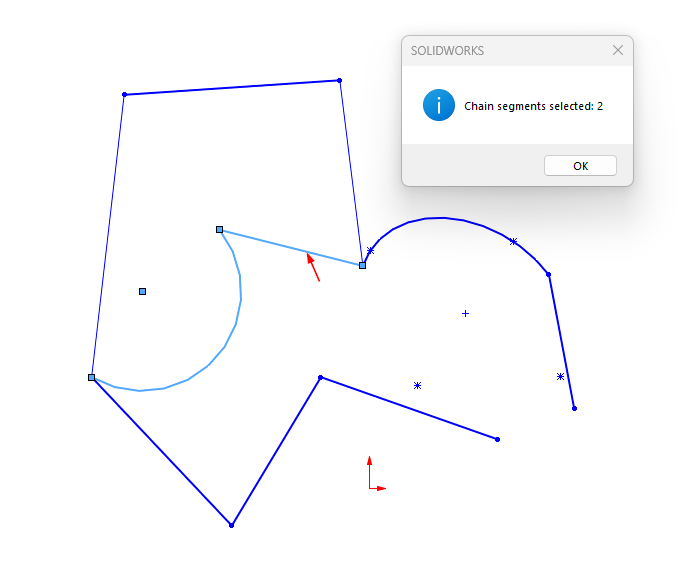
    MsgBox "Chain segments selected: " & CStr(fullChain.Count), vbInformation

End Sub

'Helper function: Get selected segment
Private Function GetSelectedSketchSegment(ByVal swSelMgr As SldWorks.SelectionMgr) As SldWorks.SketchSegment

    Dim selectedType As Long
    Dim selectedObj As Object

    Set GetSelectedSketchSegment = Nothing

    If swSelMgr Is Nothing Then
        Exit Function
    End If

    If swSelMgr.GetSelectedObjectCount2(-1) < 1 Then
        Exit Function
    End If

    selectedType = swSelMgr.GetSelectedObjectType3(1, -1)

    If selectedType <> swSelSKETCHSEGS And selectedType <> swSelEXTSKETCHSEGS Then
        Debug.Print "Selected object type: " & CStr(selectedType)
        Exit Function
    End If

    Set selectedObj = swSelMgr.GetSelectedObject6(1, -1)

    If selectedObj Is Nothing Then
        Exit Function
    End If

    Set GetSelectedSketchSegment = selectedObj

End Function

'Basic chain traversal from point
'This procedure proceeds from one point outward.
'For example, if the selected segment is:
'A ---- B
'then the first call comes from A, the second from B.

Private Sub WalkChainFromPoint( _
    ByVal startPoint As SldWorks.SketchPoint, _
    ByVal previousSegment As SldWorks.SketchSegment, _
    ByVal vAllSegs As Variant, _
    ByRef resultChain As Collection, _
    ByRef hasBranch As Boolean, _
    ByRef hasLoop As Boolean, _
    ByRef statusText As String)

    Dim currentPoint As SldWorks.SketchPoint
    Dim prevSeg As SldWorks.SketchSegment
    Dim nextSeg As SldWorks.SketchSegment
    Dim nextPoint As SldWorks.SketchPoint

    Dim connectedSegs As Collection
    Dim visitedSegs As Collection

    Set currentPoint = startPoint
    Set prevSeg = previousSegment
    Set visitedSegs = New Collection
    
    ' Store the initially selected segment as already visited.
    visitedSegs.Add previousSegment

    Do

        Set connectedSegs = GetNextConnectedSegments(currentPoint, prevSeg, vAllSegs, visitedSegs)

        If connectedSegs.Count = 0 Then ' No more segments from this point. This is a normal open-chain endpoint.
            Exit Do
        End If

        If connectedSegs.Count > 1 Then ' More than one possible next segment means that we have a branch.
            hasBranch = True
            statusText = statusText & "Branch detected at sketch point." & vbCrLf
            Exit Do
        End If

        Set nextSeg = connectedSegs.Item(1)

        If SegmentAlreadyExists(nextSeg, visitedSegs) = True Then  'The chain returned to a segment we have already visited. This usually means a closed contour or loop.
            hasLoop = True
            statusText = statusText & "Loop or already visited segment detected." & vbCrLf
            Exit Do
        End If

        resultChain.Add nextSeg
        visitedSegs.Add nextSeg

        Set nextPoint = GetOppositePoint(nextSeg, currentPoint)

        If nextPoint Is Nothing Then
            statusText = statusText & "Could not determine the next sketch point." & vbCrLf
            Exit Do
        End If

        Set prevSeg = nextSeg
        Set currentPoint = nextPoint

    Loop

End Sub

'Find the next connected segments
'We look for all segments that use the current point: seg.StartPoint Is currentPoint or seg.EndPoint Is currentPoint
'But we exclude the segment we just came from.
Private Function GetNextConnectedSegments( _
    ByVal currentPoint As SldWorks.SketchPoint, _
    ByVal previousSegment As SldWorks.SketchSegment, _
    ByVal vAllSegs As Variant, _
    ByVal visitedSegs As Collection) As Collection

    Dim result As Collection
    Dim i As Long
    Dim swSeg As SldWorks.SketchSegment

    Set result = New Collection

    For i = 0 To UBound(vAllSegs)

        Set swSeg = vAllSegs(i)

        If ShouldUseSegment(swSeg) = True Then

            If swSeg Is previousSegment Then
                ' Skip the segment we came from.
            ElseIf SegmentUsesPoint(swSeg, currentPoint) = True Then

                If SegmentAlreadyExists(swSeg, visitedSegs) = False Then
                    result.Add swSeg
                End If

            End If

        End If

    Next i

    Set GetNextConnectedSegments = result

End Function

'Check: Does the segment use a point?
Private Function SegmentUsesPoint( _
    ByVal swSeg As SldWorks.SketchSegment, _
    ByVal swPoint As SldWorks.SketchPoint) As Boolean

    SegmentUsesPoint = False

    If swSeg Is Nothing Then
        Exit Function
    End If

    If swPoint Is Nothing Then
        Exit Function
    End If

    If swSeg.GetStartPoint2 Is swPoint Then
        SegmentUsesPoint = True
        Exit Function
    End If

    If swSeg.GetEndPoint2 Is swPoint Then
        SegmentUsesPoint = True
        Exit Function
    End If

End Function

'Getting the opposite point of a segment
'If we entered a segment through one point, we need to exit through another.
Private Function GetOppositePoint( _
    ByVal swSeg As SldWorks.SketchSegment, _
    ByVal knownPoint As SldWorks.SketchPoint) As SldWorks.SketchPoint

    Set GetOppositePoint = Nothing

    If swSeg Is Nothing Then
        Exit Function
    End If

    If knownPoint Is Nothing Then
        Exit Function
    End If

    If swSeg.GetStartPoint2 Is knownPoint Then
        Set GetOppositePoint = swSeg.GetEndPoint2
        Exit Function
    End If

    If swSeg.GetEndPoint2 Is knownPoint Then
        Set GetOppositePoint = swSeg.GetStartPoint2
        Exit Function
    End If

End Function

'Check for segment repetition
Private Function SegmentAlreadyExists( _
    ByVal swSeg As SldWorks.SketchSegment, _
    ByVal segCollection As Collection) As Boolean

    Dim i As Long
    Dim testSeg As SldWorks.SketchSegment

    SegmentAlreadyExists = False

    If swSeg Is Nothing Then
        Exit Function
    End If

    For i = 1 To segCollection.Count

        Set testSeg = segCollection.Item(i)

        If testSeg Is swSeg Then
            SegmentAlreadyExists = True
            Exit Function
        End If

    Next i

End Function

'Segment filter. Currently only for "construction geometry," but others can be added, such as ignoring ellipses.
Private Function ShouldUseSegment(ByVal swSeg As SldWorks.SketchSegment) As Boolean

    ShouldUseSegment = False

    If swSeg Is Nothing Then
        Exit Function
    End If

    If INCLUDE_CONSTRUCTION_GEOMETRY = False Then
        If swSeg.ConstructionGeometry = True Then
            Exit Function
        End If
    End If

    ShouldUseSegment = True

End Function

'Assembling the complete chain
'The left side was found from the selected segment outward. Therefore, to ensure proper order, it must be reversed.
Private Sub BuildFullChain( _
    ByVal leftChain As Collection, _
    ByVal startSegment As SldWorks.SketchSegment, _
    ByVal rightChain As Collection, _
    ByRef fullChain As Collection)

    Dim i As Long

    For i = leftChain.Count To 1 Step -1
        fullChain.Add leftChain.Item(i)
    Next i

    fullChain.Add startSegment

    For i = 1 To rightChain.Count
        fullChain.Add rightChain.Item(i)
    Next i

End Sub

'Selecting found segments. Or call a function to process the chain.
Private Sub SelectSegments(ByVal segCollection As Collection)

    Dim i As Long
    Dim swSeg As SldWorks.SketchSegment
    Dim swSelData As SldWorks.SelectData
    Dim boolstatus As Boolean

    Set swSelData = swModel.SelectionManager.CreateSelectData

    swModel.ClearSelection2 True

    For i = 1 To segCollection.Count

        Set swSeg = segCollection.Item(i)

        If i = 1 Then
            boolstatus = swSeg.Select4(False, swSelData)
        Else
            boolstatus = swSeg.Select4(True, swSelData)
        End If

        If boolstatus = False Then
            Debug.Print "Failed to select segment index: " & CStr(i)
        End If

    Next i

End Sub


Well shoot, looks like it. The rest of my code (what I’m doing with the result) hasn’t ever done anything unexpected, so perhaps this bug is just invisible in my use case. Thanks for pointing it out! I’ll dig into it further.

First, thank you very much.

You guys are three or four lightyears ahead of me in programming with SW API.

That said I am experimenting a lot with your suggestions, and remade from scratch everything to better understand and aiming at a compact code for my use case. (no construction geometry, same result as the chain command)

I noticed that the above code has a problem with the construction geometry even with the flag boolean variable enabled, it does not ignore it during chain selection.

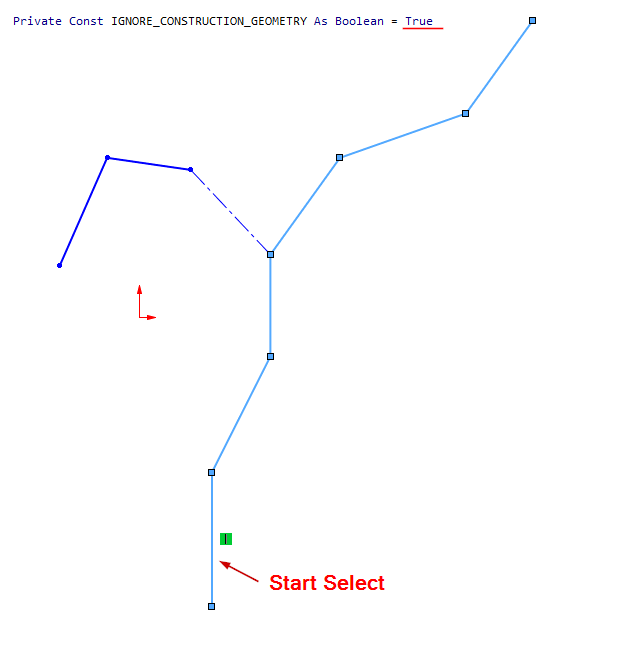
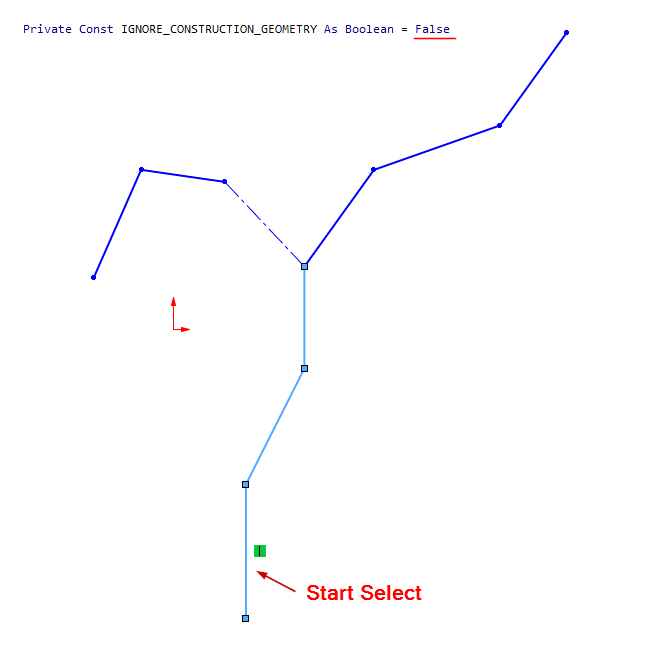
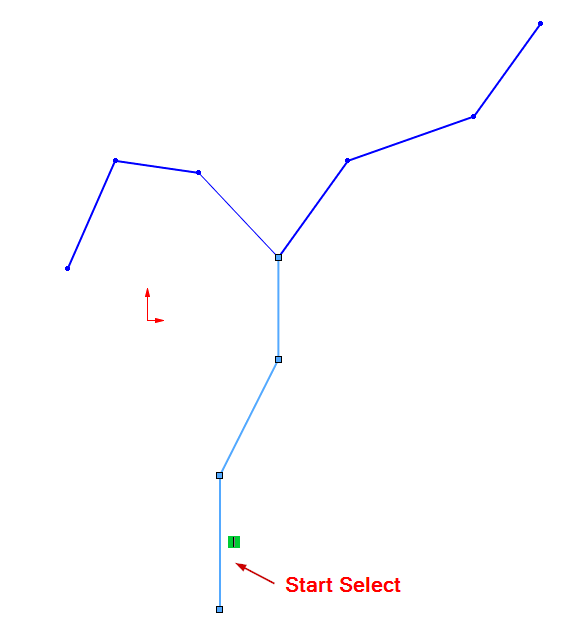
Another point, which I am struggling right now with my test code, is the result in case of branches: a Y shaped sketch with only one branch set as construction, should ignore it and continue the selection on the non construction branch, like the chain command in the UI. Instead the macro stops at the branch…

I tested the code a bit and found one of those funny situations where the code is syntactically correct but works incorrectly.
Of course, there was a “clear” explanation for this, but I didn’t understand it.


When I have a segment with construction geometry and I check

If swSeg.ConstructionGeometry = True Then
   Exit Function
End If

Even in Watches, I see TRUE, but we don’t get to the Exit Function because if swSeg.ConstructionGeometry IS LIKE FALSE :smiling_face_with_tear:
it’s due to some 1 and -1, etc. :thinking:

In short, the working version is:

If CBool(swSeg.ConstructionGeometry) Then
    Exit Function
End If

I changed the segment check in WalkChainFromPoint.
I also renamed the constant for ignoring constructional geometries to IGNORE_CONSTRUCTION_GEOMETRY to make it clearer.
I also rewrote GetNextConnectedSegments.
I also added a check at the beginning to ensure the first selected segment is not constructional with Private Const IGNORE_CONSTRUCTION_GEOMETRY As Boolean = True.
I’ll provide the entire new code:

Option Explicit

' ============================================================
' https://forum.cadmunity.com/t/is-there-a-faster-approach/6263
' Macro:Build sketch chain from the user-selected sketch segment.
'   1. Select one sketch segment.
'   2. Run the macro.
' Result:
'   The macro finds connected sketch segments in both directions
'   from the selected segment and selects the resulting chain.
' Notes:
'   - The macro compares SketchPoint objects by reference using "Is" (josh).
'   - It does not compare point coordinates.
'   - This is important because two points may have the same coordinates
'     but still be different sketch points if they are not merged/coincident.
' !!! There shouldn't be any SPLINES or parabola among the segments.
' !!! Processing spline points and finding the exact start and end points requires extensive additional functions.
' << In short, just lines, arcs, and parts of an ellipse. >>
' ============================================================

Dim swApp As SldWorks.SldWorks
Dim swModel As SldWorks.ModelDoc2
Dim swSelMgr As SldWorks.SelectionMgr
' You can include or exclude construction geometry via a constant
Private Const IGNORE_CONSTRUCTION_GEOMETRY As Boolean = False

Sub main()

    Dim swStartSeg As SldWorks.SketchSegment
    Dim swSketch As SldWorks.Sketch
    Dim vAllSegs As Variant

    Dim leftChain As Collection
    Dim rightChain As Collection
    Dim fullChain As Collection

    Dim hasBranch As Boolean
    Dim hasLoop As Boolean
    Dim statusText As String

    Set swApp = Application.SldWorks
    Set swModel = swApp.ActiveDoc

    If swModel Is Nothing Then
        MsgBox "No active document.", vbExclamation
        Exit Sub
    End If

    Set swSelMgr = swModel.SelectionManager

    Set swStartSeg = GetSelectedSketchSegment(swSelMgr)

    If swStartSeg Is Nothing Then
        MsgBox "Please select one sketch segment and run the macro again.", vbExclamation
        Exit Sub
    End If
    
    If ShouldUseSegment(swStartSeg) = False Then
        MsgBox "The selected segment is construction geometry and is ignored by the current settings.", vbExclamation
        Exit Sub
    End If

    Set swSketch = swStartSeg.GetSketch

    If swSketch Is Nothing Then
        MsgBox "Could not get parent sketch from selected segment.", vbExclamation
        Exit Sub
    End If

    vAllSegs = swSketch.GetSketchSegments

    If IsEmpty(vAllSegs) Then
        MsgBox "The sketch does not contain sketch segments.", vbExclamation
        Exit Sub
    End If

    Set leftChain = New Collection
    Set rightChain = New Collection
    Set fullChain = New Collection

    hasBranch = False
    hasLoop = False
    statusText = ""
    
    ' Walk from the start point of the selected segment.
    WalkChainFromPoint _
        swStartSeg.GetStartPoint2, _
        swStartSeg, _
        vAllSegs, _
        leftChain, _
        hasBranch, _
        hasLoop, _
        statusText
        
     ' Walk from the end point of the selected segment.
    WalkChainFromPoint _
        swStartSeg.GetEndPoint2, _
        swStartSeg, _
        vAllSegs, _
        rightChain, _
        hasBranch, _
        hasLoop, _
        statusText
        
    ' Build the final chain:
    ' left side reversed + selected segment + right side.
    BuildFullChain leftChain, swStartSeg, rightChain, fullChain

    SelectSegments fullChain

    Debug.Print "Selected chain segment count: " & CStr(fullChain.Count)

    If hasBranch = True Then
        Debug.Print "Result: branch detected."
    End If

    If hasLoop = True Then
        Debug.Print "Result: closed loop or already visited segment detected."
    End If

    If Len(statusText) > 0 Then
        Debug.Print statusText
    End If

    MsgBox "Chain segments selected: " & CStr(fullChain.Count), vbInformation

End Sub

'Helper function: Get selected segment
Private Function GetSelectedSketchSegment(ByVal swSelMgr As SldWorks.SelectionMgr) As SldWorks.SketchSegment

    Dim selectedType As Long
    Dim selectedObj As Object

    Set GetSelectedSketchSegment = Nothing

    If swSelMgr Is Nothing Then
        Exit Function
    End If

    If swSelMgr.GetSelectedObjectCount2(-1) < 1 Then
        Exit Function
    End If

    selectedType = swSelMgr.GetSelectedObjectType3(1, -1)

    If selectedType <> swSelSKETCHSEGS And selectedType <> swSelEXTSKETCHSEGS Then
        Debug.Print "Selected object type: " & CStr(selectedType)
        Exit Function
    End If

    Set selectedObj = swSelMgr.GetSelectedObject6(1, -1)

    If selectedObj Is Nothing Then
        Exit Function
    End If

    Set GetSelectedSketchSegment = selectedObj

End Function

'Basic chain traversal from point
'This procedure proceeds from one point outward.
'For example, if the selected segment is:
'A ---- B
'then the first call comes from A, the second from B.

Private Sub WalkChainFromPoint( _
    ByVal startPoint As SldWorks.SketchPoint, _
    ByVal previousSegment As SldWorks.SketchSegment, _
    ByVal vAllSegs As Variant, _
    ByRef resultChain As Collection, _
    ByRef hasBranch As Boolean, _
    ByRef hasLoop As Boolean, _
    ByRef statusText As String)

    Dim currentPoint As SldWorks.SketchPoint
    Dim prevSeg As SldWorks.SketchSegment
    Dim nextSeg As SldWorks.SketchSegment
    Dim nextPoint As SldWorks.SketchPoint

    Dim connectedSegs As Collection
    Dim visitedSegs As Collection

    Set currentPoint = startPoint
    Set prevSeg = previousSegment
    Set visitedSegs = New Collection
    
    ' Store the initially selected segment as already visited.
    visitedSegs.Add previousSegment

    Do

        Set connectedSegs = GetNextConnectedSegments(currentPoint, prevSeg, vAllSegs, visitedSegs)

        If connectedSegs.Count = 0 Then
        
            ' No valid continuation.
            ' This is a normal endpoint.
            Exit Do
        
        ElseIf connectedSegs.Count = 1 Then
        
            ' Exactly one valid continuation.
            ' Continue walking.
        
        Else
        
            ' More than one valid continuation after filtering.
            ' This is a real branch.
            hasBranch = True
            statusText = statusText & "Branch detected after filtering ignored geometry." & vbCrLf
            Exit Do
        
        End If

        Set nextSeg = connectedSegs.Item(1)

        If SegmentAlreadyExists(nextSeg, visitedSegs) = True Then  'The chain returned to a segment we have already visited. This usually means a closed contour or loop.
            hasLoop = True
            statusText = statusText & "Loop or already visited segment detected." & vbCrLf
            Exit Do
        End If

        resultChain.Add nextSeg
        visitedSegs.Add nextSeg

        Set nextPoint = GetOppositePoint(nextSeg, currentPoint)

        If nextPoint Is Nothing Then
            statusText = statusText & "Could not determine the next sketch point." & vbCrLf
            Exit Do
        End If

        Set prevSeg = nextSeg
        Set currentPoint = nextPoint

    Loop

End Sub

'Find the next connected segments
'We look for all segments that use the current point: seg.StartPoint Is currentPoint or seg.EndPoint Is currentPoint
'But we exclude the segment we just came from.
Private Function GetNextConnectedSegments( _
    ByVal currentPoint As SldWorks.SketchPoint, _
    ByVal previousSegment As SldWorks.SketchSegment, _
    ByVal vAllSegs As Variant, _
    ByVal visitedSegs As Collection) As Collection

    Dim result As Collection
    Dim i As Long
    Dim swSeg As SldWorks.SketchSegment

    Set result = New Collection

    For i = 0 To UBound(vAllSegs)

        Set swSeg = vAllSegs(i)

        ' First filter out segments that should not participate
        ' in the chain at all.
        If ShouldUseSegment(swSeg) = True Then

            ' Do not go back through the segment we came from.
            If swSeg Is previousSegment Then

                ' Skip previous segment.

            ElseIf SegmentUsesPoint(swSeg, currentPoint) = True Then

                ' Only add segments that are connected to the current point
                ' and are not already visited.
                If SegmentAlreadyExists(swSeg, visitedSegs) = False Then
                    result.Add swSeg
                End If

            End If

        End If

    Next i

    Set GetNextConnectedSegments = result

End Function

'Check: Does the segment use a point?
Private Function SegmentUsesPoint( _
    ByVal swSeg As SldWorks.SketchSegment, _
    ByVal swPoint As SldWorks.SketchPoint) As Boolean

    SegmentUsesPoint = False

    If swSeg Is Nothing Then
        Exit Function
    End If

    If swPoint Is Nothing Then
        Exit Function
    End If

    If swSeg.GetStartPoint2 Is swPoint Then
        SegmentUsesPoint = True
        Exit Function
    End If

    If swSeg.GetEndPoint2 Is swPoint Then
        SegmentUsesPoint = True
        Exit Function
    End If

End Function

'Getting the opposite point of a segment
'If we entered a segment through one point, we need to exit through another.
Private Function GetOppositePoint( _
    ByVal swSeg As SldWorks.SketchSegment, _
    ByVal knownPoint As SldWorks.SketchPoint) As SldWorks.SketchPoint

    Set GetOppositePoint = Nothing

    If swSeg Is Nothing Then
        Exit Function
    End If

    If knownPoint Is Nothing Then
        Exit Function
    End If

    If swSeg.GetStartPoint2 Is knownPoint Then
        Set GetOppositePoint = swSeg.GetEndPoint2
        Exit Function
    End If

    If swSeg.GetEndPoint2 Is knownPoint Then
        Set GetOppositePoint = swSeg.GetStartPoint2
        Exit Function
    End If

End Function

'Check for segment repetition
Private Function SegmentAlreadyExists( _
    ByVal swSeg As SldWorks.SketchSegment, _
    ByVal segCollection As Collection) As Boolean

    Dim i As Long
    Dim testSeg As SldWorks.SketchSegment

    SegmentAlreadyExists = False

    If swSeg Is Nothing Then
        Exit Function
    End If

    For i = 1 To segCollection.Count

        Set testSeg = segCollection.Item(i)

        If testSeg Is swSeg Then
            SegmentAlreadyExists = True
            Exit Function
        End If

    Next i

End Function

'Segment filter. Currently only for "construction geometry," but others can be added, such as ignoring ellipses.
Private Function ShouldUseSegment(ByVal swSeg As SldWorks.SketchSegment) As Boolean

    ShouldUseSegment = False

    If swSeg Is Nothing Then
        Exit Function
    End If

    If IGNORE_CONSTRUCTION_GEOMETRY = True Then
        If CBool(swSeg.ConstructionGeometry) Then
            Exit Function
        End If
    End If

    ShouldUseSegment = True

End Function

'Assembling the complete chain
'The left side was found from the selected segment outward. Therefore, to ensure proper order, it must be reversed.
Private Sub BuildFullChain( _
    ByVal leftChain As Collection, _
    ByVal startSegment As SldWorks.SketchSegment, _
    ByVal rightChain As Collection, _
    ByRef fullChain As Collection)

    Dim i As Long

    For i = leftChain.Count To 1 Step -1
        fullChain.Add leftChain.Item(i)
    Next i

    fullChain.Add startSegment

    For i = 1 To rightChain.Count
        fullChain.Add rightChain.Item(i)
    Next i

End Sub

'Selecting found segments. Or call a function to process the chain.
Private Sub SelectSegments(ByVal segCollection As Collection)

    Dim i As Long
    Dim swSeg As SldWorks.SketchSegment
    Dim swSelData As SldWorks.SelectData
    Dim boolstatus As Boolean

    Set swSelData = swModel.SelectionManager.CreateSelectData

    swModel.ClearSelection2 True

    For i = 1 To segCollection.Count

        Set swSeg = segCollection.Item(i)

        If i = 1 Then
            boolstatus = swSeg.Select4(False, swSelData)
        Else
            boolstatus = swSeg.Select4(True, swSelData)
        End If

        If boolstatus = False Then
            Debug.Print "Failed to select segment index: " & CStr(i)
        End If

    Next i

End Sub


And of course, with any IGNORE_CONSTRUCTION_GEOMETRY you do not go through the non-structural branching.


You can go further and represent the sketch as a graph: SketchPoint for nodes, SketchSegment for edges;

We first exclude construction segments, then construct all valid paths (or don’t exclude them and construct them).

But then you’ll need an interface, a form that doesn’t block SolidWorks.

  1. Chain Scanner
    Collects all possible chains from the selected segment, taking into account:
  • branches;
  • IGNORE_CONSTRUCTION_GEOMETRY;
  • already visited segments, to avoid an infinite loop.
  1. Chain Selection UserForm
  • Displays found chains in a ListBox.
  • When selecting a row, you can immediately highlight the corresponding chain in SolidWorks.

The OK button keeps the selected chain selected.

It’s convenient to organize chains into a Dictionary with collections. Or a Dictionary with Dictionaries (then you can store additional parameters – Dictionary with Dictionaries with Collections).

paths
 ├─ path 1
 │   ├─ segment + (array of parameters)
 │   ├─ segment + (array of parameters)
 │   └─ segment + (array of parameters)
 ├─ path 2
 │   ├─ segment + (array of parameters)
 │   └─ segment + (array of parameters)
 └─ path 3
     └─ segment + (array of parameters)

Is this the “clear” explanantion that you found?

Yes, but in a different place. I understand the gist, but I don’t like it.
I also don’t like Not in logical expressions.

Ultimately, I’m backed into a corner by the VBA, and all I have left is:

If (swSeg.ConstructionGeometry = False) = False Then
    Exit Function
End If

So the safe rule seems to be:

Do not ask if something is True.
Ask if it is not False.

A surprisingly philosophical API lesson: there is no single truth, but at least falsehood is consistently zero.

I have felt a couple of times in that rabbit hole, with this macro. And I had to try and fix it with <>FALSE or the NOT approach instead of a plain and more legible TRUE…Lesson learnt, until the next time I am going to forget this thing again!

@mihkov thank you again.

I was busy and trying to implement a minimalist approach and I wanted to experiment with a segment class, but it came out as a too much hassle to handle it with my current skills level, and the rest of other things I have to sort out in the macro and I walked back to the collection+dictionary approach and a bare minimum algorithm with construction lines ignored by default and a fallback to stop at the first branch found which is more than enough for our use case.

Then I probably found a major flaw with the approach: the SELECT4 method I used, fails to loop my segments, from a properly sorted collection loop and it takes entity 24 type (sketch points) instead, making the next operation to fail and not be executed on the selection.

I am using the selection in a assy, with modelling in context activated.

The chain selection is in the assy sketch, which I copy in a part sketch, with entity conversion, then I try to select the chain from a random segment in the component sketch, and apply a fillet sketch, which fails completely.

with the first try I used the build in chain select then when I applied the fillet: it failed, but I sort of tricked it with a selectall routine which uses select4 loop and the fillet was created correctly. I used that select all routine in another place to delete all the sketch segments inside a sketch and it just worked, but the same approach with the custom chain and the fillet fails apparently…I have to dig a bit more to work around it, but the speed calculation with the custom chain is more than worth the pain.

An idea was to build a segment class to store the segment object, its start and end points objects, its unique ID (id1,id2 from getID and id3 from entitytype*) and a method to reverse the point selection.

But, as I said, I had other issues with the macro and solving both them and my class handling incompetence at the same time was a bit too much…

*just to leave a note here that segment IDs are not unique (getID alone) in a sw session and they could be duplicated for different entities in the same sketch, like arcs, apparently…