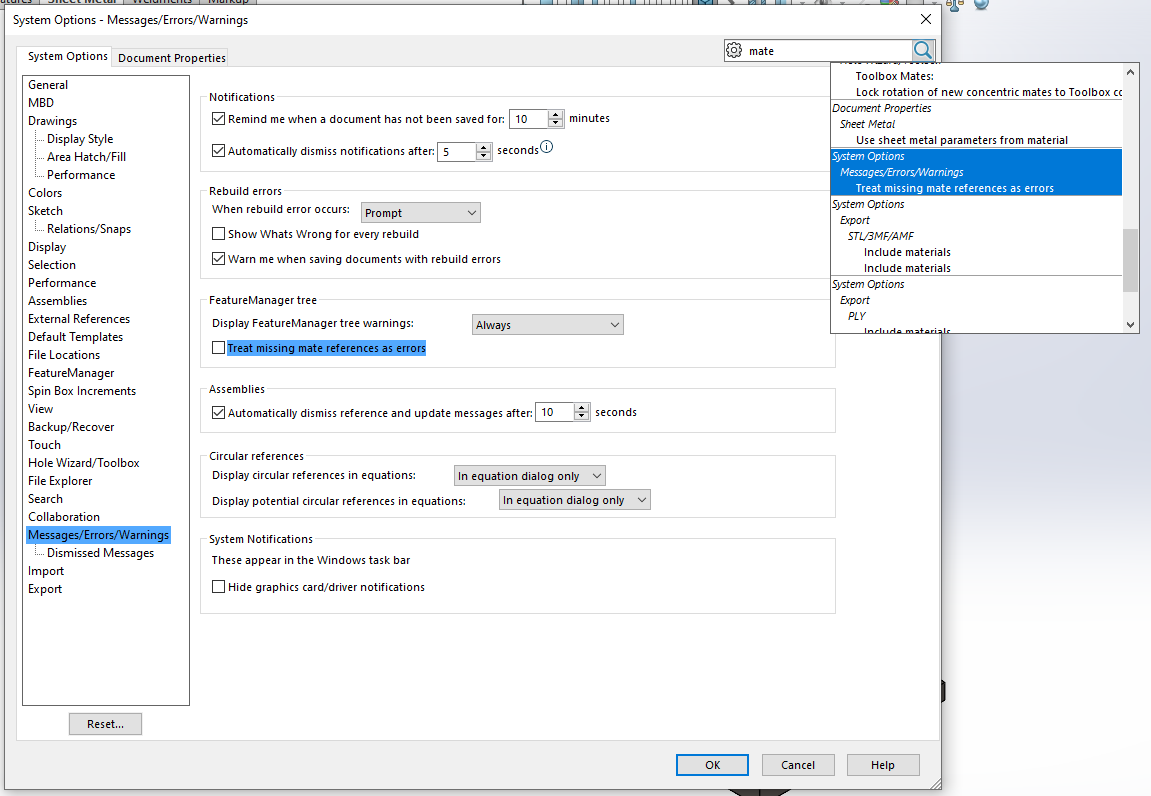
Don’t think this is a fix. I want to be notified in case mate references are missing.
Supressed parts with their mates should create no warnings, as has been the process before.
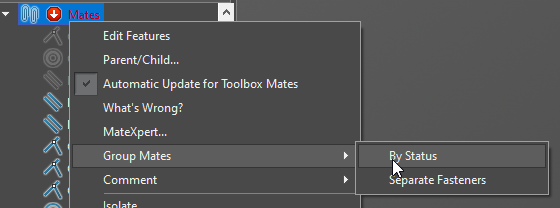
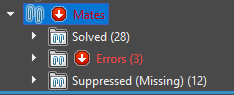
You could try grouping the mates by status. It isn’t super elegant, but it will tell you which ones are having errors and which ones are “Missing References”.
Not sure what method was chosen to upgrade but here are some tips..
It is ALWAYS a good idea to have a new install with files on a computer that can test all of this ahead of time.
Choose At least 3 -5 major projects should be isolated and copied to this computer to be used a test cases.
In your systems option under the “Performance” tab that has the “Verification on Rebuild” that should be turned on. This is a VERY health thing to
generally always have turned on but it can slow down rebuild times depending on the type of features are in the tree…etc.
There is a difference between “Ctrl+B” and “Ctrl+Q”. The first only looks at what currently is not up to date where as the latter makes sure the whole
tree is looked at and updated. There are times when, if using Ctrl+B, that errors can slip through that may later cause issues so generally using Ctrl+Q
is better.
All files, once opened in the new version, should go through the Ctrl+Q with the verification on rebuild turned on. If errors do happen then it may not, and I stress…may NOT be something that has to do with the new version and something to do with the files not being correct in the current version. In other words if you do this operation in the older version, make sure that these options are done, you might find that there are errors that existed.
Solidworks Task Scheduler is a tool that host many different options, one of which is the “Upgrade Assistant”. One of the best options here is the “Check configurations” aspects which has two options… “Check only active configurations” and “Check all configurations”. This can be something that is scheduled to run at night while everyone is at home if that’s easier.
Again cannot stress this enough, use copied projects, not one that are currently being used in design or production.
@Arthur NY yes, we did test sessions with 5 people for a week, in the past. Taking the decision to update SolidWorks with a group of 15 designers/engineers, and have to tell your boss after two weeks that you need much more time to finish a project, caused by all kind of “little bugs” in the new version. Done that, been there.
1.000.000 users on subscription bring 1.500.000.000 to Dassault. They could get a team together for pre-testing new releases in a decent way for, let’s say 1/1000 of this revenue?
I guessed, as far as various SolidWorks users are involved, the platform helps users to (re-)gain access to the application they have paid for, or thought was included in their application package? Or to explain why the application is not available, during or after updates? And you can’t stop your subscription because that part of the platform is under repair.
But I am sure the platform helps to consume more than 1/1000 of the annual subscription revenue of the SolidWorks desktop users. <()> ><
Just wanting to make sure I understand… you’re saying you did all of the above during this current go round of testing when migrating to 2021? Or it wasn’t done because it would have taken up too much time?
I’ve done all of the above when moving from 2013 to 2016 after being bitten by many bugs in 2013 and as Frank stated, it didn’t change the fact that I then had to explain to my boss why I need more time to finish a project because of constant new bugs coming up.
The process truely is not worth it for the user. It’s a really long process to go through, and even though you’ve put all the necessary effort, if not more, to ensure that they have all the information to fix certain bugs, sometimes they aren’t adressed, most of the time they are adressed but the fix they issued breaks more stuff then the fix actually fixed.
I’m an avid advisor of waiting until at least SP4 before making the move, because there are generally so many bugs in early versions of the program that it truely isn’t worth the trouble to move at that point. When we moved from 2016 to 2019, I looked up what people were saying from 2018. 2018 seemed like an awesome version to work on, the user feedback was splendid to say the least. So, I figured 2019 couldn’t be that far off from 2018 and we moved to 2019 as early as SP2.
Boy was I in for a treat. There were countless bugs, some major, some minor, along with a drastic performance decrease from 2018 to 2019. After that, we decided to stick with 2019 until Dassault gets their things together because we can’t be dependant of their ability to resolve their own incompetence.
I have nothing wrong to say about the employees I’ve dealt/worked with. They were all doing their best with what they had, to try and answer my needs and suffice to say, they all were as astounded as I was.
 )
)