What is the best way to see where a SolidWorks part or assembly is used?
For example, I’d like to see a list of all the .sldasm files that a given .sldprt is used in.
Ideally, I’d like to do this from Windows Explorer.
Thanks for any replies.
What is the best way to see where a SolidWorks part or assembly is used?
For example, I’d like to see a list of all the .sldasm files that a given .sldprt is used in.
Ideally, I’d like to do this from Windows Explorer.
Thanks for any replies.
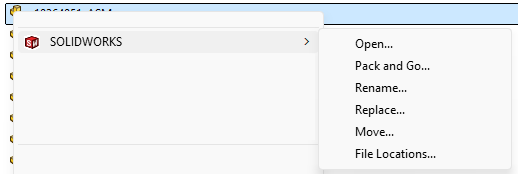
When you use the SolidWorks “Rename” feature in Windows File Explorer, a list of where used is shown.
@Frank_Oostendorp it’s work if all files in some dir. Elsewhere you need PDM.
If you only want to find out where the file is used (and not how many times), you can use SOLIDWORKS File Utilities via Windows Explorer. As shown below.
SOLIDWORKS File Utilities - 2025 - SOLIDWORKS Help
Keep in mind that this method may produce inaccurate results. It will also list files that reference the file, even if it is not physically included in them.
Also, make sure you do not have duplicate filenames. File Utilities will include any file with the same name, even if it is not the correct one.
where used? Depends on a lot of things. If you are using PDM the right way, or not, and then a lot depends on your file structure and where files are stored.
It also depends greatly on if the use of pack a go is used to make new files and the rules that you make to try to keep from making copies of copies of parts.
In the system options there are search paths, I think those help find where used when you do not have PDM. for years I would depend on the file structure and memory to try to determine if I was making a change that would affect 100’s of assemblies or just a few that we wanted to have updated.