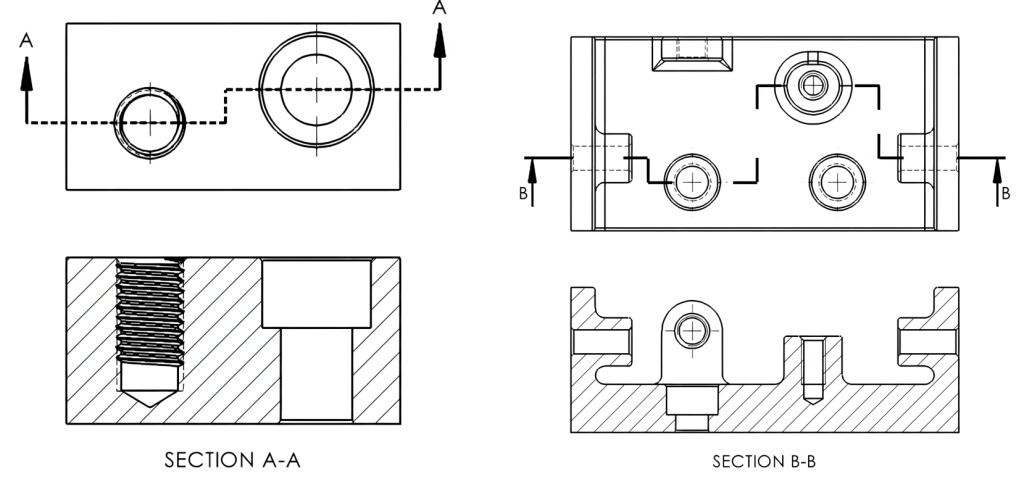
I want to create a section view that’s not based on a single straight cut line but rather a cut line that has some cranks, offsets, etc., as in the examples shown below.
Is there a way to sketch the section cut line first, then convert it into a section view? I have not had any luck in my attempts to do this.
Thanks for any help.
Yes, it is possible. Done that before. Don’t remember if it’s SW.
The thing is the section will follow the line. So the total length will be longer then the part.
Another way is actually cut the part in config and use it in drawing.
Yes, the old way. Sketch the lines how you want it in the parent drawing view, make sure they are all connected. Select one, then select the Section View tool. It will ask to do a legacy section or standard, select legacy.
Look at the bottom of the Javelin blog. If you sketch the section line yourself and do not select the foreshortened or change the “jog” lines to construction, you will get a section view that is longer than you expect because it is including the area along the “jog”. I don’t know that I explained that well.
Thanks. This was very helpful.
That’s exactly what I ran into. The “vertical” lengths of section cut line were being counted. I discovered it when some hole center-to-center dimensions were significantly larger than I expected them to be.
that sounds like something I need to try. I did not look into it that much last time I tried to do one of these and it came out all strange and I just decided to go another way.