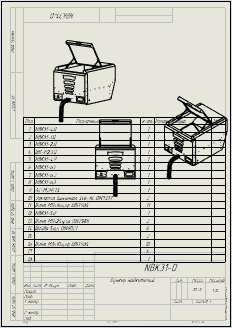
I’m trying to figure out how many rows are in a BOM table that is “attached” to a drawing view that contains BOM balloons. I have been unable to find a method of getting that table, given either the drawing view or given one of the BOM Balloon notes or annotations
I didn’t understand if the BOM balloons play an important role or if they are simply there in this particular case? Or maybe there is a situation where there is simply a BOM table “attached” to a particular view and we want to know how many lines table has.
Public Sub ListBomRows_AllSheets()
    Dim swApp As SldWorks.SldWorks
    Dim swModel As SldWorks.ModelDoc2
    Dim swDraw As SldWorks.DrawingDoc
    Dim vSheets As Variant, vOneSheet As Variant
    Dim i As Long, j As Long
    Dim swView As SldWorks.View
    Dim swSheet As SldWorks.Sheet
    Dim vSheetName As Variant
    Dim bomName As String
    Dim bomAnn As SldWorks.BomTableAnnotation
    Dim ta As SldWorks.TableAnnotation
    Dim Total_RowCount As Integer
    Dim NoHidden_RowCount As Integer

    Set swApp = Application.SldWorks
    Set swModel = swApp.ActiveDoc
    If swModel Is Nothing Or swModel.GetType <> swDocDRAWING Then Exit Sub
    Set swDraw = swModel

    vSheets = swDraw.GetViews() ' outer array = sheets
    vSheetName = swDraw.GetSheetNames

    Total_RowCount = -1
    NoHidden_RowCount = -1

    For i = 0 To UBound(vSheetName)
        Set swSheet = swDraw.Sheet(vSheetName(i))
        vOneSheet = vSheets(i)          ' inner array: [0]=Sheet, [1..]=View
        If IsEmpty(vOneSheet) Then GoTo NextSheet

        ' Iterate through VIEWS of this sheet
        For j = 1 To UBound(vOneSheet)
            Set swView = vOneSheet(j)
            If Not swView Is Nothing Then
                'Set swSheet = swView.GetSheet          ' get the sheet from the view
                bomName = swView.GetKeepLinkedToBOMName
                If Len(bomName) > 0 Then
                    Set ta = FindBomTableAnnByFeatureNameOnSheet(swDraw, swSheet, bomName)
                    If Not ta Is Nothing Then
                        Total_RowCount = ta.TotalRowCount
                        NoHidden_RowCount = ta.RowCount
                        If Total_RowCount >= 0 And NoHidden_RowCount >= 0 And Total_RowCount = NoHidden_RowCount Then
                            Debug.Print bomName & " : "; NoHidden_RowCount
                        End If
                    End If
                End If
            End If
        Next j
NextSheet:
    Next i
End Sub
' Find TableAnnotation of BOM by BOM feature name (bomName) on a specific sheet
Private Function FindBomTableAnnByFeatureNameOnSheet( _
        swDraw As SldWorks.DrawingDoc, _
        swSheet As SldWorks.Sheet, _
        bomName As String) As SldWorks.TableAnnotation

    Dim swModel As SldWorks.ModelDoc2
    Dim curSheet As String, targetSheet As String
    Dim feat As SldWorks.Feature
    Dim bom As SldWorks.BomFeature
    Dim vTA As Variant
    Dim i As Long
    Dim ta As SldWorks.TableAnnotation
    Dim sheetta As SldWorks.Sheet
    Dim featName As String
    Dim bomFeat As SldWorks.Feature

    Set swModel = swDraw
    curSheet = swDraw.GetCurrentSheet.GetName
    targetSheet = swSheet.GetName

    ' In case of split-BOM, activate the required sheet (not strictly necessary, but useful)
    If StrComp(curSheet, targetSheet, vbTextCompare) <> 0 Then
        swDraw.ActivateSheet targetSheet
    End If

    Set feat = swModel.FirstFeature
    Do While Not feat Is Nothing
        If StrComp(feat.GetTypeName2, "BomFeat", vbTextCompare) = 0 Then
            ' Feature name (this is what View.GetKeepLinkedToBOMName returns)
            featName = feat.Name
            Set bom = feat.GetSpecificFeature2
            If Not bom Is Nothing Then
                Set bomFeat = bom.GetFeature
                If Not bomFeat Is Nothing Then featName = bomFeat.Name

                If StrComp(featName, bomName, vbTextCompare) = 0 Then
                    vTA = bom.GetTableAnnotations  ' array of TableAnnotation (takes split-BOM into account)
                    If Not IsEmpty(vTA) Then
                           For i = LBound(vTA) To UBound(vTA)
                            Set ta = vTA(i)
                            If Not ta Is Nothing Then
                                Set FindBomTableAnnByFeatureNameOnSheet = ta
                            End If
                        Next i
                    End If
                End If
            End If
        End If
        Set feat = feat.GetNextFeature
    Loop

    If StrComp(curSheet, targetSheet, vbTextCompare) <> 0 Then
        swDraw.ActivateSheet curSheet
    End If
End Function
Immediate window resalt:
Bill of Materials1 :  19
Bill of Materials1 :  19
Bill of Materials1 :  19