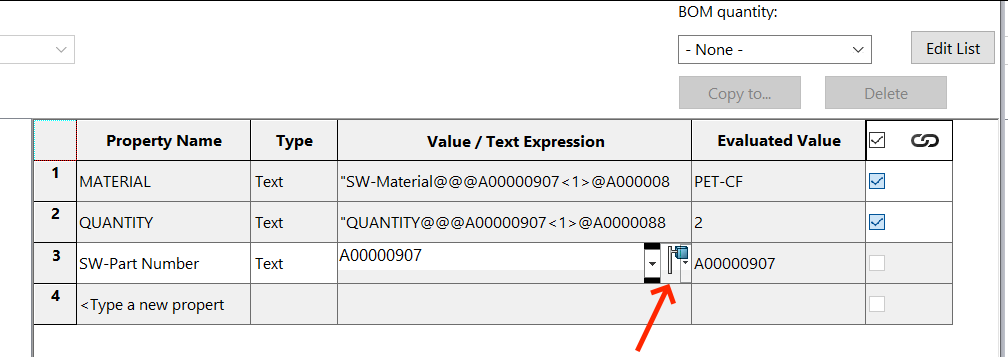
I want to add configuration-specific Cut-List item properties, so they would appear like this:
By default, accessing ICustomPropertyManager from Feature won’t allow me to specify configuration name:
Set swCustPropMgr = selectedFeature.CustomPropertyManager(activeConfig.Name)
swCustPropMgr.Add3 "SW-Part Number", swCustomInfoText, number, swCustomPropertyReplaceValue
The above doesn’t work - ICustomPropertyManager doesn’t support specifying configuration name as a parameter when accessed from IFeature, like it would when accessing it from IModelDocExtension (link to docs)
So instead I tried to access ICustomPropertyManager from config cut list items:
vcutlistItems = activeConfig.GetCutListItems()

For Each vcutlistItem In vcutlistItems
    Set swCustPropMgr = selectedItem.CustomPropertyManager()
    swCustPropMgr.Add3 "SW-Part Number", swCustomInfoText, number, swCustomPropertyReplaceValue
Next
Documentation is a bit obscure here, it feels like this is a weird corner of SW API. ICutListItem only has a single public member, CustomPropertyManager, so I assume the only intended reason for getting instance of CustomPropertyManager this way is to do exactly what I’m trying to do - but it doesn’t work with the above code sample, property is still written as “All configs”.
So what is the correct way to create a configuration-specific cut-list property via API?
Thanks, I did it, and we confirmed it’s a bug, got it through to SW R&D. It’s now registered as BR10000388022. That being said, I don’t think R&D will consider this important enough to fix anytime soon, there are far more serious bugs that haven’t received any attention for many years now.
So what can be done to work around this bug, set these cut-list properties as “this configuration” via API in some other, maybe some indirect way? Any suggestions?
Thanks, but I think you misunderstood what I meant: reading properties works fine (with your method), but I am trying to write properties as “this configuration”. Meaning the values would be different in different configurations.
OK, I know I have tested with this some years ago and i filed an enhancement request several times. Even using the WINAPI it is not possible to mimic the clicking on the icon on the right.
I did have a look into my code from then and found this remark:
//IMPORTANT REMARK for SolidWorks 2021 cutlist custom properties
//When using different configurations the cut list item bodies custom properties can be overwritten behind the scene
//Therefor don’t use different configurations if you want the cutlist body custom properties to remain the same
//this is also the case when manual changing properties ( even if we click the this config only button) and also via API
//solution : save the multibody part as a new part and create BOM’s there.
Since then i use the rule of thumb: “Don’t use cutlists and configurations at the same time”
Damn, you even tried WINAPI. Now that’s dedication
I am aware of that bug, but it was fixed sometime after 2021, not sure exactly when. But in 2024, it works fine, if you add configuration-specific cut-list properties, they stay correct, nothing gets overwritten anymore. So it works if you do it manually. But still not via API, which is what I’m trying to do.
While looking into Configuration::GetCutListItems, I found an example that shows how to use it:
Set config = swModel.GetConfigurationByName(vConfigName)
vcutlistItems = config.GetCutListItems()
Basically, you first grab the configuration, then use GetCutListItems() to access the cut list items. After that, you can get it’s CustomPropertyManager, which has methods like add3, delete2, get6, and set2.
Did you try the Set2?
In ancient times we had to delete before adding again.
Oh, damn, I hadn’t realized that this API call was added on 2024, I thought it was some time earlier. But yeah, I already tried it, and unfortunately Add3 still adds property as “all configurations” instead of “this configuration”. With my VAR, we reported this to the SW R&D, and they acknowledged that this is a bug (it’s the BR I mentioned in this topic a few posts ago, here is the link: BR10000388022
But this is actually good news. If this API was added in 2024, then it’s means this is not some ancient bug since time immemorial, it’s something that they missed very recently. So there is a good chance that with this BR, it will get fixed. You restored my hope
Yeah, there seems to be quite a lot of new features in 2024 that didn’t receive proper testing. Don’t worry about BR upvote, I don’t think that is possible anyway, at least I don’t see how
 SR# 1-23751953419
 Thanks for confirming that the bug is gone!