I have some garbage state leftover inside our vault that was probably used for test purposes years ago by the previous admin.
I was able to track down the few files preventing the state (and workflow) deletion using the T-Sql from the KB article below.
If I permantlly remove the file listed from the vault (destroy) I amable somehow to get rid of the state. I noticed that the linked T-SQL query do not list all files if they are deleted (but not destroyed)
The query should show the files including the deleted ones, but not all them are shown.
I noticed because I run the query, I searched for the file listed, deleted them from thr vault and run the query again they disappear from the list instead of being shown as deleted.
If not visible (already deleted): RMB the folder and from destroyed the file from property
I destroyed all the files supposedly in the state at the moment of deletion, but I suspect there is a problem with those states having the ignore past state disabled… I will try again later.
Not sure waht DB entry the delete “state” command is checking but there must be something in you DB you nned to find. Need to query the Documents table and that state ID to see if you get any hits.
At least with our test server it turned out to be a sort of glitch.
According to the sql query all files in a certain state were destroyed, but if the above state is the only one inside a workflow, that wotkflow can be deleted even if the remaining state returns a “there are still files in this state" kind of error…
Again: do not let me start ranting about the PDM administration utility…
Disclaimer: I’m not fluent in SQL or all of how PDM schemas are set up. But, from studying and testing the query in the KB article I have a couple of things I would think about. I don’t want to lead you on a goose chase, but sounds like you’re on one already. This is how I would ferret about the dataset.
· The query is really nice in that you don’t have to provide the State ID, just the name. But, there can be ambiguity (over time) of state name so in line 17 it’s checking that the results of searching Status by Name that there should only be one that has Enabled = 1. I’m wondering if it’s possible for the Status you’re looking for is not marked Enabled = 1. I don’t know enough about what that Enabled flag means, but I’m guessing it mostly means the state has been “Deleted” from the workflow editor GUI. I tried this on our vault:
1. Searched Status table by Enabled <> 1 I got four statuses other than ID = 1 and 2.
2. Searched Transitions table where Destination = OR of those four Status IDs, I got four Transitions. So happens all four have Enabled = 0. I’m not surprised.
3. Searched TransitionHistory where TransitionID = or of those four Transition IDs. It’s a dead end for me as there aren’t any. That may be by design and indication of a consistent/healthy dataset? If there had been rows I would have the DocumentID to go search the Document table for.
· I was thinking about what if the destination of a transition has been changed, but it looks like that’s not possible (through the admin tool). The admin would need to “Delete” (disable) the transition and create a new one, or copy from existing. Unless the previous admin tried this by editing the Destination value in the Transition table directly. This would be in the list of why they say be very, very careful editing the database directly. But this would only matter if the file is still in that Status (state) which you can easily search by querying the Documents table where CurrentStatusID = [the ID of the state you want to delete] I’m assuming you’ve already checked that and your deleting a state is blocked by the TransitionHistory not CurrentStatusID.
thank you for looking at the issue and the SQL query.
There are also other queries in the KB that are quite nuanced about having the state in the history of the file.
I tested a rollback and if a file fails to go back to the state because is deleted, there is an error popping up, but somehow it is possible to route the file to another state.
The main point here is that the previous admin setup some test workflows inside the production vault, those workflows are affecting mainly some hundres deleted files, mosty do not appear to be valuable data, only temporary files and test related.
The issue is that those test workflows are a mess and some of them were left without entry conditions, racing with the legitimate workflows: this is probably why, just deleting a file, applied a state that should never exist to some hundred of deleted data. They jumped without control in a workflow that is completely unrelated…
My stance is probably a “risky” one: keep only what you can control and delete the rest.
If a file is in the nobody’s land, well, it should never been there to begin with and it must be fixed.
those states are like “test1”, “test2”, “xxx”, without transitions.
There are other more “legitimate" workflows, but they were a sort of dead end to push file to be deleted out of the pdm, I presume, but those files ended up to stay in the vault. A mess.
Another note: I was able to delete the workflows without errors. Well one gave back an error popup, about having some files in the state, but in the end it got deleted anyway… search does not return any file in the state even looking at the past states.
I messed with our test server for a while, and I am quite confident the conisio guys made a quite robust system. I tried some funny thing on purpose (and not) and there was always a way out.
at this point I prefer to fix some data rather than leave them in a uncontrolled limbo somewhere in a obscure state.
the only complaint is that destryoing files takes too much resources and leads to locks too many times, so I have to do it on weekends or out of working hours.
I’ve rarely deleted any older workflows or states. You can Archive states now so that helps clean things up without deleting. I do rename them with a prefix so they sort at the end.
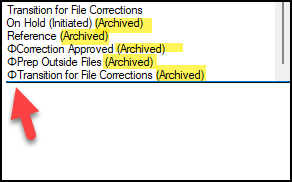
Here the end of our workflow droplist. Just noticed that PDM is putting the “Archived” states at the end so maybe no longer necessary. You can see the character I prefix with “Φ”, had to search long and hard to find a character that would sort at the end, don’t ask me what it is
Our previous admin did something like that: “do_not_use” in front of the name , but it was not consistent across the workflows, and he probably copied some of them with the prefix at some point.
so you had do_not_use(2) or do_not_use-do_not_use.workflow.for.do.not.use.data and we have actually a state named “do_not_use” leading to a whole new level of confusion.
Ok I have cleaned up all files supposedly in the last state of two workflows.
All destroyed from the vault and the archive cleaning service already kicked in.
Still they give the error when I try to delete them: files are still in the state.
On the test server if I try and delete their workflow the error is not shown and the state is deleted with the workflow, but it takes about 10 to 15 minutes with the sql cpu taking 7% to 20% of the processor resources.
This is perplexing me. Sorry for stupid questions.
If you view Documents table WHERE CurrentStatusID = [ID of state to delete] it returns 0 results?
If you search Transitions table WHERE Destination = [ID of state to delete], copy those transition IDs. Go to TransitionHistory table and search WHERE TransitionNr = [Destination from Transitions table] (OR’d if there are several transitions). Are there any rows in the result set?
I realized your previous comment was about the second query I posted, you meant this one?
because I am using the query in the first post which define the state with workflow name+state name pair.
The second query above ask for the starting state which I do not know since that workflow was setup without conditions and it was even triggered randomly when deleting a file from the vault…it is literally a single state workflow, probably tested a few days and abandoned 10 years ago.
@bnemec I am back home so I can properly answer your questions and update this post.
I run some query as you suggested and the culprit seem to be a cutlist or a bom inside some drawing data.
Query result for currentStatusID from documents table :
there are about 30 files named like PROPERFILENAME.SLDDRW:cutlist1 (or bill of materials1 in english I suppose, since in japanese it sounds like the table name in the drawing tree like table1, table2, cutlist6, bom3 etc) The files are marked as DELETED=0, a few with DELETED=1 but most are nowhere to be found in our vault.
Query result transitionID from the transitions table :
returned 4 results for ids involved
Query result from the from transitionhistory table using the above transition IDs: zero results
Since the transition ID had a workflow ID I checked them against the workflows table:
only 2 workflows involved in the 4 transition IDs mentioned in point 3. One workflow was already deleted and I am pretty sure that it was not me who deleted it and the other workflow is still in place and It had a link to one of the states that I want to delete. Looking at the workflows table I noticed (the horror!) that my production vault, was likely derived from a test environment that got most of its former workflows deleted… (since they are named like “test” “test(2)” “default.workflow(2)“ and other names no one sane in its mind would give on purpose to a production workflow) deleting things instead of starting from a fresh new db.
My preliminary conclusion is that this issue is apparently related to QA00000125380, likely garbage in the database?
So I downloaded the two SQL queries from the Q00000A125380 and run the first one to identify the files involved: same results as above, it returned 35 files for one state and 1 in the other state I cannot delete.
We are using SW PDM 2023, the QA above states that
Workaround:
The SOLIDWORKS PDM 2021 software version implements a fix for this problem. For earlier versions, follow these steps:
OK, so their fix does not work or it is not applicable for existing issues from the past like our vault seems to suffer.
Anyway I asked my VAR for suggestions and for some of the cool tools they have to check the PDM db integrity, since I am confident ours was abused more than necessary and it is likely full of garbage at the moment.
I tend to give up on vault view when doing this type of stuff. Show me the raw data first then I’ll try using the GUI once I confirm stuff.
There’s plenty of queries out there that join Documents, Projects and DocumentsInProjects. Here’s the one I have saved.
SELECT TOP (1000) d.[DocumentID]
	  ,dip.ProjectID
      ,[Filename]
	  ,p.Path
      ,[LockProject]
      ,[UserID]
      ,[LockDomain]
      ,[LockPath]
      ,[LatestRevisionNo]
      ,[LockDate]
      ,[UserDocRefsModified]
      ,d.[Deleted]
      ,[Shared]
      ,[LockViewID]
      ,[Link]
      ,[DocTypeID]
      ,[ObjectTypeID]
      ,[Flags]
  FROM [CleanupVault].[dbo].[Documents] AS d
  JOIN [CleanupVault].[dbo].[DocumentsInProjects] AS dip ON d.DocumentID = dip.DocumentID
  JOIN [CleanupVault].[dbo].[Projects] AS p ON dip.ProjectID = p.ProjectID
  WHERE d.DocumentID = [DocID you cannot find in vault]
Give it a try it on a few of the Document IDs you get. Notice on the Documents table the Object Type. I think Object Type = 1 are the only Documents that get a Project. Meaning they won’t show up in vault view or search tool, only show up in the contains tab of the file they belong to.
You could double check that the files they belong to are indeed deleted.