This should be easy but I am not finding it. I have seldom used design tables but thought I had the perfect application. I am putting together a conveyor that will change length, width and slope. I created global variables for each and then created a few equations using the variables to drive different models. My hope had been that I could then open the design table and create new configs while entering the different global variables for each config. But I am not finding how to get them in the table. I could manually crate each config and set the variables for each one, I just thought the table would save some steps for future iterations. What easy step am I missing?
1 Like
I didn’t watch the whole video… It may mention this already, but here’s how I go about figuring out design table syntax:
- Create two configs of a part
- Vary the thing I care about
- Auto-create a design table.
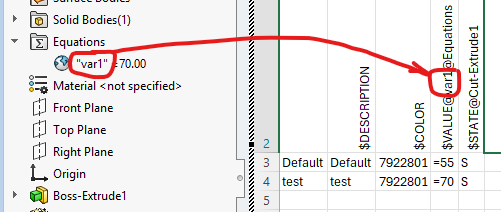
Once you know the syntax, you can just type stuff into the table. Just be aware of the rules… You can’t skip rows in the config names column, and you can’t skip columns in the parameters row. Once SW sees a blank cell in either the parameters row or the config names column it stops processing the table.
 what Josh said
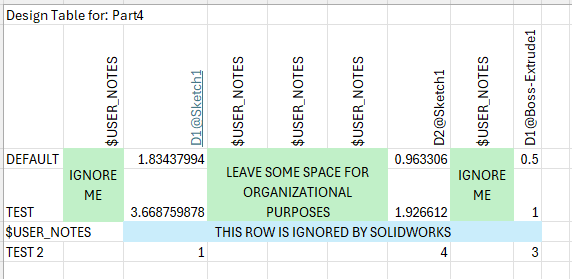
I guess it depends on how you define “skip”… I did immediately clarify that SW stops processing at blank cells in the specific row/column. One might argue that typing anything into the cell would constitute “not skipping” that cell… 
Well, I finally got it to work. I attempted to enter the code like Josh showed but it didn’t accept that. Then I changed the values of the global variables again and this time it opened the dialog box to select the changed parameters that I wanted to have in the table. For what ever reason that box did not show before. Once I got that box to open everything else was easy.
Thank you guys for the help.
Just curious… How did the text it ended up generating differ from what you tried typing in?
I don’t see that it did differ. But for some reason, and I forget the wording, SW said that I had attempted to enter parameters that didn’t exist. Maybe I accidentally put a space in the test.
I came here just to add that with threads the table is going to behave in a very funny way. be aware of that if you have a complex design since the table is going to change into random values or ignore the flag “do not modify the table feom the model” (or something that sounds like that in SW english version)
Moral of the story: even if your table seems to work, do not take it for sure and test it a bit more.
SW does not stop to amaze me when it comes to bugs and the complete mess in its code base.