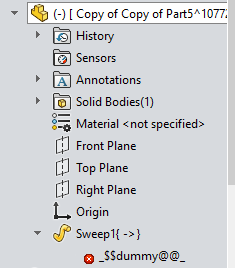
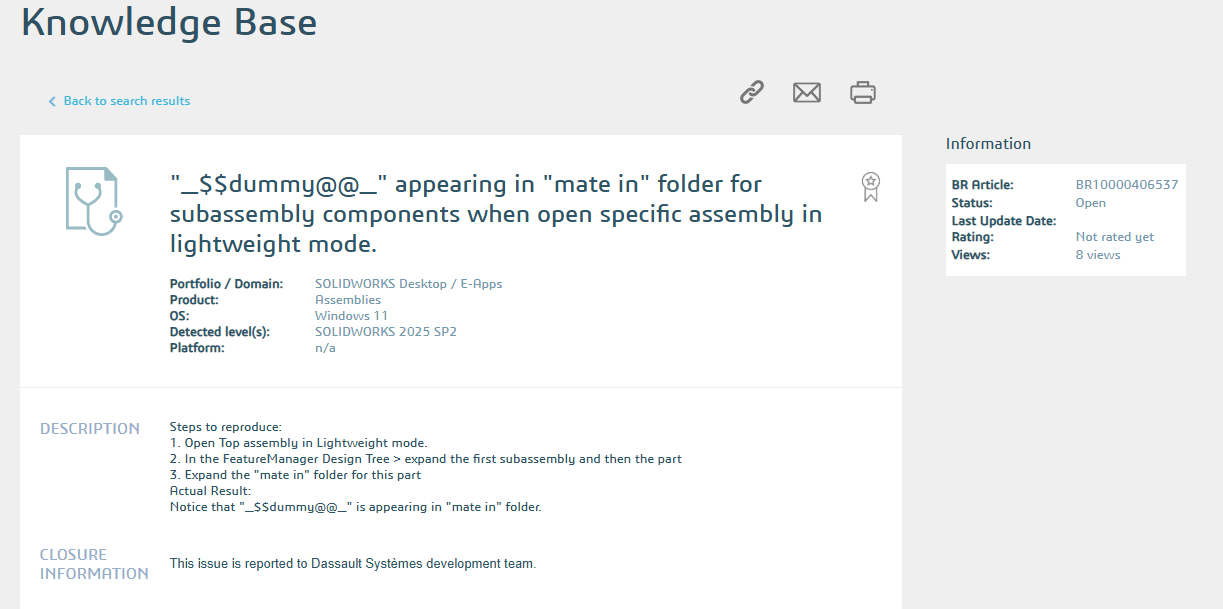
I have been seeing this since we upgraded to SW25, starting with and still on SP4. Searching the web reveals a couple posts from ten to twelve years ago with the same name, but a different situation.
I have an assembly with hydraulic hoses modeled. We put two hose ends in the model and mate them, then create a virtual subassembly. Within that virtual subassembly, we create a virtual part that will be the hose part of the hose. This is done with a 3D sketch in context of the top level assembly. And that’s how it has worked here for the last ten years that I know of.
Anyway, since updating, it seems that I only find a dummy object instead of a 3D sketch when I have to edit a hose path. Rebuilding brings my sketch back, but sometimes that is more of a time commitment than I’m ready to make. And even when it is quick, it still adds up.
Is this a bug or is there something I’m doing wrong?
The AI they are slowly adding to the software decided to insult you 
Is is editable?
It may be right 

No, it highlights when I hover, but there is no arrow next to it, nothing inside it, cannot select it.
When I open the part everything is fine, but I still have to rebuild the top level to get the sketch back. To be clear, the sweep feature still exists and looks right, is selectable, etc…
I was meaning to go back and add that all of the virtual hose parts seem to be lightweight. All the parts that are lightweight when I rebuild stay dummies. And it looks like the converse holds true too—all the dummies that are not lightweight get taken care of in the rebuild.
Looks to be related to lightweight. I’m guessing maybe related to the in-context reference and virtual components. Maybe since its not fully loading the part, there is some sort of temp object (dummy object) created to make it work when not fully loaded. Bug is causing you to see it. Just guessing though, I would report it to your VAR.