We recently upgraded from SW2024 to 2025 (now SP5) and really regret it. I feel that this is the buggiest version of SolidWorks I have used in 25 years. Granted, there are a number of years that i skipped, so they could have been worse. I have spent so much time on the phone showing our reseller these bugs that I think that Dessault Systems should be paying part of my salary for my services.
I have asked tech support if we should consider moving to 2026 in hopes that these bugs will have been addressed. They always give the standard “wait until SP4 is released before doing the upgrade” response. I ask them if they find 2025 to be especially buggy and they tell me that that is not their experience. They do admit that performance (speed) in 2025 is not great.
What is your experience? Are you happy with 2025? My advice is to stop at 2024 for the time being.
Well, for the normal things we do in my office, it has been at worst normal and at best absolutely fine… We upgraded from 22 SP 5 to 25 SP 4. So far, my biggest complaint has been the PDM tab in the command manager. My boss uses toolbars instead of the command manager, so he hasn’t even noticed that.
I have had a particular mate that keeps failing, but I think that’s because I’m asking it to be flexible through four or five assemblies, and even then, it only fails in the higher assemblies if that makes sense. When I open the assembly that contains the failing mate, everything is fine.
Apart from shenanagins with gigabyte step files, I have been fairly happy with it so far.
I’ve had generally the same experience as @toomdog : 2022 sp5 to 2025 sp4, no big difference UI or performance-wise. I’ll have to check our STEP file size.
Other than the issue with origins showing up as sketch points, which you have replied to, it’s been fine for me (certainly not worse than other versions). I am currently using sp 3.0.
I’ve come to accept the SW roulette of bugs. Some will be fixed. Some new things will be broken. We find workarounds and ways to adapt. Unfortunately, there is no work around for the crashing. That is my new metric for considering moving from 2024 to the next choice.
We’ve been on 2025 sp5 since it was available and it crashes less than some versions that I have used in the past. There was an sp release in the last 1 to 1-½ years that would crash several times a day but I don’t remember which release it was. Yesterday I had SW crash and it was long enough since the last time it crashed, that due to not saving my files often enough throughout the day, I lost about 2 - 3 hours of work that needed to be recreated!
That is probably the hardest habit to break after switching jobs 4 years ago. For 25+ years I had a data recording job recording information on dairy farms & the program we used had a very robust backup. Once you clicked ok or pressed enter to close a data form, the information just entered was saved. And I mean saved to the point that if the computer crashed & you had to restart it, the info you just entered was there.
Sorry I’ll quit harping. I just got well spoiled with that program saving what I entered. I have SW set to do backups but sometimes it doesn’t have a backup older than when I had last clicked save.
It has been my experience that traditional desktop, file based CAD does not do well with autosave/backups. The new cloud stuff that appears to use database records as storage instead of files is a different story.
In certain cases of desktop CAD the auto backup function works well. In other cases it can cause far more damage than expected. It’s the file references thing and users end up with unwanted changes to referenced files, saved in backups that they will swear they haven’t touched. It’s fine until they have the opportunity to use the automated backups, then there’s an awesome web of tangled confusion the admin must unravel to get things back to a stable state.
PDM adds another dimension to the fun, as far as I know the SW PDM Add-in does not alter the autosaving behavior, so that portion of SW is completely oblivious that vault files are different than any other file.
I don’t know if this is a solidworks problem, or me not knowing the program.
I recently setup an new computer and upgraded from 24 to 25 in the process.
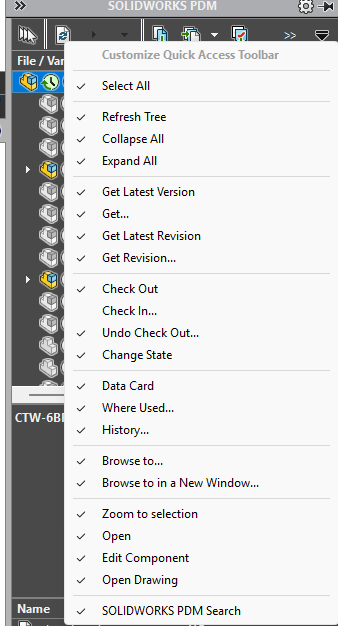
I use the task pane for simple PDM operations. In 2024 I had it only show check out, check in and change state. In 2025 everything is selected by default. I’ve tried unselecting items, but it defaults back to all being selected.
I double checked the settings in PDM admin and it is set properly, but the taskpane ignores those settings.
I was able to make those changes stick, but changing what file information is shown below the preview shows some stubborn persistent check boxes…
I posted about that a number of months ago. As I recall, the general consensus was, “Huh…”
Yesterday when I was experiencing the problem, it seemed to lose the settings every time I changed the document. This morning I went to get some screen shots to document what was going on and now it is working. Maybe it was me all along.
Monday evening I finally got PDM happy, and all of the latest files downloaded to my machine. Tuesday was a bad day for SW. It hung a few times, was extremely slow at times and just wasn’t “normal.” I rebooted several times, but it didn’t seem to improve things.
By Wednesday it seemed to have that out of its system and was back to normal. (At least normal for this machine. I don’t know if it is the computer, or the network at work, but it is slower than when I was working from home.)
I never made any changes after PDM was happy. I can’t explain what was wrong on Tuesday, or why it was better on Wednesday. I guess the PDM taskpane was part of whatever was wrong on Tuesday.