I am trying to find a macro that will go through my assembly, and dissolve all sub-assemblies. My assemblies have many layers of sub-assemblies. I would like it to continue running this function until nothing is left but components.
I’ve found one Macro that dissolves a few assemblies, but then it gets hung and the only option is to kill SW. (Maybe it is still running, but after 45 minutes I assumed it was hung.)
The code I found came from here:
Option Explicit
Dim swApp As SldWorks.SldWorks
Dim swModel As SldWorks.ModelDoc2
Dim swAssy As SldWorks.AssemblyDoc
Dim swComp As SldWorks.Component2
Dim swCompModel As SldWorks.ModelDoc2
Dim vComp As Variant
Dim blnDone As Boolean
Sub main()
    Set swApp = Application.SldWorks
    Set swModel = swApp.ActiveDoc
    Set swAssy = swModel
    blnDone = False
    While Not blnDone
        blnDone = True
        For Each vComp In swAssy.GetComponents(False)
            Set swComp = vComp
            Set swCompModel = swComp.GetModelDoc2
            If Not swCompModel Is Nothing Then
                If swCompModel.GetType = swDocASSEMBLY Then
                    swComp.Select4 False, Nothing, False
                    swAssy.DissolveSubAssembly
                    blnDone = False
                    Exit For
                End If
            End If
        Next
    Wend
End Sub
How many components and mates are you looking at? Are you able to perform this task manually without SW getting bogged down?
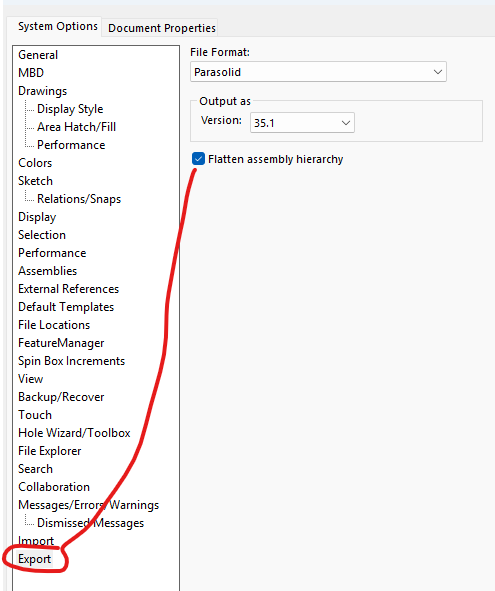
Alternately, what are you trying to accomplish by dissolving all subassemblies? Is it something that could be done by saving as parasolid with the “flatten assembly hierarchy” option and then re-importing?
There are several hundred components. Each with a minimum of 2 mates.
I can do it manually, but I have to do it one assembly at a time, and it takes hours. (In theory you can do more than one assembly at a time, but it almost always tells me I have to do them individually.)
I think the “flatten assembly hierarchy” has potential. I will give that a try.
I am performing a modal analysis on one of our frames. I don’t have the proper licenses to do that in SW. The process I developed is to save a part that contains all of the relevant steel components. I then do the same thing for the aluminum components. From there it is pretty straightforward to bring these parts into the other software, make the necessary bonds and solve.
That’s a good point. Save As Part was always the final step of the process, but changing the order of operations eliminates the need to dissolve everything.