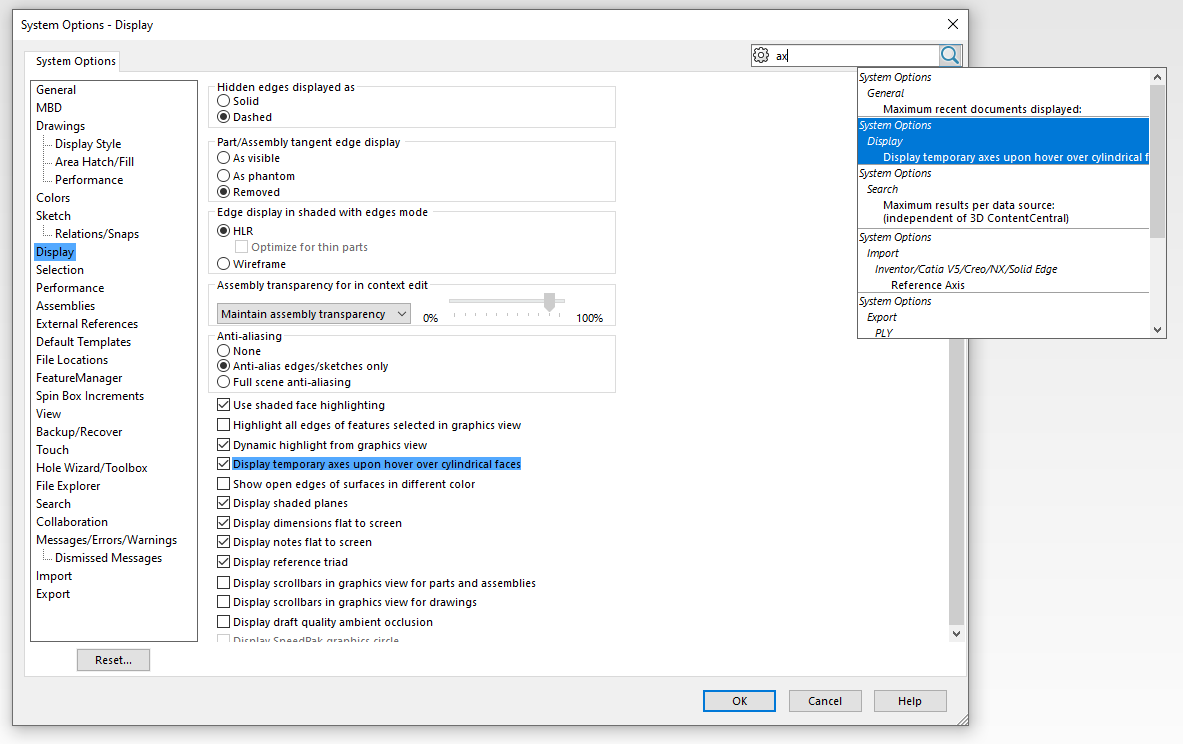
I’m using SW 2022 and it has this new annoying “feature” of creating a temporary axis whenever one hovers on a cylindrical/conical face for a longer than a heartbeat.
Firstly, can someone explain why they would need this and what meaningful purpose it can serve.?
I mean, these new axes do not show up in drawings.. do they? and surely if you wanted to use an axis to create a plane or as a point of circular pattern, you’d just create the axis like normal.? What is the benefit..? Other than one less feature within the feature tree..?
…For a thing you cannot edit… That will probably break anyway when the “Face” changes, like they do…
Moreover, and of significantly more importance to me, how do I turn this feature OFF..!?? I cannot find a setting to do this..
And FFS why is it even on by default at all. ?
I do not need my system hanging while it goes about the thinking to create something I do not need everytime my cursor hovers on a cylinder for more than a few milliseconds.
Who dreams up these great new enhancements..?
This behavior was modified in, I think, SP 3 so that the axis don’t show immediately. You have to hover over the object for a couple seconds before they show.
These show up even with temporary axis turned off? Kind of odd, but I can see the use of having them show up and then hide back for the purpose of selecting them to do a mate or whatever else. A lot less hassle then going in the menu to turn on temporary axis, select it, turn them off and continue with your selection.
As a result of probably the loudest complaints since the icon color change debacle, much of it from me, they added this option in one of the service packs (sp 3, maybe?). As you see, I have it turned on, since after they added the delay I don’t mind it, and even use it occasionally.
I don’t know how much credit I deserve for getting it fixed, but I was definitely a squeaky wheel. I think this “enhancement” caused me the most frustration since the automatic Note merging back about 2010.
This is exactly what I was hoping to find.
But alas I cannot find it in my SP0.
Nor can I update, I’ve been locked out since my last refusal to cough up more $$$$ to our terrible reseller.
Never mind that we’ve paid (ever-increasing) subs for nigh on 10yrs. now.)
I guess I will just need to retrain myself to avoid any pause over cylindrical faces.
But, if I may ask for clarity, you state: “… since after they added the delay I don’t mind it”
How much delay..?
It really does take literally only a fraction of a second to trigger it. Then it pauses for a second of two while it displays tit.
Yes, even if display of temporary axis is turned off..
I guess I will just need to retrain myself to avoid any pause over cylindrical faces.
Meh.. accept it and move on. For now.
Last I remember…if you bought a version, you are entitled to all service packs…just not the next version. Your reseller must provide you a download link to the latest SP.
That is VERY interesting. I have never known that to be the case. My subscription expires at the end of January. It is my understanding that I would only be entitled to the latest service pack released at that point in time, so for me it would be SWX2023 SP2, and not SP5 that would be released in October 2023, nine months after my subscription expiration.
This is what I just found on my VAR’s website: https://trimech.com/blog/understanding-desktop-solidworks-licenses Term vs Perpetual Licenses & Subscription Services
SOLIDWORKS standalone and network versions can be either perpetual or term licenses. Perpetual licenses are owned by the client and never expire, while term licenses are essentially rentals which will cease to function after the expiration date.
Perpetual licenses have optional subscription services which provide clients with various benefits including technical support, the right to upgrade SOLIDWORKS to newer versions as they come out at no extra cost, free certification exam vouchers, etc. Subscription services are paid on an annual basis and will expire if not maintained. But the client is still able to use whatever version of SOLIDWORKS was most current at the time their subscription expired, as well as any earlier version they may want to use.
Alin since you work for a VAR, can you clarify the corporate policy, please.
Well.
I have contacted my VAR in regards to this.
I have told them some time back that I refuse to pay them any more $$$ for the lacklustre service I’ve received from them.
I don’t see that your question was really answered. I use it for sketch relations. Probably only for sketch relations. For some reason you can’t dimension to a cylindrical surface in a sketch. You have to pick a centerline instead. Nice that now you don’t have to go turn on centerlines, but I do think it would have been easier if they just let me pick the cylinder wall.
I use temporary axis regularly for sketches and mates. While it is handy not to have to turn on temporary axis to do this, it would have been about 236th on my list of priorities for the software.