Hello there!
I suspect I already know the answer to this question, but that will be the worst answer I can get.
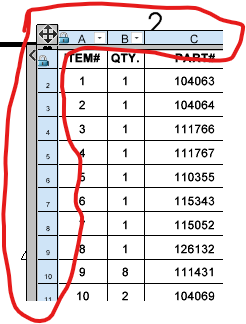
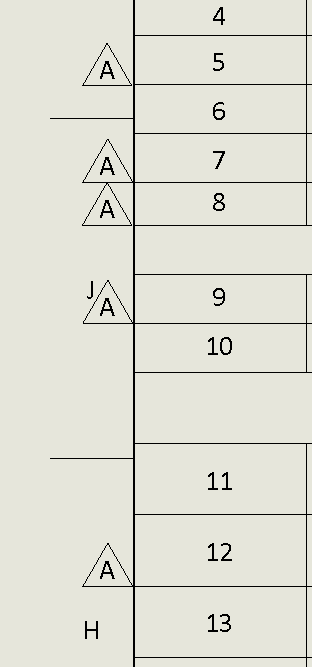
When I am placing rev symbols next to a BOM, I find myself fighting the row numbers, waiting for them to disappear, zooming to get the graphical glitch ‘shadow’ to go away…
What would be swell is if these borders did not appear until I clicked somewhere in the table to activate it. Does anyone know how to make that happen?
1 Like
at first i thought this was about that darn formatting bar.
try locking the sheet focus and be very particular about the placement because moving those rev symbols is back to the pain you are currently experiencing
1 Like
No, I have already posted about the formatting popup that is always in the way when I click anywhere inside a table  … Not sure if it was here or somewhere else.
I make sure the rev symbols attach to the sheet rather than a view when placing them. Having just locked sheet focus and hovered around, I can report it appears to do approximately bupkiss.
Oh wait, re-reading your comment it sounds like you are suggesting put them in the right place from the start. And that’s why you suggest locking sheet focus, so that they don’t attach to a view that may be overlapping the edge of the BOM.
…Yeah, but then you don’t get vertical snapping to keep them neatly in line 
2 Likes
I see what you mean they are close but not always right there
1 Like
Filter on Notes/Balloons and the table border won’t pop out.
3 Likes
Here comes Jim with the answer I never would have thought of…
Yes, that works. Now all I need is to assign a hotkey to it!
Thanks been fighting this for years.