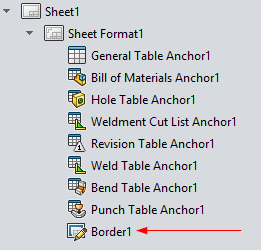
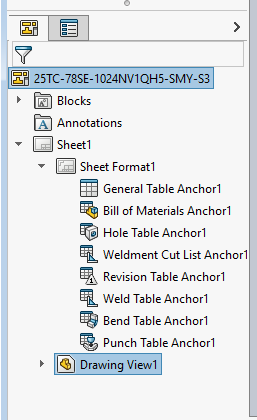
I’m trying to delete the Automatic Border on drawings that unexpectedly showed up. I can find the Border Feature in the Feature Tree, but when I delete it, nothing happens… it’s still there. I’m beginning to suspect this is a SolidWorks quirk. Does anyone know anything about this.
Here’s the code I’m using:
Set swFeat = swModel.FirstFeature
BorderDeleted = False
Do While Not swFeat Is Nothing
    Debug.Print swFeat.Name & Chr(9) & swFeat.GetTypeName2
    If swFeat.GetTypeName2 = "DrSheet" Then
        Set swSheetFeat = swFeat.GetFirstSubFeature
        Do While Not swSheetFeat Is Nothing
            Debug.Print Chr(9) & swSheetFeat.Name & Chr(9) & swSheetFeat.GetTypeName2
            If swSheetFeat.GetTypeName2 = "DrTemplate" Then
                Set swSheetFormatFeat = swSheetFeat.GetFirstSubFeature
                Do While Not swSheetFormatFeat Is Nothing
                    Debug.Print Chr(9) & Chr(9) & swSheetFormatFeat.Name & Chr(9) & swSheetFormatFeat.GetTypeName2
                    If swSheetFormatFeat.GetTypeName2 = "EditBorderFeature" Then
                        swDraw.EditTemplate
                        Debug.Print "-->" & Chr(9) & Chr(9) & "DELETE " & swSheetFormatFeat.Name & Chr(9) & swSheetFormatFeat.GetTypeName2
                        swSheetFormatFeat.Select2 False, -1
                        swModel.Extension.DeleteSelection2 0
                        swDraw.EditSheet
                        BorderDeleted = True
                        Exit Do
                    End If
                    Set swSheetFormatFeat = swSheetFormatFeat.GetNextSubFeature
                    If BorderDeleted Then Exit Do
                Loop
                End If
            Set swSheetFeat = swSheetFeat.GetNextSubFeature
            If BorderDeleted Then Exit Do
        Loop
    End If
    Set swFeat = swFeat.GetNextFeature
    If BorderDeleted Then Exit Do
Loop
Thank You