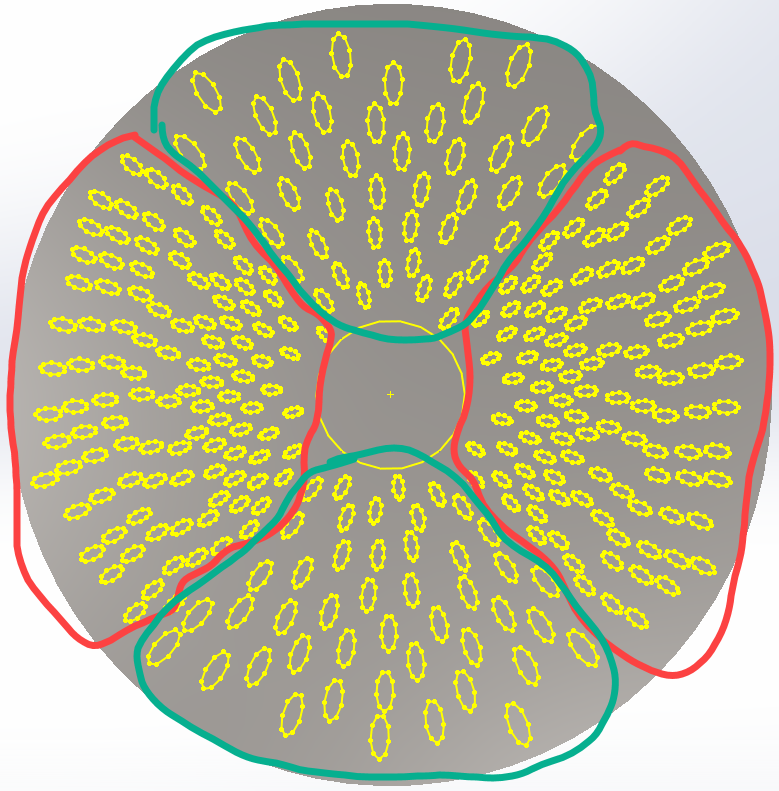
@JimSculley Are you talking about creating 300 swept cuts with 300 paths?
@tdhobrock There doesn’t appear to be a sysmetric pattern to the holes. Is the script just placing them where it finds space? The red area looks similar, and the green the same.
Correct @jcapriotti, in this specific version of hole layout, these areas are similar. Yes, the script is placing them where it finds space, while following the density and spacing rules. These parameters will be adjusted many times.
1 Like
It’s better to have it generate the ellipses with the center points included. You need the ellipses to use as the profile for the swept cut.
With a macro you can essentially do automatically what you don’t want to do manually. So, rather than create planes and sketches for 300 swept cuts yourself, have the macro do it. So, have your final body shape,add an axis at the center of the body and place you sketch with all the ellipses. Then you have the macro perform these steps:
- Select the ellipse sketch (see ModelDocExtension::SelectByID2)
- Get the ellipse data (see Sketch::GetEllipses3)
- Create a loop that does the following for each batch of ellipse data
1. Create a plane using the ellipse center point and the axis (see FeatureManager::InsertRefPlane)
2. Start a sketch on the plane (see SketchManager::InsertSketch) from step 1 and create an arc (see SketchManager::CreateArc). This is the tricky part since you have to be able to define the arc in terms of existing geometry. If you want the paths to follow the radius of the main body, does that mean the paths are concentric to that radius? If so, you do the math to get the arc where it needs to be.
3. Create a new sketch with just the ellipse you are currently working with and use the coordinate date or ConvertEntities to create/get the ellipse geometry
4. Create a sweep cut
There is more to it but that’s the general idea. I’d probably skip the DXF stuff entirely and have the Python script generate the coordinate data and have SW draw the ellipses. Or convert the python script to VBA or C# and use it directly in SW.
So the biggest dimension is 0.38mm ?
I’d try to multiply every dimension by 100 or 1000 and scale down as the last feature.
Some tolerances in SW are in absolute numbers and all operations are done in meters. Some of your features looks to be around 0.000025m, maybe too small to be reliable?