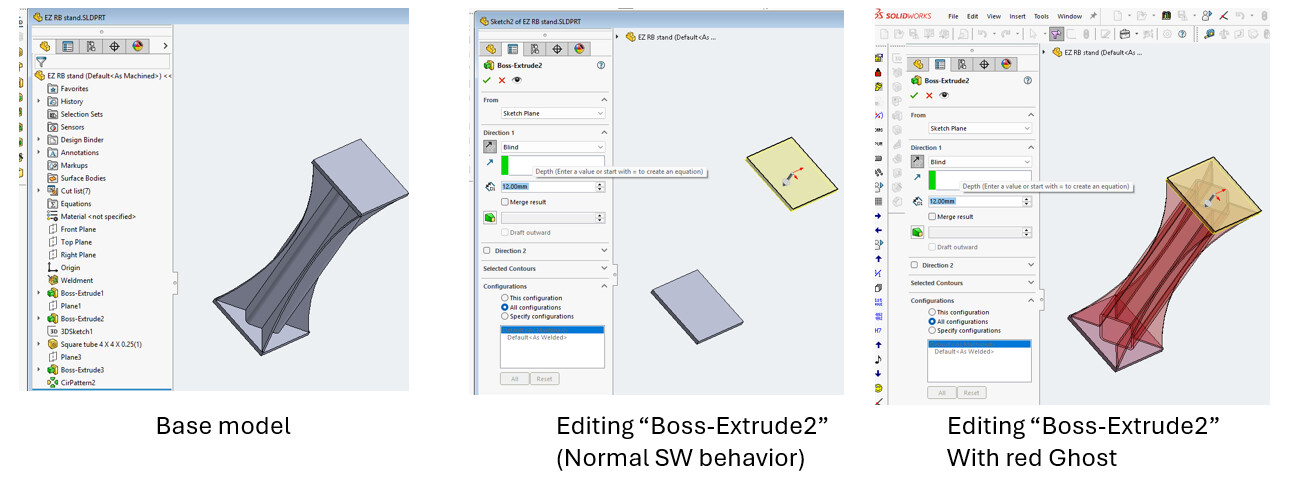
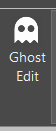
Inspired by a Top Ten post from @RickB , here’s a neat little macro that will create a transparent copy of all the bodies as currently shown in a part model, at any time. These copies persist until you hit “Destroy ghosts”, quit the macro, or switch documents. So you can roll back/suppress/etc, create ghosts, then roll forward and see the original state of the part, or you can roll forward, create ghosts, and then edit a feature or roll back or whatever you want. Etc etc. Another interesting thing to do with temporary bodies.
Edit: original request on Top Ten was to show ghosts when editing. So I added a couple of lines so that it will go directly into Edit mode if a feature is selected when you create the ghosts.
Would it be possible to create multiple ‘ghost’ copies to compare them together…? I could see a few use when designing The create ghost seems to only create one and update it when pushed again.
Hmm… Interesting thought. From a technical standpoint, there’s no reason the macro could not create pretty much as many different ghosts as you want. The ghost bodies are “temporary bodies”, which means they’re not saved anywhere other than in the memory of the macro. Right now, the macro creates one “collection” of ghost bodies (because parts can be multibody) and then shows each body. When you close the macro or hit “destroy” ghosts, the macro just deletes that collection. If you have a ghost already when you hit “create”, it will delete the collection and create a new one.
In order to have multiple “sets” of ghosts, I’d just have to add code to create a collection of collections, and then code to handle hiding and showing each collection individually. As well as some way in the interface to pick which one (ones?) to show.
This sounds very cool and thank you for sharing. I am away from my SWX now so I cannot try this, but it sounds like it could be used to create a series of stills (ghosts) as though taken from an annimation, and is something like phantom views. Am I interpreting this correctly?
As of right now, it’s basically like a static 3D “snapshot” that you can take of whatever the current model looks like, and keep it overlaid in the model while you make any changes that you want. The original use case that Rick Becker mentioned was to be able to edit a feature high up in the tree, but still see what the final model currently looks like instead of rolling back the entire visible model to the state it was in when the feature under edit was created. Here’s a pic just for an example. Of course, as I mentioned, the ghost is just a snapshot. It doesn’t update like the feature preview, and it doesn’t update if you make changes to the part. It’s just a snapshot of the state of the 3D model at the point you took it.
I made the tweaks to allow for as many ghosts as you want. You can show or hide them by selecting them in the list. Hitting one of the color buttons will re-color any ghosts currently selected in the list. Hitting “Destroy Ghosts” will delete any selected in the list.
However, I think there may be a little SolidWorks API bug that this macro is running into. I didn’t see it yesterday because I wanted the macro to work with multibody parts, so I was only messing with multibody parts.
If and only if there is only one non-ghost body and only one ghost body shown, the non-ghost body will disappear on rebuild.
Even if the ghost shows a different body from the “real” model, the real model will disappear.
It’s still there, it’s selectable, and dynamic highlight works when you run over it, but it’s not visible.
It won’t disappear if there are more than one ghost shown
It won’t disappear if two real bodies are shown, regardless of number of ghost bodies
It won’t disappear if the ghost is multibody but the real is a single body.
Kind of weird. If you want to play with it, there’s a constant at the top of the form code called DEBUG_MOVE. If you change it to “true” it will offset the ghosts by 150mm from the real so they’re easier to see. GhostEdit-Multi.swp (125 KB)
This should be integrated into SW asap! Absolutely splendid macro that has been put to good use already. First version is best though working with very few clicks. I had a look at the code to change the placement of the menu on the screen as it starts right in the middle. There are only few options available, basically upper left corner or center, or am I missing something? It would be perfect if it just popped up right under the macro button or something not right on top of the model.
Here are both versions, modified to pull the form directly to the cursor when run.
For the multi-ghost option, you mentioned that it takes more clicks… I added a checkbox on the form for “Auto-name”. It’s checked by default, but there’s a constant at the top of the form’s code where you can change that. If checked, the macro will just use the “Ghost1”, “Ghost2” naming. If the box is not checked, you’ll be prompted for a ghost name. Currently no programming added to re-name an existing ghost, but as ephemeral as they are surely there’s not a need for that… GhostEdit.swp (96 KB) GhostEdit-Multi.swp (110 KB)
Just curious, are you experiencing the bug that I mentioned where doing a rebuild while there’s only one main body and one ghost body causes the main body to disappear? If not, what release are you on?
This one detects if there’s only one real body and one ghost. If that’s the case, it creates a “bonus ghost” on top of the one that’s displayed except at 100% transparency so you don’t see it. GhostEdit-Multi.swp (176 KB)
 The create ghost seems to only create one and update it when pushed again.