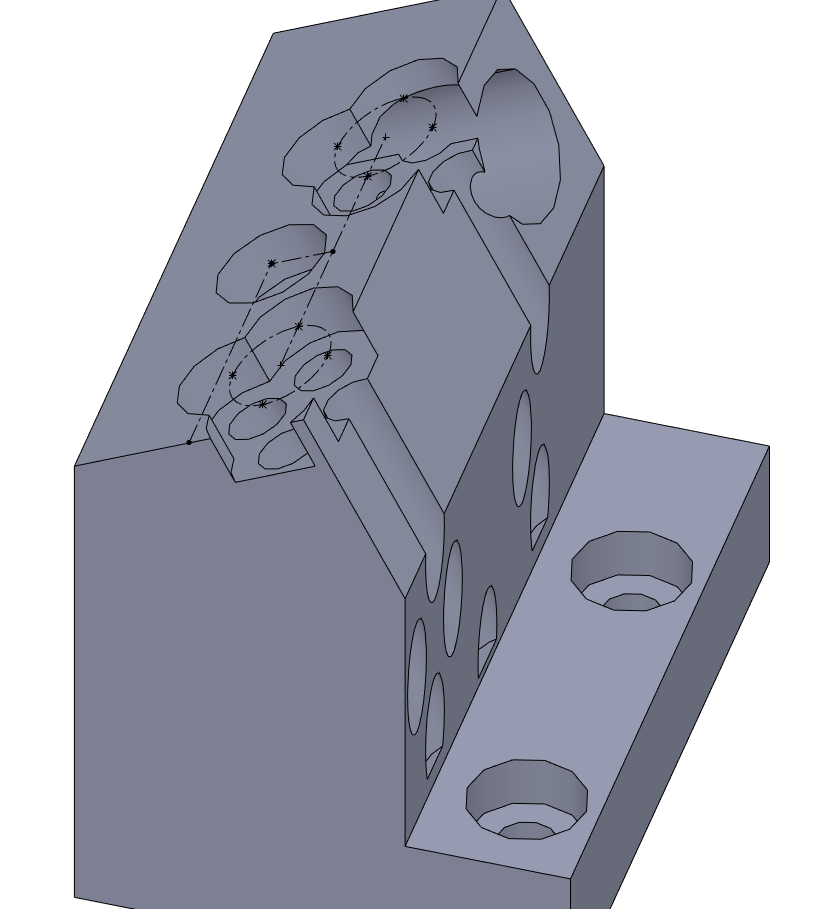
Never noticed this before, so maybe it has always been the case. I am working on a Hole Wizard position sketch and want to use a couple of circular edges for reference. The axes of these holes are not perpendicular to the sketch, so they project as ellipses, which is expected, but they also come with four points, which I can’t delete, and each point becomes a Hole Wizard hole. Anyone have a workaround for this wonderful feature?
Ah, I see. I was getting back to the sketch directly to edit it, not going through the Hole Wizard feature, so I didn’t see the options. Never before noticed them anyway, but now I know a little more. Thanks.
I did try just making an ellipse directly, instead of projecting a circle, and they behave the same way. Nothing to do with projection. I think it’s sort of odd that ellipses have these points you can’t delete.
I inquired my VAR last year about this beautiful new default and you cannot even trick it with the registry as it seems to be hard coded.
This was always a problem with SW: legacy command should not be changed mid way by the developers as it could trigger a lot of unwanted behavior with legacy data.
I make them a simple example: a model drawn before and after the new hole wizard using an old sketch with references for a new hole and immediately you have a bunch of new holes here and there.
Considering you can switch from a hole to a slot and it adds a construction line for the slot orientation it is easy to see how many unwanted results it could trigger along the way.
I use also offset lines to position holes, and all based on the “hole=point” assumption. Once this assumption is changed to “hole = point or whatever else” everybody with a sane mind could tell that some problem is going to explode in our faces.
Sometimes when I want to do a sketch driven pattern or a weird set of holes, I create a sketch with my lines/curves to locate everything and then a 2nd sketch with just my location points for the holes. Could you do something like that so the hole wizard sketch would just has the single point in the center.
Things like this is why I will continue to have a stand-alone sketch that drives my Hole Wizard features. All I have to do is drop the points on the end points or center points of the construction lines in that sketch, then hide the sketch after completing the feature.