Hi all you geniuses.
I’m struggling to run the attached macro as a batch process. I have hundreds of library features in folders that I need to open, run the macro, save and close. As I understand it task scheduler can do this fairly easy but I need to embed some additional code in the macro, right?
Help is greatly appreciated!
Rename cutextrude filename - folder.swp (30.5 KB)
Try the attached version. Make backup of your files.
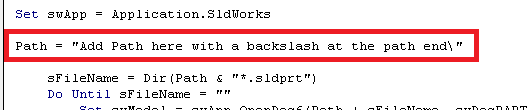
You need to add the full folder path in this line with a backslash.
Batch Process SW Files.zip (10.8 KB)
Excellent! Thank you so much Deepak.
I only had to change .sldprt to .sldlfp in the code as it’s working on library features. I’m just running it straight from the visual basic editor, so no need for task scheduler. It’s working it’s magic now and saving me a ton of work.
I was little lazy to add a folder browse function, but glad to hear that codes worked for you.