Does anyone know if it is possible to add buttons, etc. to the quick access tools at the top of the Solidworks window?
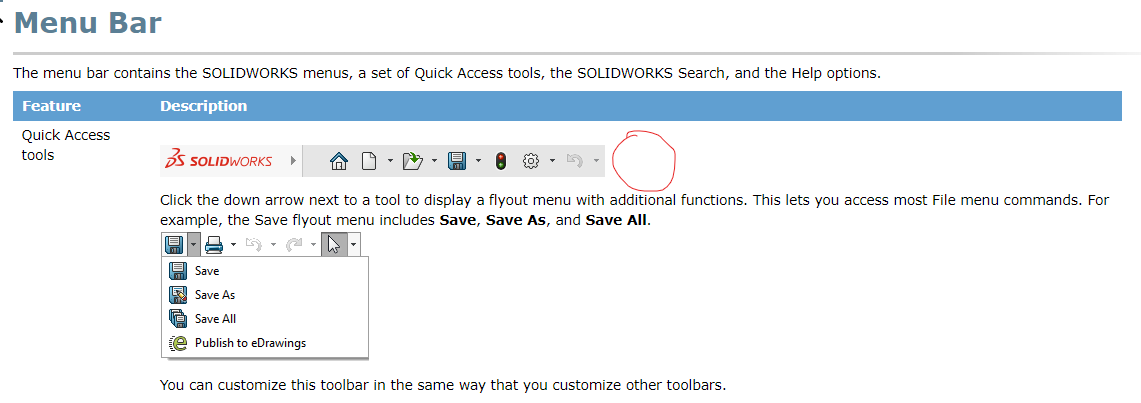
Perhaps I should have been a little more specific. I was hoping to place a button from my Add-In beside the “Options” button at the top of the Solidworks window…
Do you mean like this?
image.png
If the answer is yes, then this is what I did.
First of all, you can’t select the “customize” command unless you have a file open. If you don’t have a file open, then customize is greyed out.
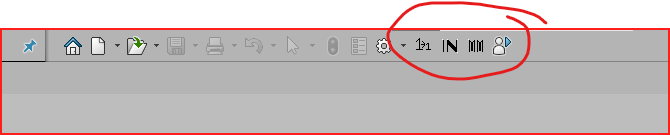
2nd, you can place any button from the command section and also can create your own buttons with macros associated with them (that’s what you see in the picture)
Not sure how you would get Add-in buttons up there unless you have a tab with buttons on it. Then you can simply drag any button from any tab up to the quick access toolbar. (while you have the customize going)
Exactly!
Do you know the secret?
I edited my post…does that help a little better?
If nothing else, you could create a macro to call your add-in. Then you can create a button to run the macro.