The next time we go off subscription, it will be with the intention of switching to a new platform.
We have software that translates any of our customers data to any format of our choosing.
At this point .. I would rather just pay for the upgrades for that, so it will always read and translate the customers data for us, and not bother to upgrade “Solid doesn’t works”. stick with the animal that we know rather than keep hoping for things to get better.
At least this major bug got solved in 2022 SP3.1.
https://r1132100503382-eu1-3dswym.3dexperience.3ds.com/#community:yUw32GbYTEqKdgY7-jbZPg/iquestion:ZeczF-2QTwiq_L8W4V2W4Q
I think you and I have very different ideas of what a major bug is.
mates that go slow vs mirroring that doesn’t actually work.
I wish they would be working on the things that are broken, rather than the things that are just a little laggy.
I’m sure everyone has their wishlist for fixes, but mirroring is really a sore spot for us.
The issue with not being able to re-name files during Pack and Go was the big one for me. That seems to be fixed with sp 3.0 (which has since been removed and replaced with sp 3.1).
I do not see how our ideas differ. I pointed to a major bug, while you pointed to a humongous one. Where is the disagreement?
and that right there is why we Love you Alin ! LOL
I think this is normal for different users to rank the various regressions/bugs differently. For example, we have many many mirrored/(RH, LH) parts but we never use mirror functionality in the assembly environment, the resulting file management is more hassle than it’s worth. Always make the mirrored part file fist then put them in the assembly. What is earth shattering for one user may have zero impact on the next.
Slightly off topic. 2023 Beta is available for download.
We cannot discuss it here, though, since it would be against the NDAs. 
Thanks Alin,
I got the email, but I don’t have a spare computer to try it on, so I’ll probably pass.
One other thing to consider on the broken mirror / upgrade issue, and it’s a catch 22 situation.
If it is indeed fixed with the next version and you don’t upgrade you are stuck with a version that for your workflow is perpetually broken.
So the question becomes do you swallow the hard pill and upgrade to fix the broken function, or ride it out.
I have just installed it and started to run benchmarking related large assembly performance.
Crazy increase in performance I cannot explain.
If curious, join the conversation in the space we are legally allowed to do so:
https://r1132100503382-eu1-3dswym.3dexperience.3ds.com/#community:HtbjmKYdSlWkfqQeOuP6Zw/iquestion:bsIw0rl3Qj-QwCRnmbiivA
Watch the video and let me know what you think might cause this crazy opening time saving.
P.S. Matt, I hope you do not mind sharing this link, but I would really like to brainstorm things like this with the best power-users… and most of them are here. 
Am curious. I did the link and replied to the “Community signup request . . .”. How long does that take? Do I get notified in a real email?
Thanks
Dwight
We were heavily impacted with a supposed low priority “localization” bug with 2021.
This bug was erroneuosly classified as such ignoring that it was not a mistranslation issue, but the translation of a legacy variable name (not the variable label, the variable itself) that blown up our cutlists. We had to supply SW with our losses estimates to make them fix their mess and it was escaleted to CRITICAL and somehow fixed with this SP3.1
We are still waiting for another issue with cutlists to be solved: a rebuilding triggering some bodies material to change without apparent reason.
Also still waiting for a toll to upgrade templates as is quite time consuming and it come with the risk of breaking things such automation, variables etc.
Those are just a small sample of the many reasons our engineers trust in SW is below zero atm.
I installed SP 3.1 last week. I haven’t used it a ton yet, but the crash-to-desktop issue that I was having seems to be much better. Fingers crossed, but it hasn’t happened yet.
I discovered a bug in SP 3.1 today. Configuration-specific properties do not work.
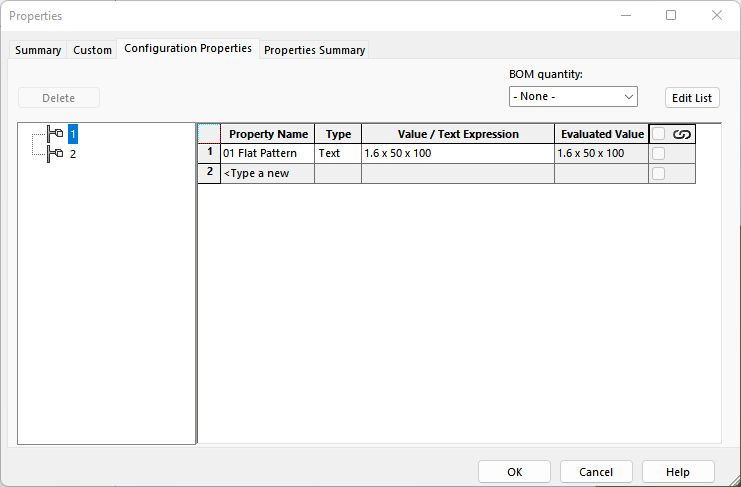
Try setting a different “01 Flat Pattern” value for the “2” configuration.
Then, close the Property Manager and come back to see if it all saved.
Mine does not. Maybe yours is working.
Just tested. I have no problem. They saved as expected. I tried changing them both manually and with macro.
In both cases no problem on my side.